Display
|
crwdns2933313:01crwdne2933313:0 crwdns2934263:00crwdne2934263:0 |
Magenta cartridge causes error 59.C0 |
|
crwdns2933315:02crwdne2933315:0 crwdns2934263:01crwdne2934263:0 |
Why is printer stuck on initializing |
|
crwdns2933315:02crwdne2933315:0 crwdns2934263:01crwdne2934263:0 |
HP Color LaserJet Pro MFP M277dw toner cartridges tray not coming out |
|
crwdns2933315:02crwdne2933315:0 crwdns2934263:00crwdne2934263:0 |
Why does my printer print papers with lines and faded |
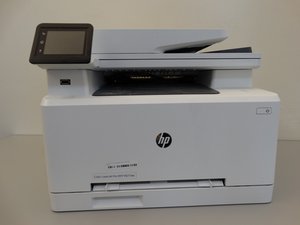
The HP Color LaserJet Pro MFP M277dw (B3Q11A) released in 2015, is one of the first printers to use HP’s JetIntelligence Technology which allows for faster printing while using less energy and having a smaller toner cartridge. Equipped with a 3-inch tilting touch screen, the printer has wireless connectivity that allows for printing over a shared network. Features include duplex (double-sided) printing, scanning, and faxing.
Now discontinued, the printer is still supported with the latest firmware from HP.
The printer can be identified with its name right above the single-sheet feed slot on the front of the printer.
HP Color LaserJet Pro M252, MFP M274 and M277 Troubleshooting Manual
HP Color LaserJet Pro MFP M277 Series Data Sheet
HP Color LaserJet Pro M252, MFP M274 and MFP M277 Repair Manual
HP Color LaserJet Pro MFP M277dw Specifications
HP Color LaserJet Pro M252 and MFP M277 Troubleshooting Manual
HP Color LaserJet Pro MFP M277dw Mi guía de ventas
HP Color LaserJet Pro MFP M277 Setup Poster (KK, NO, RO, PL, PT, SV, RU, SK, SL, TR, UK, AR)
HP Color LaserJet Pro MFP M277 Setup Poster (ID, KO, PT, TH, ZH)
CPSU-WHITE-F18S4G2
crwdns2931471:03crwdne2931471:0
crwdns2935297:060crwdne2935297:0
crwdns2936751:024crwdne2936751:0 13
crwdns2936753:07crwdne2936753:0 56
crwdns2936753:030crwdne2936753:0 288
crwdns2959996:0crwdne2959996:0 22,397