
Nokia 2780 Flip Screen Replacement

crwdns2959932:0crwdnd2959932:0Kaylyn Careycrwdnd2959932:0crwdnd2959932:0crwdnd2959932:02crwdnd2959932:0crwdne2959932:0
crwdns2959936:0Mud 18, 2026crwdne2959936:0
crwdns2869540:0crwdne2869540:0: 543
crwdns2959988:0crwdne2959988:0
- crwdns2959990:0crwdne2959990:0
- 2
- crwdns2959992:0crwdne2959992:0
- 28
- crwdns2959994:0crwdne2959994:0
- 112
- crwdns2959996:0crwdne2959996:0
- 543
crwdns2955950:0crwdne2955950:0: 0
crwdns2959998:0crwdne2959998:0
crwdns2960000:0crwdne2960000:0crwdns2959984:0crwdne2959984:0: 0 1
crwdns2959956:0crwdne2959956:0
crwdns2959968:01crwdne2959968:0
crwdns2959986:0crwdne2959986:0: 0 1
crwdns2959958:0crwdne2959958:0
crwdns2959976:01crwdne2959976:0
crwdns2869444:0crwdne2869444:0
crwdns2869445:0crwdne2869445:0
crwdns2862615:0crwdne2862615:0
crwdns2862616:0crwdne2862616:0
crwdns2862611:0crwdne2862611:0
crwdns2862612:0crwdne2862612:0
crwdns2890100:0crwdne2890100:0
crwdns2944378:0crwdne2944378:0
crwdns2915892:0crwdne2915892:0
crwdns2959928:0crwdne2959928:0 ↓Follow this guide to replace the screen with your Nokia 2780 Flip.
Nokia screens are 2.7-inch TFT with a resolution of 240 x 320 pixels. If your Nokia is cracked or damaged, has a black screen but the phone will still power on, lines, dead pixels, or discoloration appears, or the screen flickers when opening/closing the phone, it could be time to replace the screen.
- If the screen is cracked or shattered, take appropriate safety precautions before beginning the repair. This Taping Over a Cracked Screen guide can help prevent injury from broken glass during removal.
- The screen is secured with adhesive, so applying heat before you attempt to remove the old one will make the process a lot easier. Take a look at our iOpener Instructions, How to Use a Heat Gun to Soften Adhesive, or How to Use a Hair Dryer to Soften Adhesive guide, depending on what you use for the repair. This will help you to avoid further damage to your phone and injury to yourself.
crwdns2959930:0crwdne2959930:0


-
-
-
Insert an iFixit opening tool into the seam between the back case and the bottom edge of the phone.
 crwdns2952109:0crwdne2952109:0
-
-
-
Slide the opening tool or spudger around the edge of the phone to release the clips securing the bottom case.
-
Gently pry the bottom case from the phone to remove it.
-
-
-
Lift the battery up and out of the compartment.
-
-
-
-
-
Use a Torx T5 screwdriver to remove the six visible 1.4 mm screws that secure the internal rear housing.
-
-
-
Insert a plastic opening tool in the seam between the top case and midframe and slide it around the perimeter to release the clips holding them together.
-
Remove the midframe from the phone.
-
-
-
Place a spudger or an opening tool under the edge of the press connector and pry straight up to disconnect it.
-
-
-
Remove the plastic cover on top of the hinge.
-
-
-
-
Pull back the frame surrounding the motherboard from both sides and gently remove the motherboard.
-
-
-
-
-
Use a plastic spudger and opening picks to pry the back cover from the display.
-
-
-
Use a suction handle to remove the old screen.
-
-


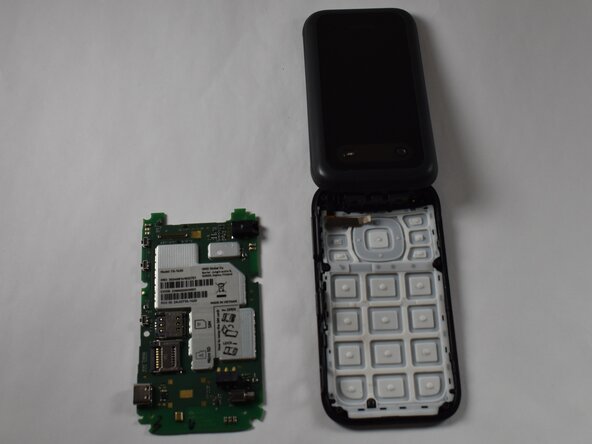


To reassemble your device, follow these instructions in reverse order. Take your e-waste to an R2 or e-Stewards certified recycler.

crwdns2935287:0crwdne2935287:0

Purdue University Northwest, Team 7-5, Dieterle Spring 2026 crwdns2935289:0Purdue University Northwest, Team 7-5, Dieterle Spring 2026crwdne2935289:0
PNW-DIETERLE-S26S7G5
crwdns2931471:04crwdne2931471:0
crwdns2935297:060crwdne2935297:0
