crwdns2933423:0crwdne2933423:0
crwdns2947577:0crwdnd2947577:0crwdne2947577:0

Disconnect the Battery

crwdns2862623:0crwdne2862623:0
crwdns2948751:0crwdne2948751:0

crwdns2942213:0crwdne2942213:0

  1. Disconnect the Battery, Apply a heated iOpener: crwdns2935265:01crwdnd2935265:01crwdnd2935265:01crwdne2935265:0
    • Power off your phone before beginning disassembly.

    • Use a hairdryer, a heatgun, or prepare an iOpener and apply it to the right edge of the back of the phone for about a minute to soften the adhesive underneath.

    crwdns2952109:0crwdne2952109:0

    crwdns2917038:0crwdne2917038:0

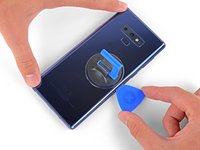
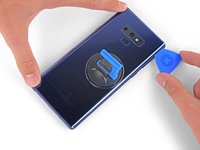
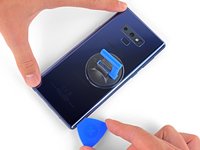
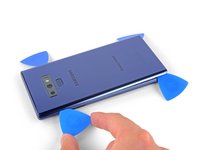
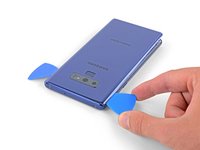
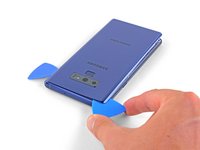
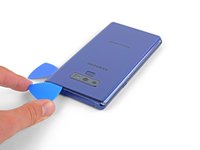
  2. Disconnect the Battery, Insert an opening pick: crwdns2935265:02crwdnd2935265:01crwdnd2935265:03crwdne2935265:0 Disconnect the Battery, Insert an opening pick: crwdns2935265:02crwdnd2935265:02crwdnd2935265:03crwdne2935265:0 Disconnect the Battery, Insert an opening pick: crwdns2935265:02crwdnd2935265:03crwdnd2935265:03crwdne2935265:0
    • Apply a suction handle to the back cover.

    • Lift with a suction handle to create a gap between the back cover and the frame of the phone.

    • Insert an opening pick into the gap.

    • If the glass is badly cracked, cover it in packing tape to create a surface for the suction cup to adhere to.

    • If the adhesive won't budge, apply more heat, not excessive force. Too much force could break the glass.

    crwdns2952109:0crwdne2952109:0

    crwdns2917038:0crwdne2917038:0

  3. Disconnect the Battery, Cut through the adhesive: crwdns2935265:03crwdnd2935265:01crwdnd2935265:01crwdne2935265:0
    • Note that there is more adhesive along the top edge and around the camera bezel than around the rest of the phone.

    • Cut carefully around the left edge near the fingerprint sensor or you risk damaging the ribbon cable inside.

    • If, at any point, the adhesive feels stubborn, apply more heat—not more force.

    crwdns2952109:0crwdne2952109:0

    crwdns2917038:0crwdne2917038:0

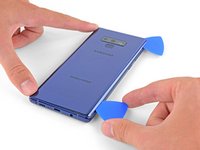
  4. Disconnect the Battery, Slide the opening pick: crwdns2935265:04crwdnd2935265:01crwdnd2935265:03crwdne2935265:0 Disconnect the Battery, Slide the opening pick: crwdns2935265:04crwdnd2935265:02crwdnd2935265:03crwdne2935265:0 Disconnect the Battery, Slide the opening pick: crwdns2935265:04crwdnd2935265:03crwdnd2935265:03crwdne2935265:0
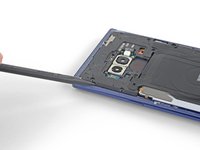
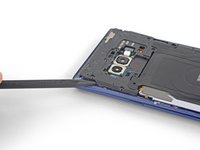
    • Starting from the center, cut the adhesive up and down the right side with an opening pick.

    • Do not insert the pick more than halfway into the phone when cutting near the fingerprint sensor or cameras, or you risk damaging internal components.

    crwdns2952109:0crwdne2952109:0

    crwdns2917038:0crwdne2917038:0

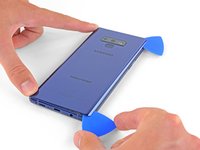
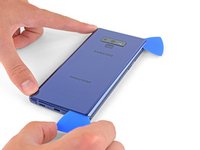
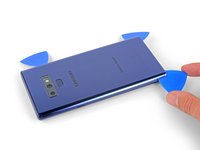
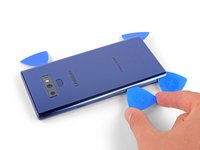
  5. Disconnect the Battery: crwdns2935265:05crwdnd2935265:01crwdnd2935265:03crwdne2935265:0 Disconnect the Battery: crwdns2935265:05crwdnd2935265:02crwdnd2935265:03crwdne2935265:0 Disconnect the Battery: crwdns2935265:05crwdnd2935265:03crwdnd2935265:03crwdne2935265:0
    • Be careful near the corner, as the glass is very weak. Apply more heat at any time if the adhesive becomes stuck.

    • Leave an opening pick in the upper-right corner.

    • Use another opening pick to cut the adhesive around the bottom-right corner.

    • Leave that opening pick in the phone.

    crwdns2952109:0crwdne2952109:0

    crwdns2917038:0crwdne2917038:0

  6. Disconnect the Battery: crwdns2935265:06crwdnd2935265:01crwdnd2935265:01crwdne2935265:0
    • Use a heat gun or hair dryer or apply a heated iOpener to the left side of the rear panel for at three minutes to soften the adhesive underneath.

    crwdns2952109:0crwdne2952109:0

    crwdns2917038:0crwdne2917038:0

  7. Disconnect the Battery: crwdns2935265:07crwdnd2935265:01crwdnd2935265:03crwdne2935265:0 Disconnect the Battery: crwdns2935265:07crwdnd2935265:02crwdnd2935265:03crwdne2935265:0 Disconnect the Battery: crwdns2935265:07crwdnd2935265:03crwdnd2935265:03crwdne2935265:0
    • Be careful near the corners, as the glass is weakest there.

    • Insert an opening pick into the lower-left corner of the rear panel.

    • Using another opening pick, cut the adhesive along the left edge of the rear panel.

    • Don't insert an opening pick in more than halfway on the left edge near the fingerprint sensor or you may damage the ribbon cable inside.

    • It is fine if opening picks fall out as the back cover becomes separated.

    crwdns2952109:0crwdne2952109:0

    crwdns2917038:0crwdne2917038:0

  8. Disconnect the Battery: crwdns2935265:08crwdnd2935265:01crwdnd2935265:03crwdne2935265:0 Disconnect the Battery: crwdns2935265:08crwdnd2935265:02crwdnd2935265:03crwdne2935265:0 Disconnect the Battery: crwdns2935265:08crwdnd2935265:03crwdnd2935265:03crwdne2935265:0
    • Using the inserted opening pick, carefully cut the adhesive around the upper-left corner of the rear panel.

    • Finally, cut the last of the adhesive along the top of the phone.

    • Use an iOpener, hair dryer, or heat gun to apply more heat as needed where you are cutting the adhesive.

    crwdns2952109:0crwdne2952109:0

    crwdns2917038:0crwdne2917038:0

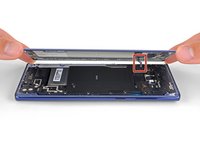
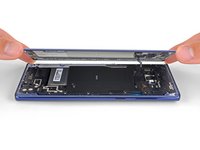
  9. Disconnect the Battery: crwdns2935265:09crwdnd2935265:01crwdnd2935265:02crwdne2935265:0 Disconnect the Battery: crwdns2935265:09crwdnd2935265:02crwdnd2935265:02crwdne2935265:0
    • Separate the right side of the rear cover first.

    • Tilt the cover up along the left edge to expose the fingerprint sensor ribbon cable.

    • Do not pull out the fingerprint sensor ribbon cable yet.

    • The fingerprint sensor cover might stay attached to the midframe.

    crwdns2952109:0crwdne2952109:0

    crwdns2917038:0crwdne2917038:0

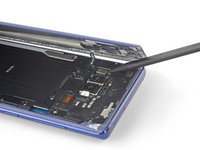
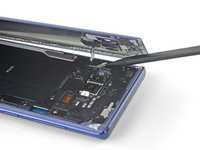
  10. Disconnect the Battery, Disconnect the fingerprint sensor: crwdns2935265:010crwdnd2935265:01crwdnd2935265:02crwdne2935265:0 Disconnect the Battery, Disconnect the fingerprint sensor: crwdns2935265:010crwdnd2935265:02crwdnd2935265:02crwdne2935265:0
    • Use the tip of a spudger to pry the fingerprint sensor ribbon cable up and out of its socket.

    crwdns2952109:0crwdne2952109:0

    crwdns2917038:0crwdne2917038:0

  11. Disconnect the Battery: crwdns2935265:011crwdnd2935265:01crwdnd2935265:01crwdne2935265:0
    crwdns2935267:0crwdne2935267:0
    Tweezers
    $4.99
    • Remove the back cover.

    • To re-install the back cover:

    • Use tweezers to peel away any remaining adhesive from the phone's chassis. Then clean the adhesion areas with high concentration isopropyl alcohol (at least 90%) and a lint-free cloth to prep the surface for the new adhesive. You don't have to clear out adhesive down to the plastic but larger pieces should be removed.

    • Turn on your phone and test your repair before installing new adhesive and resealing the phone.

    • Carefully apply the new adhesive to the back cover, then line up one edge of the glass against the phone chassis and firmly press the glass into the phone.

    crwdns2952109:0crwdne2952109:0

    crwdns2917038:0crwdne2917038:0

  12. Disconnect the Battery, Remove the upper midframe: crwdns2935265:012crwdnd2935265:01crwdnd2935265:02crwdne2935265:0 Disconnect the Battery, Remove the upper midframe: crwdns2935265:012crwdnd2935265:02crwdnd2935265:02crwdne2935265:0
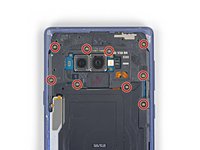
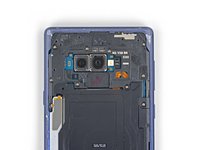
    • Use a Phillips screwdriver to remove the nine 4 mm screws securing the upper midframe.

    crwdns2952109:0crwdne2952109:0

    crwdns2917038:0crwdne2917038:0

  13. Disconnect the Battery: crwdns2935265:013crwdnd2935265:01crwdnd2935265:02crwdne2935265:0 Disconnect the Battery: crwdns2935265:013crwdnd2935265:02crwdnd2935265:02crwdne2935265:0
    • Insert the tip of a spudger into the upper-left corner of the upper midframe.

    • Pry the upper midframe out of the phone.

    • The upper midframe snaps into and out of place.

    crwdns2952109:0crwdne2952109:0

    crwdns2917038:0crwdne2917038:0

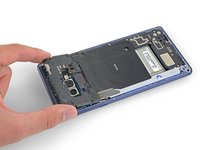
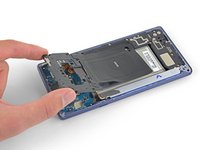
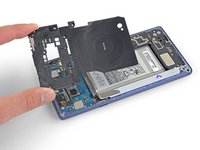
  14. Disconnect the Battery: crwdns2935265:014crwdnd2935265:01crwdnd2935265:03crwdne2935265:0 Disconnect the Battery: crwdns2935265:014crwdnd2935265:02crwdnd2935265:03crwdne2935265:0 Disconnect the Battery: crwdns2935265:014crwdnd2935265:03crwdnd2935265:03crwdne2935265:0
    • Peel the wireless charging coil off the battery starting with the left side.

    • The adhesive is weak but you can use an opening pick to cut it if necessary.

    • During reassembly start by snapping the midframe into place first before adhering the wireless charging coil.

    crwdns2952109:0crwdne2952109:0

    crwdns2917038:0crwdne2917038:0

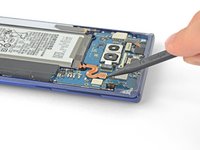
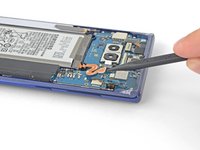
  15. Disconnect the Battery, Disconnect the battery: crwdns2935265:015crwdnd2935265:01crwdnd2935265:02crwdne2935265:0 Disconnect the Battery, Disconnect the battery: crwdns2935265:015crwdnd2935265:02crwdnd2935265:02crwdne2935265:0
    • Use the tip of a spudger to disconnect the orange ribbon cable connecting the battery to the motherboard.

    crwdns2952109:0crwdne2952109:0

    crwdns2917038:0crwdne2917038:0

crwdns2915888:0crwdne2915888:0

To reassemble your device, follow these instructions in reverse order.

crwdns2935221:0crwdne2935221:0

Sam Omiotek

crwdns2935283:002/25/19crwdne2935283:0

98,734 crwdns2915208:0crwdne2915208:0

crwdns2935297:0290crwdne2935297:0

crwdns2947412:00crwdne2947412:0

crwdns2917038:0crwdne2917038:0

crwdns2936625:0crwdne2936625:0:

crwdns2936751:024crwdne2936751:0 2

crwdns2936753:07crwdne2936753:0 14

crwdns2936753:030crwdne2936753:0 101

crwdns2942667:0crwdne2942667:0 613