AirPort/Bluetooth Board
|
crwdns2933315:011crwdne2933315:0 crwdns2934263:09crwdne2934263:0 |
How do I clean sticky keys on MacBook Pro? |
|
crwdns2933315:020crwdne2933315:0 crwdns2934263:020crwdne2934263:0 |
Logic Board Failure due to Nvidia Graphics processor GT330M |
|
crwdns2933315:09crwdne2933315:0 crwdns2934263:016crwdne2934263:0 |
Problem with NVIDIA GeForce GT 330M 256 MB? |
|
crwdns2933315:06crwdne2933315:0 crwdns2934263:06crwdne2934263:0 |
Trackpad not working after keyboard cleaning. |
crwdns2916646:0crwdne2916646:0
crwdns2943213:0crwdne2943213:0
- Apple MagSafe 1 AC Adapter
- MacBook and MacBook Pro Unibody Plastic Feet
- MacBook Pro Unibody Lower Case Screw Set
- MacBook Pro 15" Unibody (Mid 2009-Mid 2010) Battery
- 2.5" Hard Drive Enclosure with USB 3.0 Cable
- MacBook and MacBook Pro (Non-Retina) SSD Upgrade Kit
- MacBook Pro 15" Unibody (Mid 2009-Late 2011) Hard Drive Cable
- MacBook Pro 15" Unibody (Mid 2009-Mid 2012) Trackpad
crwdns2943215:0crwdne2943215:0
- Spudger
- Tweezers
- iFixit Opening Tool
- iFixit Opening Picks (Set of 6)
- Phillips #00 Screwdriver
- iFixit Thermal Paste
- iFixit Desoldering Wick
- Heat Gun
- Lead-Free Solder
- Soldering Workstation
- Solder Wick Braid
- Heavy-Duty Suction Cups (Pair)
- Tri-point Y0 Screwdriver
- T6 Torx Screwdriver
- Tri-point Y1 Screwdriver
- FixHub Portable Soldering Station
- Precision Utility Knife
- Adhesive Cleanup Kit (Set of 12)
- Arctic Silver ArctiClean
- Soldering Iron 60w Hakko 503F
crwdns2943049:0crwdne2943049:0
A1286 (EMC 2353 MacBookPro6,2) 2.4 GHz, A1286 (EMC 2353 MacBookPro6,2) 2.53 GHz, A1286 (EMC 2353 MacBookPro6,2) 2.66 GHz, A1286 (EMC 2353 MacBookPro6,2) 2.8 GHz
Manual
Troubleshooting
Track down a number of hardware problems using the MacBook Pro 15" Unibody Troubleshooting page.
Upgrades
There are a number of components in the MacBook Pro 15" Mid 2010 Unibody that can be cost-effectively upgraded.
- RAM: The stock RAM included with the MacBook Pro 15" Unibody Mid 2010 can be easily upgraded to the maximum of 8 GB.
- Hard Drive: 320 and 500 Gigabyte hard drives came standard with the MacBook Pro 15" Unibody Mid 2010. You can easily upgrade the drive to 750 GB.
- Battery: Replace an aging battery for more usability between charges.
Identification and Background
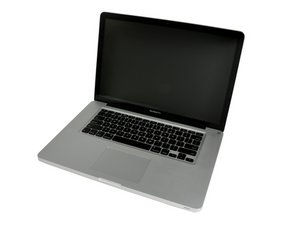
The MacBook Pro 15" Mid 2010 Unibody was announced in April of 2010.
MacBooks tend to look very similar, and it's important to know which machine you have before ordering any replacement parts. Check your machine against the details in this section. If they don't match, find your model under MacBook Pro 15" Unibody and check the Identification section on its page.
The MacBook Pro 15" Mid 2010 Unibody's case is composed of a single block of aluminum, following the same process of the MacBook Unibody and the MacBook Pro 17" Unibody. The Unibody revision also introduced some features that were never before seen on an Apple laptop: the inclusion of dual video cards (one for regular use, one for graphics intensive applications) the Mini DisplayPort (which replaced the full-size DVI display connector), and larger hard drive and RAM capacities.
Tech Specs
Display:
- 15.4-inch LED-backlit glossy widescreen 1680 x 1050 display with support for millions of colors
Storage:
- 320GB or 500GB 5400-rpm Serial ATA hard drive; optional 500GB 7200-rpm hard drive, or 128GB, 256GB, or 512GB solid-state drive
- 8x DVD/CD slot-loading SuperDrive
Processor:
- 2.4GHz or 2.53GHz Intel Core i5 processor with 3MB shared L3 cache; or 2.66GHz Intel Core i7 processor with 4MB shared L3 cache
Memory:
- 4GB or 8GB of 1066MHz DDR3 memory
Wireless Connectivity:
- 802.11n Wi-Fi wireless networking; IEEE 802.11a/b/g compatible
- Bluetooth 2.1 wireless technology
Graphics and video:
- NVIDIA GeForce GT 330M graphics processor
- Intel HD Graphics
- Automatic graphics switching
- iSight camera
- Mini DisplayPort
Ports:
- MagSafe power port
- Gigabit Ethernet port
- One FireWire 800 port
- Mini DisplayPort
- Two USB 2.0 ports
- SD card slot
- Audio line in
- Audio line out
Audio:
- Stereo speakers with subwoofers
- Omnidirectional microphone
- Audio line in minijack
- Audio line out/headphone minijack
- Support for Apple iPhone headset with microphone#
Battery and power:
- Built-in 77.5-watt-hour lithium-polymer battery
- 85W MagSafe Power Adapter with cable management system
- MagSafe power port
What’s in the box:
- MacBook Pro
- Display cleaning cloth
- 85W MagSafe Power Adapter, AC wall plug, and power cord
- Software DVDs
- Printed and electronic documentation
Additional Information
- iFixit: List of Troubleshooting Guides
- iFixit: Mac OS X HD Reinstallation Tips
- iFixit: DIY Laptop Upgrades
- Wikipedia: MacBook Pro Page
- Mactracker: Application with Apple Product Specs
- EveryMac: MacBook Pro Product Specs
- Apple Tech Specs
- Apple: MacBook Pro
- iFixit Blog: MacBook Pro Unibody Headphone Jack Issues
- iFixit Blog: MacBook Pro 15" Core i5 Teardown