crwdns2933423:0crwdne2933423:0
crwdns2947577:0crwdnd2947577:0crwdne2947577:0

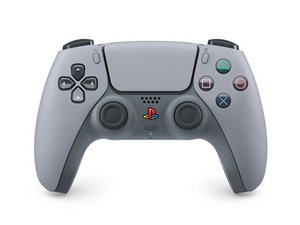
Repair guides, disassembly, and troubleshooting information for the fifth generation Sony PlayStation 5 DualSense controller. Identified by model number CFI-ZCT1W and motherboard model BDM-050.

How can I fix non-responsive buttons?

After dropping my controller one too many times, all buttons besides the joysticks have stopped working. How can I fix this? I’ve already tried resetting my console and the controller.

crwdns2934081:0crwdne2934081:0 crwdns2934083:0crwdne2934083:0 crwdns2934093:0crwdne2934093:0

crwdns2934109:0crwdne2934109:0

crwdns2889612:0crwdne2889612:0 0

crwdns2934285:0crwdne2934285:0

crwdns2933313:01crwdne2933313:0

crwdns2934051:0crwdne2934051:0

Hi!

Please check if the button circuit membrane is still connected OK. If this is the case, you might want to replace it. But I think it’s not making (good) contact with the motherboard.

You can follow this guide till step 27: DualSense Controller V5 Touchpad Replacement

Please let us know how it goes!

crwdns2934105:0crwdne2934105:0

crwdns2889612:0crwdne2889612:0 1

crwdns2944067:02crwdne2944067:0:

There was two pieces of plastic from the housing stuck between the membranes and pads, thanks for your help!

crwdns2934271:0crwdnd2934271:0crwdne2934271:0

Alright! My pleasure! Glad that that was it :)! Have a good one!

crwdns2934271:0crwdnd2934271:0crwdne2934271:0

crwdns2934285:0crwdne2934285:0

crwdns2934229:0crwdne2934229:0

strange wabegijig crwdns2934231:0crwdne2934231:0
crwdns2936625:0crwdne2936625:0:

crwdns2936751:024crwdne2936751:0 3

crwdns2936753:07crwdne2936753:0 6

crwdns2936753:030crwdne2936753:0 35

crwdns2942667:0crwdne2942667:0 35