A personal computer that resides in one location with its core components inside a case separate to third-party peripherals required for operation, such as a mouse, keyboard, and monitor.
I have a Lenovo Thinkcentre model 10AW008FMH and the fan is constantly running at 100% It happend suddenly i left the office for the day and came the next morning to it doing this, it never happend before and it is highly annoying for me and other colleagues so i can’t use it.
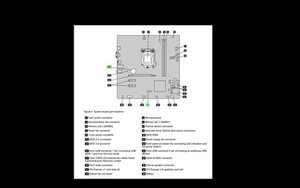
Remove CMOS battery (#24 in image below) (note the orientation of the battery)
Hold power button for 5 seconds
Reconnect the power cord to the AC wall outlet.
Power On computer and then hold Power again to Power off
Connect CMOS jumper back the way it was
Replace the CMOS battery back correctly
Power up (system may beep twice)
Press F1 for BIOS
Set the BIOS to the default settings
Set time and date
Press F10 to save BIOS settings and exit
Check if the fan is still running at 100% continually. If it still does you have a motherboard problem, possibly the temp sensor thinking that the CPU is overheating but it could be something else ;-)
Image taken from p.72 of the service manual for your desktop. Click on image to enlarge for better viewing
Thank you for taking the time out of your day trying to help me!
Now i have already tried to remove the CMOS battery and reinstall it but it did not help. I'm thinking myself that the BIOS somehow corrupted and that a reinstall would help.
Is that even possible, to reinstall the same version BIOS?


 13
13  7
7 
 1,6crwdns2936485:0crwdne2936485:0