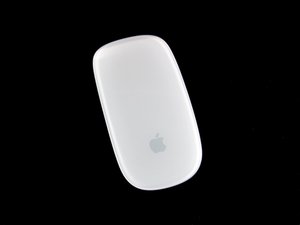
When i switch on my magic mouse, it stated connected in my mac but the curser is not moving. Button and scroll work well. It seems like the mouse laser is not functioning. Need help.
I had the same issue....turns out a piece of hair got into the tracker lens under the mouse. Blowing it out made the mouse start working/tracking again.
Unfortunately, I didn't had the same luck. I am stuck with a mouse that I do like but that doesn't work. And it seems it's quite common with this module...
With bluetooth on and the mouse connected, hold OPTION+SHIFT and click the bluetooth icon in the menu macOS menu bar. Select Debug>Factory reset all connected Apple devices. Restart mouse & reconnect.
Not sure if this will work with your model, but it may be worth a try. Worked for Model Number A1296 3vdc. Running MacOS High Sierra 10.13.1 on 13" MBA Mid 2011.
@ rmteixeira, I use to have the same issue as you, then I found that folding a small piece of aluminum foil and placing it between batteries and cover fixed the problem. I read that the Apple rechargeable batteries are a few cm too small.
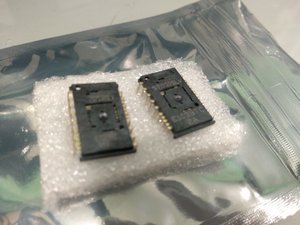
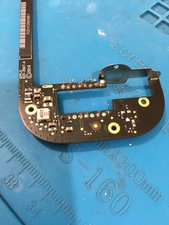
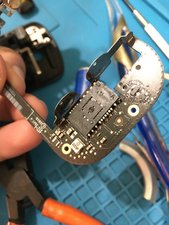
I had the same issue and after trying all the recommendations still no success so the conclusion was that the sensor was dead. Probably not worth for most but I was able to replace the part and it's working again. with only a simple soldering iron is a little difficult but, a fun challenge. You can find the part on Aliexpress, just search for "S7530SLV".
Hi, rodgsilva I have one magic mouse failing, since 2 years was abandoned in a box and I was looking for a fix, I am a electronic enthusiast and I am agree with this advice, left and right click good but no movement in the cursor. I will try this. Thanks for sharing, the Magic Mouse is a great tool!
Im trying this out soon as I am facing the same issue but I can't seem to separate the bulb from the chip itself. Was wondering how you did it. Any suggestions would greatly help out. Thanks
Easy solution : I got the same issue with my magic mouse 2. scroll works well but curson moving like drunken guy. when i saw the bottom of the mouse the lazer light is also clear. but i just took a small tissue and wiped those bulbs to make sure. then its started working nicely , then i found the reason that the laser bulbs are covered with some cream or oil, it can be anything , just try wiping the bulb @mouse bottom using some tissue paper , it should work.
So simple :) It works so well :) I had tried doing most other things before I read this- I'm old school (tech type) and I'm slightly ashamed I didn't think of doing this! Thank you Rajesh!
Had the same problem. My Magic Mouse 2 cursor was not moving even though the tracking was performing excellently well . I checked various online post for different solutions nothing worked until I saw Rajesh simple solution of cleaning the laser surface with a tissue, it worked like magic. I'm amazed how a simple solution like that took so long to find. Thank you so much.
I'm so embarrassed to admit this worked for me, too. Thank you so much!! I had about 3 usb mice trying to figure out some other option. This was awesome. Again, thanks!!!
I had tried everything, Some people had me going into all sorts of categories in system preferences. Nothing worked; I was already to buy a new mouse. Then I saw your suggestion - I figured that it couldn't hurt. I got my Q-tip and the mouse is back in business . Thank you so much.
Jan 23, 2013 11:42 AM in response to henryfromgreen cove springs
Had the same problem. Here's the process I went through to getting it working again:
Tried fresh batteries. Clicks worked, but no mouse tracking.
Another set of fresh batteries. The same result.
Tried removing and re-adding the mouse in the Bluetooth Preferences. No difference.
Found a blog post that suggested cleaning the battery contacts. Mine looked nice and shiny, but I scrubbed them anyway. Still no good.
Went into Bluetooth preferences, highlighted the mouse then under the gear menu, clicked "Update Services" then "Monitor Connection RSSI". Monitor Connection RSSI opened a new window with a graph. It took a few seconds for it to start plotting data, but as soon as it did, the mouse began working correctly.
OR
Feb 1, 2013 12:14 AM in response to henryfromgreen cove springs
Delete the extension named USBOverdrive.kext in the extensions folder under \System\Library\Extensions. Restart the computer and it work.
Sometimes the Bluetooth mouse and sometimes even the USB wired mouse stops moving properly.
That is usually caused when the laser lens gets dirty.
Get a Q-tip or a small cloth like from a cotton tee shirt. Moisten it with rubbing alcohol, (not the drinking kind). Clean the lens thoroughly, then try the mouse again. If it still does not move, and the batteries are good, then its time for a new mouse.
As everyone has explained, the lens on the bottom of the magic mouse sometimes becomes dirty, smudged, and even some cases can develop scratching.
Most of the time the problem is the mouse not recognizing the movement of your hand. This is because the laser can't detect a surface. As everyone has said, check the clarity of the lens first. If you have done so and the problem still persist, check the bluetooth connection. Make sure there are no other connected mice, usb mice, or other unknown bluetooth devices in the "Bluetooth" pane.
Assuming this is the original Apple Magic Mouse check the terminal connections for the batteries too. If there isn't enough power circulating the mouse due to corrosion of the terminals, some features or normal behavior may diminish.
Today I found our that the cursor of my Magic Mouse 1 didn’t move anymore as well.
the Green light on the bottom of the mouse is on all the Time after connection via Bluetooth. Therefore the batteries are good. Left and right click worked well and I can scroll in safari up/down/left/right with the mouse too. But no move of the cursor.
BUT. After reset all BT devices via debug on the BT menu. After reconnect my mouse the cursor moves again. But unfortunately only 20 seconds. I did 3 times the reset with all BT devices already. Every time with the same result. 20-30 seconds the cursor moves but then the cursor stops. :(
I had the same issue, none of the suggestions above worked. I had left a pair of batteries inside and they were leaking. I cracked the mouse open and found that one of the chips (Probably responsible for transmitting the sensor data was already corroded. Tried to solder, but it was too late. RIP my mouse.
Lesson learned: Do not leave alkaline batteries inside when storing electronics
nope. i had been using it for few years and suddenly it cant move. I cant see anything cover the 'laser' part. as it do not have any laser lights like other normal mouse, i do not know what is wrong.
Apparently it is a common problem for these mice to stop sending signal. I found a couple videos, if they do not help then you may just have a bad mouse... But I hope these help!
I would recommend trying these out in the order they are posted.
thanks for the recommendation but it does not work. My Magic Mouse connect well to my mac, it is just that the cursor is not moving. button and scroll work fine. Might be my mouse is broken.
I noticed the same problem after I got Apple Airpods. All of sudden my Magic Mouse stopped working. It responded to clicks but cursor did not move. The problem was solved by remove Airpods from the list of connected bluetooth devises. Go to Preferences / Bluetooth and remove Airpods and mouse. The go to Preferences/Mouse and reconnect your Magic Mouse.
If you run Windows via bootcamp restart in Mac to remove Airpods and re-connect Magic Mouse.
I had the same problem. Turned out that the issue was I have a glass top desk. I tried a variety of things (restarting my computer, reinstalling/uninstalling the mouse, etc.) I happened to move the mouse onto a notebook and bumped it and noticed the cursor moved. May not be your issue, but for some reason it wouldn’t track on the glass top desk. Maybe there is some type of reflection confusing it? Not sure but thought I’d throw that out there for anyone else that has a glass desk.
I had the same problem and fixed it by pushing in one of the 2 black plastic rails that are at the bottom part of the mouse. It probably came detached when I dropped the mouse a few days ago
It is hard to believe but in my case. I checked the battery, sensor everything looks good. Reconnection helps a little bit but it will come back again. Turned out if I leave my magic mouse far from my wifi router then the problem has gone. So for some reasons there is some sort of signal interfering happening. Hope this help.
My Magic Mouse works normally without the protective cover. When I put it on, it stops moving the cursor normally. Moves only left and right, but not up and down. Any idea?
My Magic Mouse suddenly did the same thing on me. It connects but only cursor and swiping works but tracking doesn’t at all. I already cleaned all the bulbs and the inside where the batteries go and blew it with compressed air to make sure all dirt is out. I unpaired it and reset it to factory settings too. Same thing keeps occurring. I put in freshly charged batteries. The tiny green light isn’t on at all even though the mouse is connecting and everything else is working. Help please?
Much to my surprise, removing the black plastic rails allows my Apple Magic Mouse to properly track motion when I slide it around. The black plastic rails have been problematic for years, as they kept falling off. These rails are not really necessary, as long as you use the mouse on top of a cloth mouse pad (otherwise you’ll hear annoying scratching sounds as your mouse slides over your table top.
I am not certain why removing the rails is beneficial, but I have two guesses:
The optical tracking system may have become myopic in its old age, to the point where the Magic Mouse can no longer detect motion unless it is slightly closer to the desk surface.
After falling off of the mouse and being put back on again for many years, the black plastic rails have become warped and now hold the Magic Mouse too high above the table top so that the mouse can no longer detect motion.
In any event, removing the black plastic rails solves the problem. I am delighted to once again have a working Magic Mouse.
Update:
After my Magic Mouse (deliberately) went off the rails as described above, it worked fine for a while but then had trouble tracking movement. It still responded to gestures such as scrolling. Eventually I discovered that when operating the mouse without the black plastic rails, the optical sensor is more prone to pick up lint that interferes with motion detection. Blowing the lint out restored my mouse to normal operation.
Try turning the Magic Mouse over so its underside is facing you, then blow lightly in the circular hole that's located just to the left of the on/off switch. By doing so you're clearing out the dust (I think). This has worked for me a few times.

 2
2  2
2  1
1 




















crwdns2944067:013crwdne2944067:0
Hi Azmir, did you solve the issue with your mouse..? I have the same issue, please let me know if you have any recommended solution.
Thank you
crwdns2957956:0crwdnd2957956:0 Carlos crwdne2957956:0
I had the same issue....turns out a piece of hair got into the tracker lens under the mouse. Blowing it out made the mouse start working/tracking again.
crwdns2957956:0crwdnd2957956:0 Mac User crwdne2957956:0
Unfortunately, I didn't had the same luck. I am stuck with a mouse that I do like but that doesn't work. And it seems it's quite common with this module...
crwdns2957956:0crwdnd2957956:0 Simao Dias crwdne2957956:0
Someone fixed that? I am with the same problem :/
crwdns2957956:0crwdnd2957956:0 Nielsen Rechia crwdne2957956:0
Not from this side...
crwdns2957956:0crwdnd2957956:0 Simao Dias crwdne2957956:0
crwdns2934275:08crwdne2934275:0