

How to open Lumia 720
How to open Lumia 720? I see there is no screws on it
crwdns2934109:0crwdne2934109:0
crwdns2889612:0crwdne2889612:0
0
crwdns2934065:0crwdne2934065:0: 97
 2
2
 3
3
How to open Lumia 720? I see there is no screws on it
crwdns2934109:0crwdne2934109:0
crwdns2934065:0crwdne2934065:0: 861.1crwdns2936485:0crwdne2936485:0
1.5crwdns2936485:0crwdne2936485:0
978
 2.4crwdns2936485:0crwdne2936485:0
zero, see if this works for you.
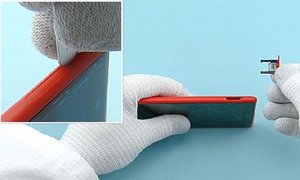
Insert the Sim door key in the small hole on the SD door and press it gently. Remove the SD door.
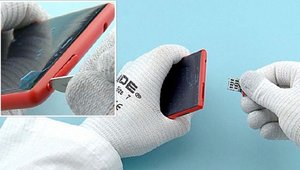
Insert the SIM door key to the small hole on the SIM DOOR and press it gently. remove the SIM Door.
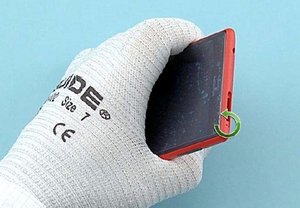
Unscrew the TORX #2 screw.
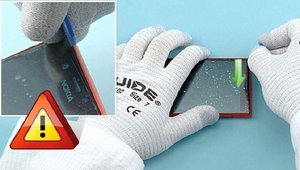
To release the Display Module, insert an opening tool to the top left corner of the device and slide to the direction shown in the image.
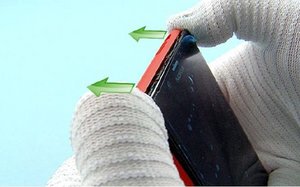
Push the top end of the Body Assembly to the direction shown to release the top part of the display assembly.
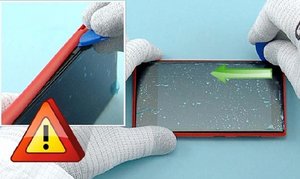
Release the left side of the body assembly by sliding the opening tool to the direction shown.
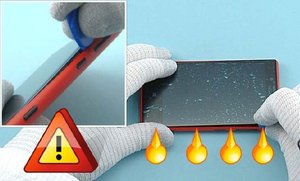
Release the four clips on the right side. Do not slide an opening tool as it might damage the sidekey flex.
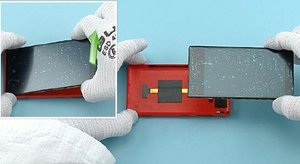
Lift the top end of the display module up first. The display and the body assembly can now be separated.
Hope this helps, good luck
crwdns2934105:0crwdne2934105:0
crwdns2936751:024crwdne2936751:0 0
crwdns2936753:07crwdne2936753:0 6
crwdns2936753:030crwdne2936753:0 18
crwdns2942667:0crwdne2942667:0 34,901

