crwdns2933423:0crwdne2933423:0
crwdns2947577:0crwdnd2947577:0crwdne2947577:0

iMac Intel 24" EMC 2267 Optical Drive Replacement

crwdns2862623:0crwdne2862623:0
crwdns2948751:0crwdne2948751:0

crwdns2942213:0crwdne2942213:0

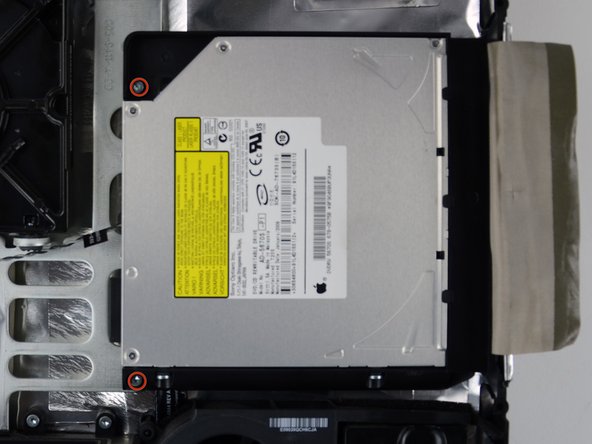
    1. iMac Intel 24" EMC 2267 Optical Drive Replacement, Optical Drive: crwdns2935265:01crwdnd2935265:01crwdnd2935265:02crwdne2935265:0 iMac Intel 24" EMC 2267 Optical Drive Replacement, Optical Drive: crwdns2935265:01crwdnd2935265:02crwdnd2935265:02crwdne2935265:0
      • Peel off the tape holding the optical drive in place.

      • Remove the two 7.1 mm T10 torx screws.

      crwdns2952109:0crwdne2952109:0

      crwdns2917038:0crwdne2917038:0

    2. iMac Intel 24" EMC 2267 Optical Drive Replacement: crwdns2935265:02crwdnd2935265:01crwdnd2935265:03crwdne2935265:0 iMac Intel 24" EMC 2267 Optical Drive Replacement: crwdns2935265:02crwdnd2935265:02crwdnd2935265:03crwdne2935265:0 iMac Intel 24" EMC 2267 Optical Drive Replacement: crwdns2935265:02crwdnd2935265:03crwdnd2935265:03crwdne2935265:0
      • Firmly grab the optical drive connector and pull it straight out of the optical drive.

      • Remove the optical drive from the device.

      crwdns2952109:0crwdne2952109:0

      crwdns2917038:0crwdne2917038:0

crwdns2915888:0crwdne2915888:0

To reassemble your device, follow these instructions in reverse order.

crwdns2935221:0crwdne2935221:0

Brittany McCrigler

crwdns2935283:003/05/12crwdne2935283:0

91,069 crwdns2915208:0crwdne2915208:0

crwdns2935297:0142crwdne2935297:0

crwdns2935287:0crwdne2935287:0

iFixit crwdns2935289:0iFixitcrwdne2935289:0

Staff

crwdns2931471:0122crwdne2931471:0

crwdns2935297:086,241crwdne2935297:0

crwdns2947412:00crwdne2947412:0

crwdns2917038:0crwdne2917038:0

crwdns2936625:0crwdne2936625:0:

crwdns2936751:024crwdne2936751:0 0

crwdns2936753:07crwdne2936753:0 3

crwdns2936753:030crwdne2936753:0 16

crwdns2942667:0crwdne2942667:0 826