crwdns2933423:0crwdne2933423:0
crwdns2947577:0crwdnd2947577:0crwdne2947577:0

iMac 27" 2017 RAM Replacement

crwdns2942213:0crwdne2942213:0

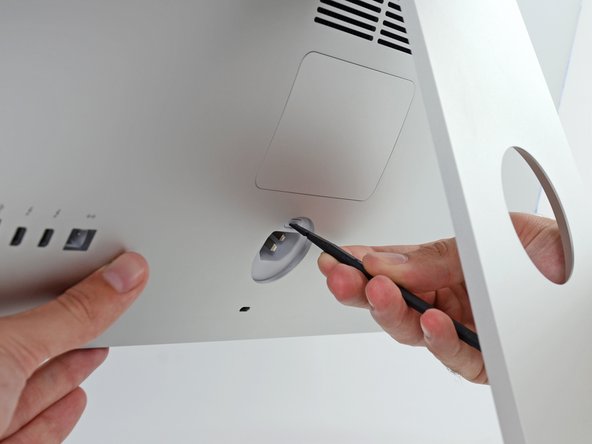
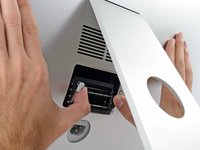
  1. iMac 27" 2017 RAM Replacement, Open the RAM door: crwdns2935265:01crwdnd2935265:01crwdnd2935265:02crwdne2935265:0 iMac 27" 2017 RAM Replacement, Open the RAM door: crwdns2935265:01crwdnd2935265:02crwdnd2935265:02crwdne2935265:0
    • While holding the display steady, use the flat end of a spudger to press in on the RAM door release button, located just above the power port.

    • You may have to press fairly hard—keep at it until the bottom of the door pops out about 0.25" from the rear of the iMac.

    crwdns2952109:0crwdne2952109:0
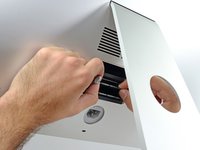
  2. iMac 27" 2017 RAM Replacement, Remove the RAM door: crwdns2935265:02crwdnd2935265:01crwdnd2935265:03crwdne2935265:0 iMac 27" 2017 RAM Replacement, Remove the RAM door: crwdns2935265:02crwdnd2935265:02crwdnd2935265:03crwdne2935265:0 iMac 27" 2017 RAM Replacement, Remove the RAM door: crwdns2935265:02crwdnd2935265:03crwdnd2935265:03crwdne2935265:0
    • Pull the RAM access door off the back of the iMac.

    crwdns2952109:0crwdne2952109:0
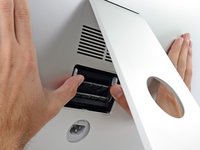
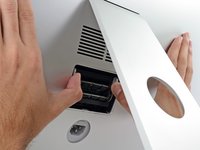
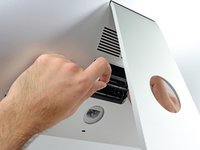
  3. iMac 27" 2017 RAM Replacement, Unlock the RAM tray: crwdns2935265:03crwdnd2935265:01crwdnd2935265:03crwdne2935265:0 iMac 27" 2017 RAM Replacement, Unlock the RAM tray: crwdns2935265:03crwdnd2935265:02crwdnd2935265:03crwdne2935265:0 iMac 27" 2017 RAM Replacement, Unlock the RAM tray: crwdns2935265:03crwdnd2935265:03crwdnd2935265:03crwdne2935265:0
    • The RAM tray is locked into its upright position with two grey tabs.

    • Use your thumbs or index fingers to unlock the tray by pushing the tabs outward, away from the RAM.

    • Pull the tabs out and down, swinging the RAM tray down to a near-horizontal position.

    crwdns2952109:0crwdne2952109:0
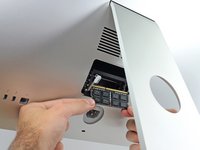
  4. iMac 27" 2017 RAM Replacement, Remove the RAM: crwdns2935265:04crwdnd2935265:01crwdnd2935265:03crwdne2935265:0 iMac 27" 2017 RAM Replacement, Remove the RAM: crwdns2935265:04crwdnd2935265:02crwdnd2935265:03crwdne2935265:0 iMac 27" 2017 RAM Replacement, Remove the RAM: crwdns2935265:04crwdnd2935265:03crwdnd2935265:03crwdne2935265:0
    • Remove a stick of RAM by grabbing it with two hands and pulling straight out of the RAM tray.

    • RAM modules are keyed so that they can only be installed in the proper orientation. Note where the shorter section of contacts is when removing, and reinstalling, your RAM.

    • To install a new module, insert the module into the desired slot in the tray and press it firmly in place. Push the tray back up until it locks in place.

    • The RAM access door is not symmetrical. If it is not flush on both ends, try putting it in the other way.

    • Re-insert the RAM access door back into its place.

    crwdns2952109:0crwdne2952109:0
crwdns2915888:0crwdne2915888:0

To reassemble your device, follow the above steps in reverse order.
Take your e-waste to an R2 or e-Stewards certified recycler.
Repair didn’t go as planned? Check out our Answers community for troubleshooting help.

crwdns2935229:06crwdne2935229:0

Adam O'Camb

crwdns2935283:004/11/15crwdne2935283:0

222 777 crwdns2915208:0crwdne2915208:0

crwdns2935297:0416crwdne2935297:0

crwdns2947412:02crwdne2947412:0

bom dia, posso trocar a memoria de 2444MHZ para 2666MHZ? 3000MHZ ?

MARCELO MIRA - crwdns2934203:0crwdne2934203:0 crwdns2950251:0crwdne2950251:0

crwdns2917038:0crwdne2917038:0

crwdns2936625:0crwdne2936625:0:

crwdns2936751:024crwdne2936751:0 9

crwdns2936753:07crwdne2936753:0 52

crwdns2936753:030crwdne2936753:0 285

crwdns2942667:0crwdne2942667:0 21,060