crwdns2933423:0crwdne2933423:0
crwdns2947577:0crwdnd2947577:0crwdne2947577:0

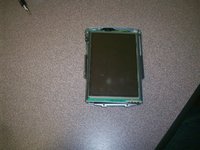
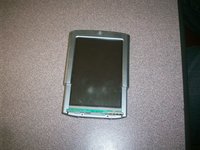
Tungsten T3 Motherboard Replacement

crwdns2942213:0crwdne2942213:0

  1. Tungsten T3 Motherboard Replacement, Motherboard: crwdns2935265:01crwdnd2935265:01crwdnd2935265:01crwdne2935265:0
    • To remove the cover press down on the center indentation and remove from device.

    • If you have a memory card inserted into your device make sure to remove it.

    crwdns2952109:0crwdne2952109:0

    crwdns2917038:0crwdne2917038:0

  2. Tungsten T3 Motherboard Replacement: crwdns2935265:02crwdnd2935265:01crwdnd2935265:01crwdne2935265:0
    • There will be a set of 2 screws located on each side of your device. Remove these by using a Phillips head screwdriver.

    crwdns2952109:0crwdne2952109:0

    crwdns2917038:0crwdne2917038:0

  3. Tungsten T3 Motherboard Replacement: crwdns2935265:03crwdnd2935265:01crwdnd2935265:01crwdne2935265:0
    • The arrows in the picture indicate two small holes located at the top of the device. Insert a paper clip or a tack simultaneously into each of these holes and moderately push downward to remove the backing.

    • The springs will give as pressure is exerted. Once you feel this take place, pull down the cover with the paper clip/tack while continuing to push downward. This will release the back cover.

    crwdns2952109:0crwdne2952109:0

    crwdns2917038:0crwdne2917038:0

  4. Tungsten T3 Motherboard Replacement: crwdns2935265:04crwdnd2935265:01crwdnd2935265:01crwdne2935265:0
    • The buttons and sliding tray will be connected to the main body by a orange cable. You can separate the two components by gently peeling the cable off of the main body. You can remove this by gently lifting up.

    • Make sure the cable is still connected to the buttons and sliding tray.

    • Set aside the buttons and slide tray, making sure the orange cable is with it.

    crwdns2952109:0crwdne2952109:0

    crwdns2917038:0crwdne2917038:0

  5. Tungsten T3 Motherboard Replacement: crwdns2935265:05crwdnd2935265:01crwdnd2935265:01crwdne2935265:0
    • The arrows indicate two small screws. Using a Phillips head screwdriver, remove them.

    crwdns2952109:0crwdne2952109:0

    crwdns2917038:0crwdne2917038:0

  6. Tungsten T3 Motherboard Replacement: crwdns2935265:06crwdnd2935265:01crwdnd2935265:01crwdne2935265:0
    • To open the device, the sides must be (with moderate force) pried apart using a prying tool as seen in the picture.

    • Both sides must be separated from one another.

    • Tip: The right side may be slightly more difficult. It will be easiest to begin on the left.

    • Beginning with the left side, gently pry at the division of the face plates until they separate from one another.

    • Repeat this process on the other side of the device.

    crwdns2952109:0crwdne2952109:0

    crwdns2917038:0crwdne2917038:0

  7. Tungsten T3 Motherboard Replacement: crwdns2935265:07crwdnd2935265:01crwdnd2935265:01crwdne2935265:0
    • Hint: There will be pressure points along the side (as seen in the picture). Exerting pressure in these points will allow the sides to separate more easily.

    crwdns2952109:0crwdne2952109:0

    crwdns2917038:0crwdne2917038:0

  8. Tungsten T3 Motherboard Replacement: crwdns2935265:08crwdnd2935265:01crwdnd2935265:01crwdne2935265:0
    • Remove the face plate and set aside. This will leave the core of the device in front of you.

    • The core of the device will be connected by various cables. Gently lift the screen and mother board (as in picture).

    • As labeled in the picture, the orange screen cable will connect on the lower right side of the motherboard.

    • Disconnect the cable by pulling it upward from the motherboard connection. Depending on your device, it may require little to moderate force.

    • Carefully remove your screen.

    crwdns2952109:0crwdne2952109:0

    crwdns2917038:0crwdne2917038:0

  9. Tungsten T3 Motherboard Replacement: crwdns2935265:09crwdnd2935265:01crwdnd2935265:01crwdne2935265:0
    • The battery connects to the motherboard (as seen in picture) by red and black cables.

    • Be gentle when disconnecting. The wires will be tightly fitted; however, it is very important the connection is not broken in the port.

    • Gently pull out battery wire connection.

    crwdns2952109:0crwdne2952109:0

    crwdns2917038:0crwdne2917038:0

  10. Tungsten T3 Motherboard Replacement: crwdns2935265:010crwdnd2935265:01crwdnd2935265:01crwdne2935265:0
    • At this step the Motherboard control panel will be completely disconnected from your Tungsten T3 Device.

    • Replace the old control panel with the new Motherboard.

    crwdns2952109:0crwdne2952109:0

    crwdns2917038:0crwdne2917038:0

  11. Tungsten T3 Motherboard Replacement: crwdns2935265:011crwdnd2935265:01crwdnd2935265:01crwdne2935265:0
    • The new Motherboard reconnects to the battery through the same connection as shown in picture.

    • Once connected, place the new Motherboard control panel.

    crwdns2952109:0crwdne2952109:0

    crwdns2917038:0crwdne2917038:0

  12. Tungsten T3 Motherboard Replacement: crwdns2935265:012crwdnd2935265:01crwdnd2935265:01crwdne2935265:0
    • Next, the screen must be reconnected to the motherboard.

    • Connect the new orange cable into the same location as the previous screen. (Location noted in picture by arrow). Make sure the cable is placed facing downward on the connection.

    • Lower the motherboard into place. Make sure to keep the back facing downward. Hint: This will be the side where all cables are connected.

    • Gently lay the screen on the core of the device.

    crwdns2952109:0crwdne2952109:0

    crwdns2917038:0crwdne2917038:0

  13. Tungsten T3 Motherboard Replacement: crwdns2935265:013crwdnd2935265:01crwdnd2935265:02crwdne2935265:0 Tungsten T3 Motherboard Replacement: crwdns2935265:013crwdnd2935265:02crwdnd2935265:02crwdne2935265:0
    • Lay the face plate on device. It must be snapped into place.

    crwdns2952109:0crwdne2952109:0

    crwdns2917038:0crwdne2917038:0

  14. Tungsten T3 Motherboard Replacement: crwdns2935265:014crwdnd2935265:01crwdnd2935265:01crwdne2935265:0
    • When attaching the tray to the main device, the cable must be in the position as seen in the left figure.

    • On each side, the prongs must be adjusted so that they fit into their respective slots.

    crwdns2952109:0crwdne2952109:0

    crwdns2917038:0crwdne2917038:0

  15. Tungsten T3 Motherboard Replacement: crwdns2935265:015crwdnd2935265:01crwdnd2935265:01crwdne2935265:0
    • To reconnect the sliding tray and buttons, lay the device on its face.

    • The orange button cable must be raised above sliding tray and connected to its respective port (as seen in picture).

    crwdns2952109:0crwdne2952109:0

    crwdns2917038:0crwdne2917038:0

  16. Tungsten T3 Motherboard Replacement: crwdns2935265:016crwdnd2935265:01crwdnd2935265:01crwdne2935265:0
    • To reconnect the sliding track, align the hooks and tracks (noted in picture).

    • Push the hooks into the tracks and slide the tray upward. This should lock the hooks in place.

    • To ensure that it has been connected properly, slide up and down.

    crwdns2952109:0crwdne2952109:0

    crwdns2917038:0crwdne2917038:0

  17. Tungsten T3 Motherboard Replacement: crwdns2935265:017crwdnd2935265:01crwdnd2935265:01crwdne2935265:0
    • Install the screws on both sides of device as seen in the picture.

    • You can refer to step 2. We will just be inserting the original screws into place.

    crwdns2952109:0crwdne2952109:0

    crwdns2917038:0crwdne2917038:0

  18. Tungsten T3 Motherboard Replacement: crwdns2935265:018crwdnd2935265:01crwdnd2935265:01crwdne2935265:0
    • Here is your repaired Tungsten T3 Palm Pilot. Enjoy!

    crwdns2952109:0crwdne2952109:0

    crwdns2917038:0crwdne2917038:0

crwdns2915888:0crwdne2915888:0

To reassemble your device, follow these instructions in reverse order.

crwdns2935221:0crwdne2935221:0

crwdns2935227:0crwdne2935227:0

Whitney

crwdns2935283:009/08/11crwdne2935283:0

318 crwdns2915208:0crwdne2915208:0

crwdns2935297:03crwdne2935297:0

crwdns2935287:0crwdne2935287:0

University of Maine, Team 1-14, Diaz Fall 2011 crwdns2935289:0University of Maine, Team 1-14, Diaz Fall 2011crwdne2935289:0

UMAINE-DIAZ-F11S1G14

crwdns2931471:02crwdne2931471:0

crwdns2935297:03crwdne2935297:0

crwdns2947412:00crwdne2947412:0

crwdns2917038:0crwdne2917038:0

crwdns2936625:0crwdne2936625:0:

crwdns2936751:024crwdne2936751:0 2

crwdns2936753:07crwdne2936753:0 18

crwdns2936753:030crwdne2936753:0 54

crwdns2942667:0crwdne2942667:0 1,559