crwdns2933423:0crwdne2933423:0
crwdns2947577:0crwdnd2947577:0crwdne2947577:0

Sony Walkman D-E356CK Disk Reader Replacement

crwdns2942213:0crwdne2942213:0

  1. Sony Walkman D-E356CK Disk Reader Replacement, Back Panel: crwdns2935265:01crwdnd2935265:01crwdnd2935265:01crwdne2935265:0
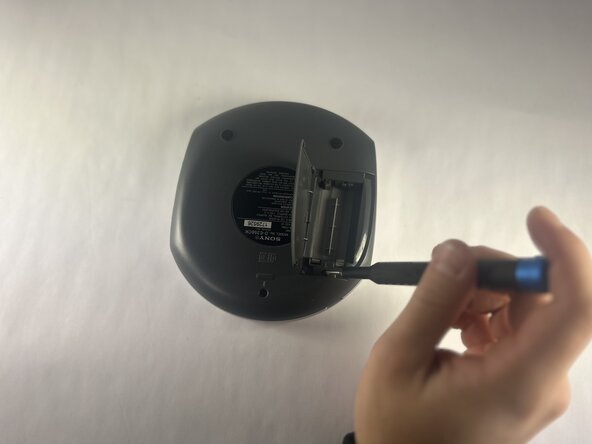
    • Open the battery compartment.

    • Remove the AA batteries from within the compartment.

  2. Sony Walkman D-E356CK Disk Reader Replacement: crwdns2935265:02crwdnd2935265:01crwdnd2935265:03crwdne2935265:0 Sony Walkman D-E356CK Disk Reader Replacement: crwdns2935265:02crwdnd2935265:02crwdnd2935265:03crwdne2935265:0 Sony Walkman D-E356CK Disk Reader Replacement: crwdns2935265:02crwdnd2935265:03crwdnd2935265:03crwdne2935265:0
    • Press the button located in the bottom left corner of the device labeled "open."

    • Remove the three 11 mm-long Phillips screws.

  3. Sony Walkman D-E356CK Disk Reader Replacement: crwdns2935265:03crwdnd2935265:01crwdnd2935265:02crwdne2935265:0 Sony Walkman D-E356CK Disk Reader Replacement: crwdns2935265:03crwdnd2935265:02crwdnd2935265:02crwdne2935265:0
    • Open the battery compartment.

    • Remove the two 11 mm-long Phillips screws on the back side of the Walkman.

  4. Sony Walkman D-E356CK Disk Reader Replacement: crwdns2935265:04crwdnd2935265:01crwdnd2935265:02crwdne2935265:0 Sony Walkman D-E356CK Disk Reader Replacement: crwdns2935265:04crwdnd2935265:02crwdnd2935265:02crwdne2935265:0
    • Insert an opening tool into the seam between the back panel and chassis.

    • Pry around the perimeter until the back panel releases.

    • Remove the back panel.

  5. Sony Walkman D-E356CK Disk Reader Replacement, Motherboard: crwdns2935265:05crwdnd2935265:01crwdnd2935265:03crwdne2935265:0 Sony Walkman D-E356CK Disk Reader Replacement, Motherboard: crwdns2935265:05crwdnd2935265:02crwdnd2935265:03crwdne2935265:0 Sony Walkman D-E356CK Disk Reader Replacement, Motherboard: crwdns2935265:05crwdnd2935265:03crwdnd2935265:03crwdne2935265:0
    • Gently lift the motherboard to reveal the backside of the motherboard.

    • Disconnect the two JST connectors.

  6. Sony Walkman D-E356CK Disk Reader Replacement: crwdns2935265:06crwdnd2935265:01crwdnd2935265:01crwdne2935265:0
    • Lift the latch that secures the ribbon cable.

    • Disconnect the ribbon cable.

  7. Sony Walkman D-E356CK Disk Reader Replacement, Disk Motor: crwdns2935265:07crwdnd2935265:01crwdnd2935265:03crwdne2935265:0 Sony Walkman D-E356CK Disk Reader Replacement, Disk Motor: crwdns2935265:07crwdnd2935265:02crwdnd2935265:03crwdne2935265:0 Sony Walkman D-E356CK Disk Reader Replacement, Disk Motor: crwdns2935265:07crwdnd2935265:03crwdnd2935265:03crwdne2935265:0
    • Remove the disk motor housing from front panel and flip it over.

    • Remove the 5mm screws from the disk motor.

  8. Sony Walkman D-E356CK Disk Reader Replacement, Disk Reader: crwdns2935265:08crwdnd2935265:01crwdnd2935265:02crwdne2935265:0 Sony Walkman D-E356CK Disk Reader Replacement, Disk Reader: crwdns2935265:08crwdnd2935265:02crwdnd2935265:02crwdne2935265:0
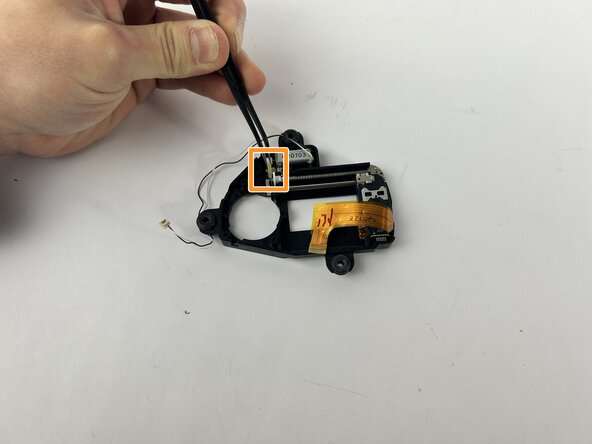
    • Carefully take out the clear plastic piece found in the image.

    • Use the tweezers to carefully remove the clear yellow gear.

  9. Sony Walkman D-E356CK Disk Reader Replacement: crwdns2935265:09crwdnd2935265:01crwdnd2935265:01crwdne2935265:0
    • Remove the rod with a white gear attached at the end.

crwdns2915888:0crwdne2915888:0

To reassemble your device, follow the above steps in reverse order.
Take your e-waste to an R2 or e-Stewards certified recycler.
Repair didn’t go as planned? Try some basic troubleshooting or ask our Answers community for help.

Andrew Choquette

crwdns2935283:010/15/25crwdne2935283:0

366 crwdns2915208:0crwdne2915208:0

crwdns2935297:04crwdne2935297:0

crwdns2935287:0crwdne2935287:0

UMass Dartmouth, Team 1-1, Botvin Fall 2025 crwdns2935289:0UMass Dartmouth, Team 1-1, Botvin Fall 2025crwdne2935289:0

UMASSD-BOTVIN-F25S1G1

crwdns2931471:04crwdne2931471:0

crwdns2935297:05crwdne2935297:0

crwdns2947412:00crwdne2947412:0

crwdns2917038:0crwdne2917038:0

crwdns2936625:0crwdne2936625:0:

crwdns2936751:024crwdne2936751:0 0

crwdns2936753:07crwdne2936753:0 1

crwdns2936753:030crwdne2936753:0 8

crwdns2942667:0crwdne2942667:0 56