crwdns2933423:0crwdne2933423:0
crwdns2947577:0crwdnd2947577:0crwdne2947577:0

Smart Soldering Iron Safety Features and Modes

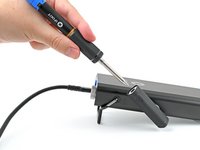
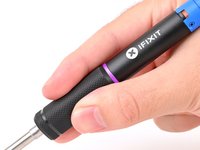
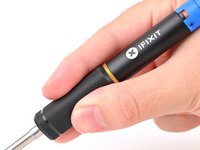
    1. Smart Soldering Iron Safety Features and Modes, How to read the Touch-Safe Indicator LED: crwdns2935265:01crwdnd2935265:01crwdnd2935265:03crwdne2935265:0 Smart Soldering Iron Safety Features and Modes, How to read the Touch-Safe Indicator LED: crwdns2935265:01crwdnd2935265:02crwdnd2935265:03crwdne2935265:0 Smart Soldering Iron Safety Features and Modes, How to read the Touch-Safe Indicator LED: crwdns2935265:01crwdnd2935265:03crwdnd2935265:03crwdne2935265:0
      • The color of the Touch-Safe Indicator LED provides information about the status of the soldering iron tip. Note: the soldering iron grip is always safe to touch.

      • The LED only functions when the soldering iron is connected to a power source—so use caution when handling an unplugged iron if you don't know how hot it is.

      • Blue LED: The iron has cooled below 40 °C (100 °F), and the tip is safe to touch.

      • Purple LED: When pulsing, the iron is actively heating up or cooling down. When static, the iron is in Idle Mode. The iron tip is not safe to touch.

      • Orange LED: The iron has reached the set temperature and is ready to solder. The iron tip is not safe to touch.

      crwdns2952109:0crwdne2952109:0

      crwdns2917038:0crwdne2917038:0

    1. Smart Soldering Iron Safety Features and Modes, Free fall detection accelerometer: crwdns2935265:02crwdnd2935265:01crwdnd2935265:01crwdne2935265:0
      • The Smart Soldering Iron is equipped with an accelerometer-based auto safety feature.

      • If the iron detects that it's been dropped, it will automatically cut power to the soldering tip to prevent damage or injury when it lands.

      • To clear the free‑fall state and resume soldering, press the blue button on the Power Station or power cycle the iron by unplugging and replugging into a USB-C power source.

      crwdns2952109:0crwdne2952109:0

      crwdns2917038:0crwdne2917038:0

    2. Smart Soldering Iron Safety Features and Modes, Active Mode: crwdns2935265:03crwdnd2935265:01crwdnd2935265:03crwdne2935265:0 Smart Soldering Iron Safety Features and Modes, Active Mode: crwdns2935265:03crwdnd2935265:02crwdnd2935265:03crwdne2935265:0 Smart Soldering Iron Safety Features and Modes, Active Mode: crwdns2935265:03crwdnd2935265:03crwdnd2935265:03crwdne2935265:0
      • Never leave the soldering iron unattended while it's on.

      • Don't touch the heated tip of the soldering iron.

      • In Active Mode, the iron is heating to or maintaining the set working temperature. The LED will be pulsing purple or orange, respectively.

      crwdns2952109:0crwdne2952109:0

      crwdns2917038:0crwdne2917038:0

    3. Smart Soldering Iron Safety Features and Modes, Idle Mode: crwdns2935265:04crwdnd2935265:01crwdnd2935265:01crwdne2935265:0
      • Don't touch the heated tip of the soldering iron while in Idle Mode.

      • After 30 seconds of no movement, the soldering iron enters Idle Mode, a low-power mode that reduces the tip temperature to 200 °C.

      • The Idle Mode LED is static (not pulsing) purple.

      • Picking up a resting iron wakes it from Idle Mode, and the tip will automatically heat back up to your set temperature.

      • When powered by a Portable Power Station, warming from Idle Mode temperature to set temperature will only take a few seconds.

      • While Idle Mode can be disabled, we recommend leaving it enabled to extend tip life.

      crwdns2952109:0crwdne2952109:0

      crwdns2917038:0crwdne2917038:0

    4. Smart Soldering Iron Safety Features and Modes, Sleep Mode: crwdns2935265:05crwdnd2935265:01crwdnd2935265:01crwdne2935265:0
      • After Idle Mode, Sleep Mode occurs when the iron is completely motionless for a set amount of time.

      • The iron is off until it's moved again.

      • It's safe to touch the soldering iron tip in this state as long as the indicator ring is blue.

      crwdns2952109:0crwdne2952109:0

      crwdns2917038:0crwdne2917038:0

crwdns2915888:0crwdne2915888:0

For more information about your Smart Soldering Iron, click here!

crwdns2935221:0crwdne2935221:0

crwdns2935227:0crwdne2935227:0

Kara Piepenbrink

crwdns2935283:005/31/24crwdne2935283:0

8,230 crwdns2915208:0crwdne2915208:0

crwdns2935297:021crwdne2935297:0

crwdns2935287:0crwdne2935287:0

iFixit crwdns2935289:0iFixitcrwdne2935289:0

Staff

crwdns2931471:0123crwdne2931471:0

crwdns2935297:059,737crwdne2935297:0

crwdns2947412:00crwdne2947412:0

crwdns2917038:0crwdne2917038:0

crwdns2936625:0crwdne2936625:0:

crwdns2936751:024crwdne2936751:0 5

crwdns2936753:07crwdne2936753:0 22

crwdns2936753:030crwdne2936753:0 88

crwdns2942667:0crwdne2942667:0 1,348