crwdns2933423:0crwdne2933423:0
crwdns2947577:0crwdnd2947577:0crwdne2947577:0

Sennheiser Accentum Wireless Driver Assembly Replacement

crwdns2942213:0crwdne2942213:0

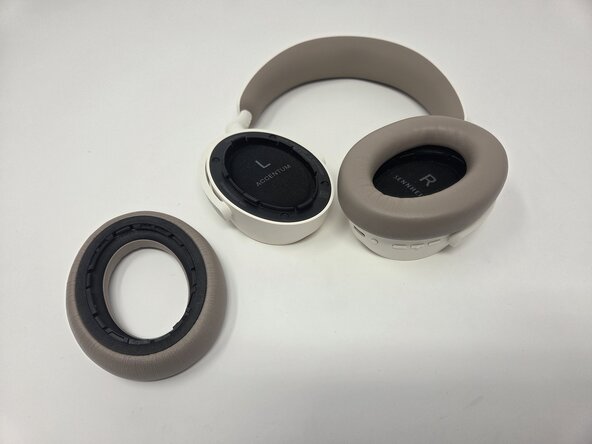
    1. Sennheiser Accentum Wireless Driver Assembly Replacement, Ear Pad: crwdns2935265:01crwdnd2935265:01crwdnd2935265:02crwdne2935265:0 Sennheiser Accentum Wireless Driver Assembly Replacement, Ear Pad: crwdns2935265:01crwdnd2935265:02crwdnd2935265:02crwdne2935265:0
      • Gently pull up on the affected ear pad to remove it.

      crwdns2952109:0crwdne2952109:0

      crwdns2917038:0crwdne2917038:0

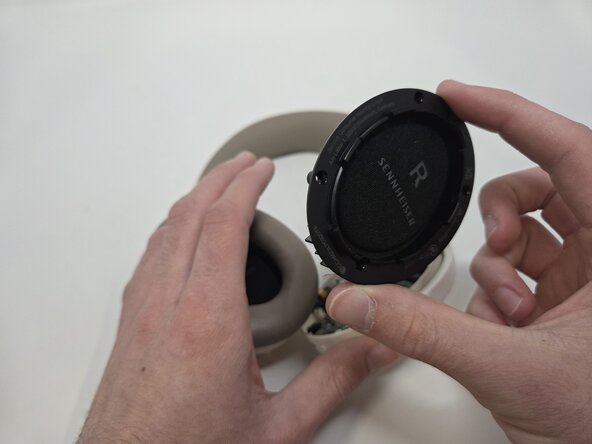
    1. Sennheiser Accentum Wireless Driver Assembly Replacement, Sennheiser Accentum Wireless Accessing Internal Hardware: crwdns2935265:02crwdnd2935265:01crwdnd2935265:02crwdne2935265:0 Sennheiser Accentum Wireless Driver Assembly Replacement, Sennheiser Accentum Wireless Accessing Internal Hardware: crwdns2935265:02crwdnd2935265:02crwdnd2935265:02crwdne2935265:0
      • Remove the four black foam screw covers.

      crwdns2952109:0crwdne2952109:0

      crwdns2917038:0crwdne2917038:0

    2. Sennheiser Accentum Wireless Driver Assembly Replacement: crwdns2935265:03crwdnd2935265:01crwdnd2935265:02crwdne2935265:0 Sennheiser Accentum Wireless Driver Assembly Replacement: crwdns2935265:03crwdnd2935265:02crwdnd2935265:02crwdne2935265:0
      • Use a Phillips #0 screwdriver to unscrew the screws on each earpiece. Each earpiece holds four, 6 mm screws.

      • The left earpiece holds the battery (the right earpiece holds the motherboard and buttons).

      crwdns2952109:0crwdne2952109:0

      crwdns2917038:0crwdne2917038:0

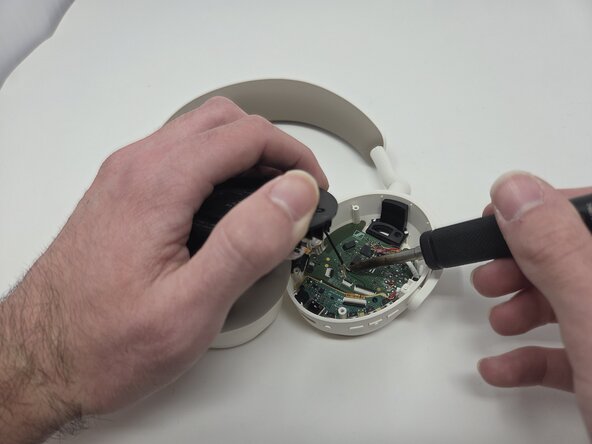
    1. Sennheiser Accentum Wireless Driver Assembly Replacement, Driver Assembly: crwdns2935265:04crwdnd2935265:01crwdnd2935265:02crwdne2935265:0 Sennheiser Accentum Wireless Driver Assembly Replacement, Driver Assembly: crwdns2935265:04crwdnd2935265:02crwdnd2935265:02crwdne2935265:0
      • De-solder the wire connecting the driver assembly to the motherboard. If it's easier cut the wire and de-solder later then cut the wire. Click here for de-soldering tips.

      • Remove the driver assembly.

      crwdns2952109:0crwdne2952109:0

      crwdns2917038:0crwdne2917038:0

    2. Sennheiser Accentum Wireless Driver Assembly Replacement: crwdns2935265:05crwdnd2935265:01crwdnd2935265:01crwdne2935265:0
      • Solder the new driver assembly to its motherboard connection.

      crwdns2952109:0crwdne2952109:0

      crwdns2917038:0crwdne2917038:0

crwdns2915888:0crwdne2915888:0

To reassemble your device, follow the above steps in reverse order.
Take your e-waste to an R2 or e-Stewards certified recycler.
Repair didn’t go as planned? Try some basic troubleshooting or ask our Answers community for help.

crwdns2935221:0crwdne2935221:0

crwdns2935227:0crwdne2935227:0

Kylie Webster

crwdns2935283:002/03/26crwdne2935283:0

375 crwdns2915208:0crwdne2915208:0

crwdns2935297:04crwdne2935297:0

crwdns2935287:0crwdne2935287:0

Utah Tech University, Team 1-3, McMurrin Spring 2026 crwdns2935289:0Utah Tech University, Team 1-3, McMurrin Spring 2026crwdne2935289:0

UTAHTECH-MCMURRIN-S26S1G3

crwdns2931471:03crwdne2931471:0

crwdns2935297:084crwdne2935297:0

crwdns2947412:00crwdne2947412:0

crwdns2917038:0crwdne2917038:0

crwdns2936625:0crwdne2936625:0:

crwdns2936751:024crwdne2936751:0 5

crwdns2936753:07crwdne2936753:0 29

crwdns2936753:030crwdne2936753:0 99

crwdns2942667:0crwdne2942667:0 323