crwdns2933423:0crwdne2933423:0
crwdns2947577:0crwdnd2947577:0crwdne2947577:0

Retro-Bit Retro Duo Reset Button/Power Switch Replacement

crwdns2869540:0crwdne2869540:0: 1,5 тыс.

crwdns2959988:0crwdne2959988:0

crwdns2959990:0crwdne2959990:0
2
crwdns2959992:0crwdne2959992:0
26
crwdns2959994:0crwdne2959994:0
95
crwdns2959996:0crwdne2959996:0
1 487
crwdns2955950:0crwdne2955950:0: 0

crwdns2959998:0crwdne2959998:0

crwdns2960000:0crwdne2960000:0
crwdns2959984:0crwdne2959984:0: 0

crwdns2959956:0crwdne2959956:0

crwdns2959986:0crwdne2959986:0: 1

crwdns2959980:01crwdne2959980:0

crwdns2955944:0crwdne2955944:0: crwdns2931287:03crwdne2931287:0
crwdns2955970:0crwdne2955970:0: crwdns2937799:0crwdne2937799:0
Retro-Bit Retro Duo Reset Button/Power Switch Replacement

crwdns2915892:0crwdne2915892:0

crwdns2959928:0crwdne2959928:0 ↓

If the reset button and/or power switch get stuck or physically broken, they can be replaced using Phillips #0 and #2 screwdrivers.

crwdns2959930:0crwdne2959930:0

crwdns2943215:0crwdne2943215:0

    1. Retro-Bit Retro Duo Reset Button/Power Switch Replacement, Reset Button/Power Switch: crwdns2935265:01crwdnd2935265:01crwdnd2935265:03crwdne2935265:0 Retro-Bit Retro Duo Reset Button/Power Switch Replacement, Reset Button/Power Switch: crwdns2935265:01crwdnd2935265:02crwdnd2935265:03crwdne2935265:0 Retro-Bit Retro Duo Reset Button/Power Switch Replacement, Reset Button/Power Switch: crwdns2935265:01crwdnd2935265:03crwdnd2935265:03crwdne2935265:0
      • With the console on its top. Remove the four 12 mm Phillips #2 screws.

      • There may be a sticker covering one, or more, of the screws. Simply remove the it before the screws.

      • Flip the console on its feet and carefully lift the top casing from the back (where the AV/S and power ports are).

      • To avoid damage, do not completely remove the top case. There is a small circuit board--which houses two LEDs-- connected to the main circuit board.

      crwdns2952109:0crwdne2952109:0

      crwdns2917038:0crwdne2917038:0

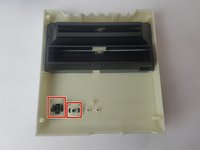
    2. Retro-Bit Retro Duo Reset Button/Power Switch Replacement: crwdns2935265:02crwdnd2935265:01crwdnd2935265:03crwdne2935265:0 Retro-Bit Retro Duo Reset Button/Power Switch Replacement: crwdns2935265:02crwdnd2935265:02crwdnd2935265:03crwdne2935265:0 Retro-Bit Retro Duo Reset Button/Power Switch Replacement: crwdns2935265:02crwdnd2935265:03crwdnd2935265:03crwdne2935265:0
      • Remove the one 6 mm Phillips #0 screw.

      • Lift the top case.

      • This step allows easy button access and prevents accidental damage.

      crwdns2952109:0crwdne2952109:0

      crwdns2917038:0crwdne2917038:0

    3. Retro-Bit Retro Duo Reset Button/Power Switch Replacement: crwdns2935265:03crwdnd2935265:01crwdnd2935265:03crwdne2935265:0 Retro-Bit Retro Duo Reset Button/Power Switch Replacement: crwdns2935265:03crwdnd2935265:02crwdnd2935265:03crwdne2935265:0 Retro-Bit Retro Duo Reset Button/Power Switch Replacement: crwdns2935265:03crwdnd2935265:03crwdnd2935265:03crwdne2935265:0
      crwdns2935267:0crwdne2935267:0
      Tweezers
      $4.99
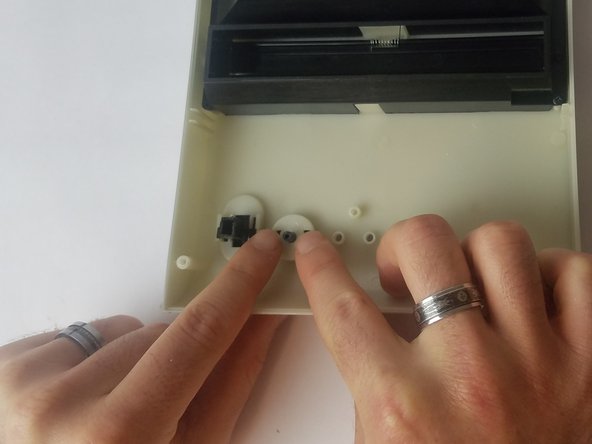
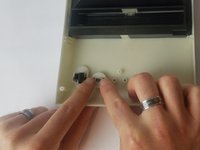
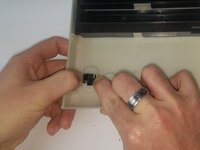
      • Using your fingers (or precision tweezers), carefully pinch the button tabs and push through to the other side.

      • Make sure you pinch both tabs simultaneously, or the button will not pop out.

      crwdns2952109:0crwdne2952109:0

      crwdns2917038:0crwdne2917038:0

crwdns2915888:0crwdne2915888:0

To reassemble your device, follow these instructions in reverse order.

If the problem persists after the buttons are replaced, it may be a circuit board issue. If so, please visit our guide for circuit board replacement at Retro-Bit Retro Duo Circuit Board Replacement

crwdns2935221:0crwdne2935221:0

Truong Vo

crwdns2935283:009/25/17crwdne2935283:0

324 crwdns2915208:0crwdne2915208:0

crwdns2935297:03crwdne2935297:0

crwdns2935287:0crwdne2935287:0

USF Tampa, Team S4-G4, Eyestone Fall 2017 crwdns2935289:0USF Tampa, Team S4-G4, Eyestone Fall 2017crwdne2935289:0

USFT-EYESTONE-F17S4G4

crwdns2931471:03crwdne2931471:0

crwdns2935297:060crwdne2935297:0

crwdns2947412:00crwdne2947412:0

crwdns2917038:0crwdne2917038:0

crwdns2936625:0crwdne2936625:0:

crwdns2936751:024crwdne2936751:0 2

crwdns2936753:07crwdne2936753:0 26

crwdns2936753:030crwdne2936753:0 95

crwdns2959996:0crwdne2959996:0 1,487