
Remove IBM WorkPad c3 Battery

crwdns2959932:0crwdnd2959932:0Emily Falkensteincrwdnd2959932:0crwdnd2959932:0crwdnd2959932:04crwdnd2959932:0crwdne2959932:0
crwdns2959936:0Mud 7, 2024crwdne2959936:0
crwdns2869540:0crwdne2869540:0: 5.2K
crwdns2959988:0crwdne2959988:0
- crwdns2959990:0crwdne2959990:0
- 3
- crwdns2959992:0crwdne2959992:0
- 18
- crwdns2959994:0crwdne2959994:0
- 92
- crwdns2959996:0crwdne2959996:0
- 5,162
crwdns2955950:0crwdne2955950:0: 0
crwdns2959998:0crwdne2959998:0
crwdns2960000:0crwdne2960000:0crwdns2959984:0crwdne2959984:0: 1 2
crwdns2959972:01crwdne2959972:0
crwdns2959970:02crwdne2959970:0
crwdns2959986:0crwdne2959986:0: 1 2
crwdns2959980:01crwdne2959980:0
crwdns2959978:02crwdne2959978:0
crwdns2915892:0crwdne2915892:0
crwdns2959928:0crwdne2959928:0 ↓If your battery is not working you can remove it and replace it following the step by step process. The battery can easily just pop out following simple steps
crwdns2959930:0crwdne2959930:0
crwdns2943215:0crwdne2943215:0


-
-
-
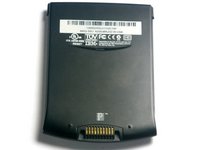
Turn the device over so that the screen is facing down.
 crwdns2952109:0crwdne2952109:0
-
-
-
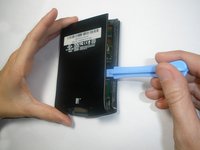
Using a hair dryer, slowly heat the edges of the WorkPad.
-
Spend at least one minute heating each side of the device. This will melt the glue holding the case together, and allow it to be removed.
-
-
-
-
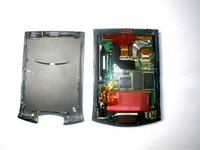
Use a plastic opening tool to pry the back case from the WorkPad.
-
-
-
-
-
Remove the yellow tape that is covering the battery connector
-
-
crwdns2935267:0crwdne2935267:0Tweezers$4.99
-
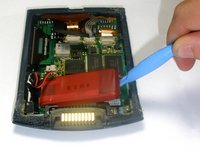
Using the tweezers, carefully disconnect the battery cable from the port
-
-
-
Using the plastic opening tools, lift the battery out of the case
-
-






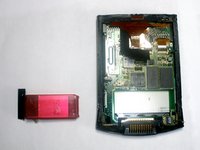
To reassemble your device, follow these instructions in reverse order.
crwdns2935221:0crwdne2935221:0
crwdns2935227:0crwdne2935227:0

crwdns2935287:0crwdne2935287:0

Cal Poly, Team 21-35, Regan Fall 2010 crwdns2935289:0Cal Poly, Team 21-35, Regan Fall 2010crwdne2935289:0
CPSU-REGAN-F10S21G35
crwdns2931471:03crwdne2931471:0
crwdns2935297:060crwdne2935297:0
