crwdns2933423:0crwdne2933423:0
crwdns2947577:0crwdnd2947577:0crwdne2947577:0

crwdns2937539:0crwdnd2937539:0crwdne2937539:0

PlayStation 5 Faceplates Replacement

crwdns2869540:0crwdne2869540:0: 4.8万

crwdns2959988:0crwdne2959988:0

crwdns2959990:0crwdne2959990:0
42
crwdns2959992:0crwdne2959992:0
354
crwdns2959994:0crwdne2959994:0
1,526
crwdns2959996:0crwdne2959996:0
48,413
crwdns2955950:0crwdne2955950:0: 3

crwdns2960004:02crwdne2960004:0, crwdns2960006:01crwdne2960006:0

crwdns2960000:0crwdne2960000:0
crwdns2959984:0crwdne2959984:0: 44

crwdns2959974:044crwdne2959974:0

crwdns2959986:0crwdne2959986:0: 1

crwdns2959980:01crwdne2959980:0

crwdns2955944:0crwdne2955944:0: 5 - 10 crwdns2931279:0crwdne2931279:0
crwdns2955970:0crwdne2955970:0: crwdns2937799:0crwdne2937799:0
crwdns2862627:0crwdne2862627:0

crwdns2862628:0crwdne2862628:0

PlayStation 5 Faceplates Replacement

crwdns2915892:0crwdne2915892:0

crwdns2959928:0crwdne2959928:0 ↓

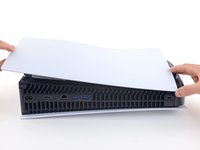
Follow this guide to remove or replace the faceplates, or covers, on your PlayStation 5.

Before you begin, completely power down and unplug all cables from your console. Remember to follow general electrostatic discharge (ESD) safety procedures while repairing the console.

crwdns2959930:0crwdne2959930:0

crwdns2943213:0crwdne2943213:0

crwdns2943215:0crwdne2943215:0

    1. PlayStation 5 Faceplates Replacement, Remove the stand screw: crwdns2935265:01crwdnd2935265:01crwdnd2935265:01crwdne2935265:0
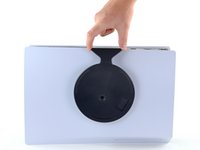
      • If your PlayStation 5 is in its vertical orientation, flip it upside down so the stand is facing up.

      • If your PlayStation 5 is in its horizontal orientation, skip to Step 6.

      • Work on a flat surface to prevent your PlayStation from falling over.

      • Use a coin or a flathead screwdriver to remove the 26.5 mm-long stand screw.

      crwdns2952109:0crwdne2952109:0

      crwdns2917038:0crwdne2917038:0

    2. PlayStation 5 Faceplates Replacement, Remove the vertical stand: crwdns2935265:02crwdnd2935265:01crwdnd2935265:02crwdne2935265:0 PlayStation 5 Faceplates Replacement, Remove the vertical stand: crwdns2935265:02crwdnd2935265:02crwdnd2935265:02crwdne2935265:0
      • Lift straight up to remove the stand.

      crwdns2952109:0crwdne2952109:0

      crwdns2917038:0crwdne2917038:0

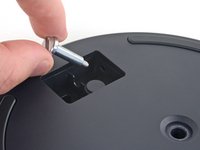
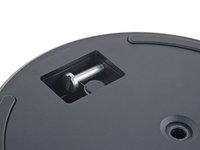
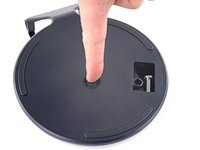
    3. PlayStation 5 Faceplates Replacement, Store the stand screw: crwdns2935265:03crwdnd2935265:01crwdnd2935265:02crwdne2935265:0 PlayStation 5 Faceplates Replacement, Store the stand screw: crwdns2935265:03crwdnd2935265:02crwdnd2935265:02crwdne2935265:0
      • Insert the screw into the cubby on the bottom of the stand.

      crwdns2952109:0crwdne2952109:0

      crwdns2917038:0crwdne2917038:0

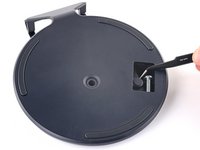
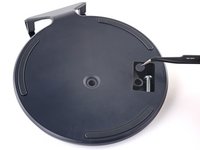
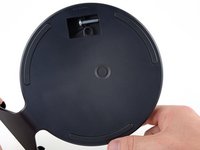
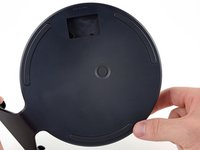
    4. PlayStation 5 Faceplates Replacement, Cap the screw hole: crwdns2935265:04crwdnd2935265:01crwdnd2935265:03crwdne2935265:0 PlayStation 5 Faceplates Replacement, Cap the screw hole: crwdns2935265:04crwdnd2935265:02crwdnd2935265:03crwdne2935265:0 PlayStation 5 Faceplates Replacement, Cap the screw hole: crwdns2935265:04crwdnd2935265:03crwdnd2935265:03crwdne2935265:0
      crwdns2935267:0crwdne2935267:0
      Tweezers
      $4.99
      • Use a pair of tweezers or your fingernail to remove the cap from the cubby.

      • Use your finger to press the cap into the screw hole.

      crwdns2952109:0crwdne2952109:0

      crwdns2917038:0crwdne2917038:0

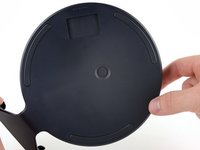
    5. PlayStation 5 Faceplates Replacement, Close the cubby: crwdns2935265:05crwdnd2935265:01crwdnd2935265:03crwdne2935265:0 PlayStation 5 Faceplates Replacement, Close the cubby: crwdns2935265:05crwdnd2935265:02crwdnd2935265:03crwdne2935265:0 PlayStation 5 Faceplates Replacement, Close the cubby: crwdns2935265:05crwdnd2935265:03crwdnd2935265:03crwdne2935265:0
      • Twist the stand counterclockwise to close the cubby.

      crwdns2952109:0crwdne2952109:0

      crwdns2917038:0crwdne2917038:0

    6. PlayStation 5 Faceplates Replacement, Remove the horizontal stand: crwdns2935265:06crwdnd2935265:01crwdnd2935265:02crwdne2935265:0 PlayStation 5 Faceplates Replacement, Remove the horizontal stand: crwdns2935265:06crwdnd2935265:02crwdnd2935265:02crwdne2935265:0
      • If your PlayStation 5 is in its horizontal orientation, rest it on its face with the charging port facing up.

      • Lift the stand straight up to remove it.

      crwdns2952109:0crwdne2952109:0

      crwdns2917038:0crwdne2917038:0

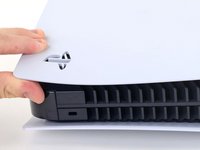
    1. PlayStation 5 Faceplates Replacement, Remove the left faceplate: crwdns2935265:07crwdnd2935265:01crwdnd2935265:03crwdne2935265:0 PlayStation 5 Faceplates Replacement, Remove the left faceplate: crwdns2935265:07crwdnd2935265:02crwdnd2935265:03crwdne2935265:0 PlayStation 5 Faceplates Replacement, Remove the left faceplate: crwdns2935265:07crwdnd2935265:03crwdnd2935265:03crwdne2935265:0
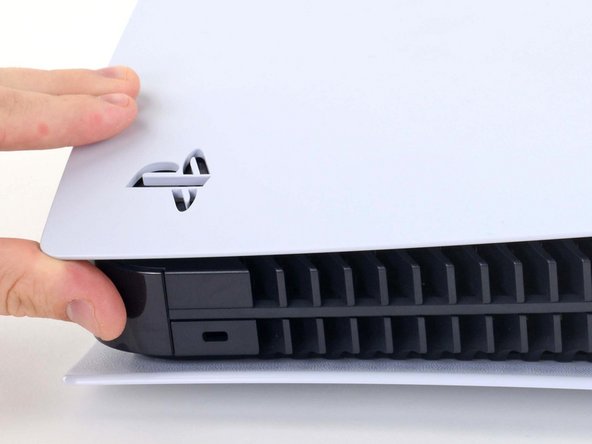
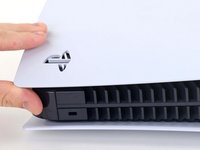
      • Lift up the corner of the faceplate with the PlayStation logo to unclip it from the case.

      crwdns2952109:0crwdne2952109:0

      crwdns2917038:0crwdne2917038:0

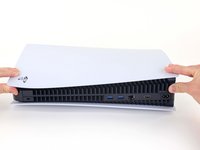
    2. PlayStation 5 Faceplates Replacement: crwdns2935265:08crwdnd2935265:01crwdnd2935265:02crwdne2935265:0 PlayStation 5 Faceplates Replacement: crwdns2935265:08crwdnd2935265:02crwdnd2935265:02crwdne2935265:0
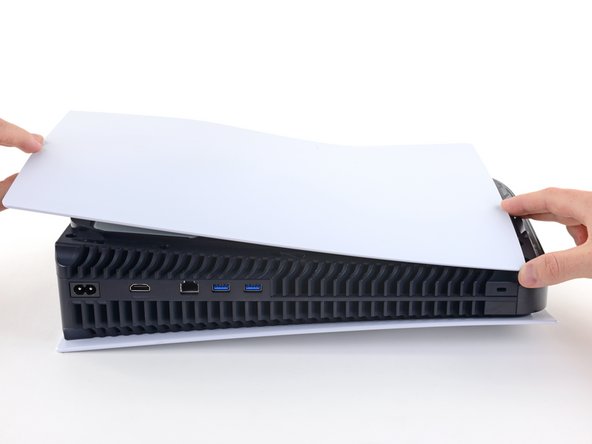
      • While lifting up the corner, slide the faceplate towards the bottom of the device.

      • Remove the left faceplate.

      crwdns2952109:0crwdne2952109:0

      crwdns2917038:0crwdne2917038:0

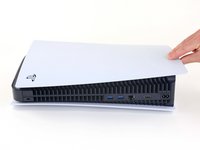
    3. PlayStation 5 Faceplates Replacement, Remove the right faceplate: crwdns2935265:09crwdnd2935265:01crwdnd2935265:03crwdne2935265:0 PlayStation 5 Faceplates Replacement, Remove the right faceplate: crwdns2935265:09crwdnd2935265:02crwdnd2935265:03crwdne2935265:0 PlayStation 5 Faceplates Replacement, Remove the right faceplate: crwdns2935265:09crwdnd2935265:03crwdnd2935265:03crwdne2935265:0
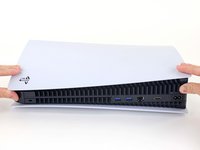
      • Flip the device over so that the USB and ethernet ports are on the left side from your perspective.

      • Lift up the corner of the faceplate to unclip it from the case.

      crwdns2952109:0crwdne2952109:0

      crwdns2917038:0crwdne2917038:0

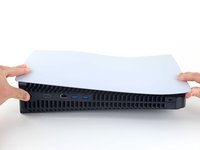
    4. PlayStation 5 Faceplates Replacement: crwdns2935265:010crwdnd2935265:01crwdnd2935265:02crwdne2935265:0 PlayStation 5 Faceplates Replacement: crwdns2935265:010crwdnd2935265:02crwdnd2935265:02crwdne2935265:0
      • While lifting up the corner, slide the faceplate towards the bottom of the device.

      • Remove the right faceplate.

      crwdns2952109:0crwdne2952109:0

      crwdns2917038:0crwdne2917038:0

crwdns2915888:0crwdne2915888:0

To reassemble your device, follow these instructions in reverse order.

Take your e-waste to an R2 or e-Stewards certified recycler.
Repair didn’t go as planned? Try some basic troubleshooting, or ask our PlayStation 5 Answers community for help.

crwdns2935221:0crwdne2935221:0

crwdns2935229:044crwdne2935229:0

Clay Kim

crwdns2935283:002/16/21crwdne2935283:0

13,660 crwdns2915208:0crwdne2915208:0

crwdns2935297:021crwdne2935297:0

crwdns2947410:01crwdne2947410:0

Hello, thanks for the updates

hadi rp - crwdns2934203:0crwdne2934203:0 crwdns2950251:0crwdne2950251:0

crwdns2917038:0crwdne2917038:0

crwdns2936625:0crwdne2936625:0:

crwdns2936751:024crwdne2936751:0 42

crwdns2936753:07crwdne2936753:0 354

crwdns2936753:030crwdne2936753:0 1,526

crwdns2959996:0crwdne2959996:0 48,413