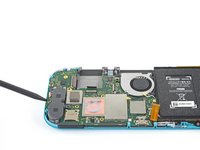
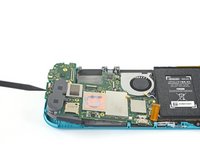
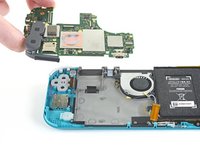
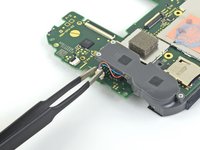
crwdns2933423:0crwdne2933423:0
crwdns2947577:0crwdnd2947577:0crwdne2947577:0

Nintendo Switch Lite Motherboard Replacement

crwdns2942213:0crwdne2942213:0

  1. Nintendo Switch Lite Motherboard Replacement, Remove the back panel screws: crwdns2935265:01crwdnd2935265:01crwdnd2935265:01crwdne2935265:0
    crwdns2935267:0crwdne2935267:0
    Magnetic Project Mat
    $19.95
    • Before beginning this repair, make sure that the device is completely turned off.

    • Use a Y00 screwdriver to remove the four 6.3 mm-long screws securing the back panel.

    • Throughout this repair, keep track of each screw and make sure it goes back exactly where it came from.

    crwdns2952109:0crwdne2952109:0

    crwdns2917038:0crwdne2917038:0

  2. Nintendo Switch Lite Motherboard Replacement, Remove the top and bottom back panel screws: crwdns2935265:02crwdnd2935265:01crwdnd2935265:02crwdne2935265:0 Nintendo Switch Lite Motherboard Replacement, Remove the top and bottom back panel screws: crwdns2935265:02crwdnd2935265:02crwdnd2935265:02crwdne2935265:0
    • Use a JIS 000 driver or an iFixit PH 000 driver to remove the following screws securing the back panel:

    • Two 3.6 mm-long screws on the top of the device

    • Two 3.6 mm-long screws on the bottom of the device

    • To prevent these tight screws from stripping, apply firm downward force, work slowly and try a different screwdriver if the screws won't come out.

    crwdns2952109:0crwdne2952109:0

    crwdns2917038:0crwdne2917038:0

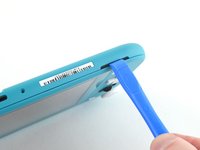
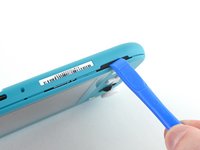
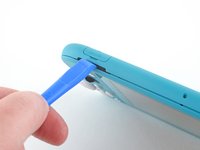
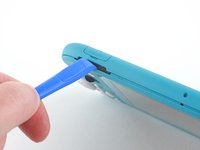
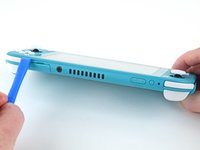
  3. Nintendo Switch Lite Motherboard Replacement, Release the clips securing the back panel: crwdns2935265:03crwdnd2935265:01crwdnd2935265:02crwdne2935265:0 Nintendo Switch Lite Motherboard Replacement, Release the clips securing the back panel: crwdns2935265:03crwdnd2935265:02crwdnd2935265:02crwdne2935265:0
    • Insert an opening tool into the left speaker grille on the bottom of the device.

    • Twist the opening tool to release the clips securing the back panel.

    • Avoid inserting the opening tool further than required to prevent damage to the speaker module.

    crwdns2952109:0crwdne2952109:0

    crwdns2917038:0crwdne2917038:0

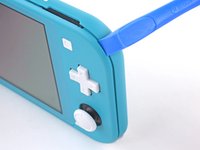
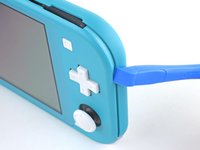
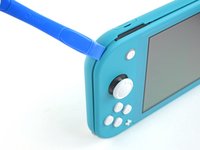
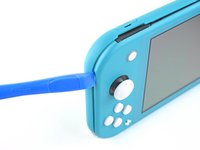
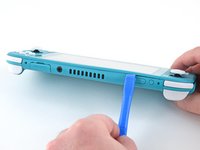
  4. Nintendo Switch Lite Motherboard Replacement, Continue releasing the clips around the device: crwdns2935265:04crwdnd2935265:01crwdnd2935265:02crwdne2935265:0 Nintendo Switch Lite Motherboard Replacement, Continue releasing the clips around the device: crwdns2935265:04crwdnd2935265:02crwdnd2935265:02crwdne2935265:0
    • Slide the opening tool around the bottom-left corner to release the clips on the left side of the device.

    crwdns2952109:0crwdne2952109:0

    crwdns2917038:0crwdne2917038:0

  5. Nintendo Switch Lite Motherboard Replacement, Twist to release the clips: crwdns2935265:05crwdnd2935265:01crwdnd2935265:02crwdne2935265:0 Nintendo Switch Lite Motherboard Replacement, Twist to release the clips: crwdns2935265:05crwdnd2935265:02crwdnd2935265:02crwdne2935265:0
    • Insert an opening tool into the right speaker grille on the bottom of the device.

    • Twist the opening tool to release the clips.

    • Avoid inserting the opening tool further than required to prevent damage to the speaker module.

    crwdns2952109:0crwdne2952109:0

    crwdns2917038:0crwdne2917038:0

  6. Nintendo Switch Lite Motherboard Replacement, Slide and pry around the corners: crwdns2935265:06crwdnd2935265:01crwdnd2935265:02crwdne2935265:0 Nintendo Switch Lite Motherboard Replacement, Slide and pry around the corners: crwdns2935265:06crwdnd2935265:02crwdnd2935265:02crwdne2935265:0
    • Slide and pry the opening tool around the bottom-right corner to release the clips on the right side of the device.

    crwdns2952109:0crwdne2952109:0

    crwdns2917038:0crwdne2917038:0

  7. Nintendo Switch Lite Motherboard Replacement: crwdns2935265:07crwdnd2935265:01crwdnd2935265:02crwdne2935265:0 Nintendo Switch Lite Motherboard Replacement: crwdns2935265:07crwdnd2935265:02crwdnd2935265:02crwdne2935265:0
    • Continue sliding and prying the opening tool along the gap on the top of the device to release the clips.

    crwdns2952109:0crwdne2952109:0

    crwdns2917038:0crwdne2917038:0

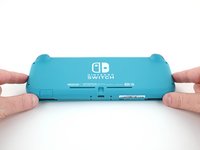
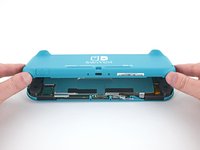
  8. Nintendo Switch Lite Motherboard Replacement, Remove the back panel: crwdns2935265:08crwdnd2935265:01crwdnd2935265:03crwdne2935265:0 Nintendo Switch Lite Motherboard Replacement, Remove the back panel: crwdns2935265:08crwdnd2935265:02crwdnd2935265:03crwdne2935265:0 Nintendo Switch Lite Motherboard Replacement, Remove the back panel: crwdns2935265:08crwdnd2935265:03crwdnd2935265:03crwdne2935265:0
    • Lift the bottom edge of the back panel, opening it like a book.

    • Remove the back panel.

    crwdns2952109:0crwdne2952109:0

    crwdns2917038:0crwdne2917038:0

  9. Nintendo Switch Lite Motherboard Replacement, Remove the shield plate: crwdns2935265:09crwdnd2935265:01crwdnd2935265:01crwdne2935265:0
    • Use a JIS 000 driver or an iFixit PH 000 driver to remove the four screws securing the shield plate:

    • Three 3.1 mm screws

    • One 4.5 mm screw

    crwdns2952109:0crwdne2952109:0

    crwdns2917038:0crwdne2917038:0

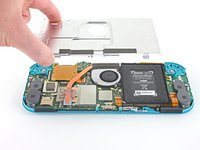
  10. Nintendo Switch Lite Motherboard Replacement: crwdns2935265:010crwdnd2935265:01crwdnd2935265:03crwdne2935265:0 Nintendo Switch Lite Motherboard Replacement: crwdns2935265:010crwdnd2935265:02crwdnd2935265:03crwdne2935265:0 Nintendo Switch Lite Motherboard Replacement: crwdns2935265:010crwdnd2935265:03crwdnd2935265:03crwdne2935265:0
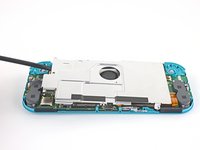
    • Use a spudger or your fingers to lift the shield plate up and out of the device.

    • You may feel a bit of resistance. This is normal, since the shield plate is slightly bonded to the heat sink with thermal paste.

    • Remove the shield plate.

    • Clean off the old thermal paste from the shield plate and heat sink using isopropyl alcohol and a microfiber cloth. Apply new thermal paste to the heat sink before reassembly.

    crwdns2952109:0crwdne2952109:0

    crwdns2917038:0crwdne2917038:0

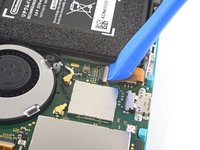
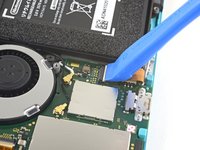
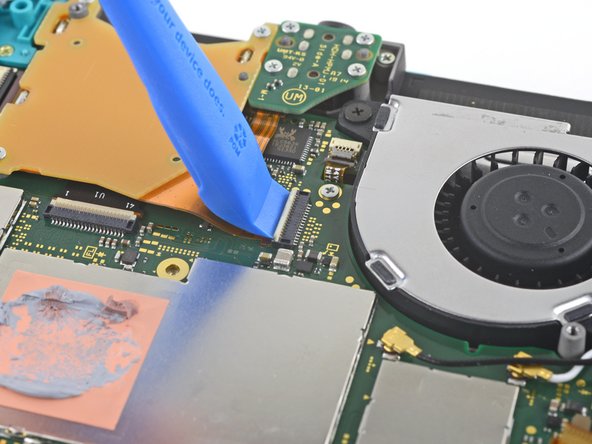
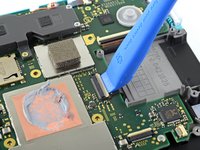
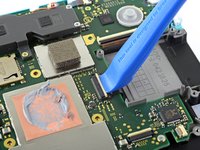
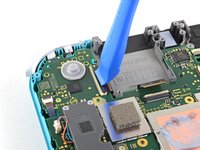
  11. Nintendo Switch Lite Motherboard Replacement, Disconnect the interconnect cable: crwdns2935265:011crwdnd2935265:01crwdnd2935265:02crwdne2935265:0 Nintendo Switch Lite Motherboard Replacement, Disconnect the interconnect cable: crwdns2935265:011crwdnd2935265:02crwdnd2935265:02crwdne2935265:0
    • Use an opening tool or your fingernail to flip up the small, hinged locking flap on the motherboard interconnect cable's ZIF connector.

    crwdns2952109:0crwdne2952109:0

    crwdns2917038:0crwdne2917038:0

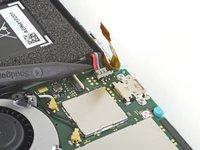
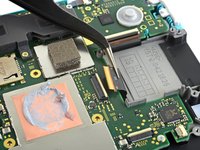
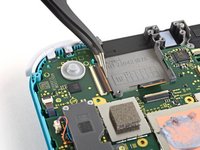
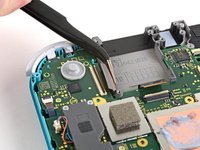
  12. Nintendo Switch Lite Motherboard Replacement: crwdns2935265:012crwdnd2935265:01crwdnd2935265:02crwdne2935265:0 Nintendo Switch Lite Motherboard Replacement: crwdns2935265:012crwdnd2935265:02crwdnd2935265:02crwdne2935265:0
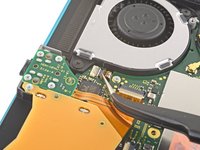
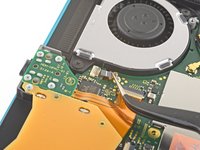
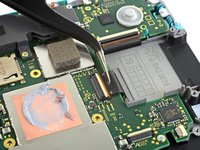
    • Do Not Use Metal Tweezers! Some fixers state that metallic tweezers can short circuit the ribbon cable/connector. It might be safer to just use nylon-tipped or ceramic-tipped tweezers.

    • Use a pair of tweezers to slide the interconnect cable out of its connector on the motherboard.

    crwdns2952109:0crwdne2952109:0

    crwdns2917038:0crwdne2917038:0

  13. Nintendo Switch Lite Motherboard Replacement, Disconnect the battery: crwdns2935265:013crwdnd2935265:01crwdnd2935265:02crwdne2935265:0 Nintendo Switch Lite Motherboard Replacement, Disconnect the battery: crwdns2935265:013crwdnd2935265:02crwdnd2935265:02crwdne2935265:0
    • Use the point of a spudger to pry the battery connector straight up and out of its socket on the motherboard.

    • During reassembly, wait until after you connect the interconnect cable (above) before connecting the battery.

    crwdns2952109:0crwdne2952109:0

    crwdns2917038:0crwdne2917038:0

  14. Nintendo Switch Lite Motherboard Replacement, Remove the heat sink: crwdns2935265:014crwdnd2935265:01crwdnd2935265:01crwdne2935265:0
    • Use the flat end of a spudger or your fingers to carefully peel up the foam that's lightly adhered to the fan.

    • The foam only needs to be peeled back enough to clear the fan.

    crwdns2952109:0crwdne2952109:0

    crwdns2917038:0crwdne2917038:0

  15. Nintendo Switch Lite Motherboard Replacement: crwdns2935265:015crwdnd2935265:01crwdnd2935265:01crwdne2935265:0
    • Use a JIS 000 driver or an iFixit PH 000 driver to remove the three 3 mm screws securing the heat sink to the motherboard.

    crwdns2952109:0crwdne2952109:0

    crwdns2917038:0crwdne2917038:0

  16. Nintendo Switch Lite Motherboard Replacement: crwdns2935265:016crwdnd2935265:01crwdnd2935265:03crwdne2935265:0 Nintendo Switch Lite Motherboard Replacement: crwdns2935265:016crwdnd2935265:02crwdnd2935265:03crwdne2935265:0 Nintendo Switch Lite Motherboard Replacement: crwdns2935265:016crwdnd2935265:03crwdnd2935265:03crwdne2935265:0
    • Use a spudger or your fingers to lift the heatsink up and off of the motherboard to remove it.

    • You may feel a bit of resistance. This is normal, since the heat sink is slightly bonded to the CPU with thermal paste.

    • Clean off the old thermal paste from the heat sink and CPU using isopropyl alcohol and a microfiber cloth. Apply new thermal paste to the CPU before reassembly.

    crwdns2952109:0crwdne2952109:0

    crwdns2917038:0crwdne2917038:0

  17. Nintendo Switch Lite Motherboard Replacement, Remove the game card reader and headphone jack: crwdns2935265:017crwdnd2935265:01crwdnd2935265:02crwdne2935265:0 Nintendo Switch Lite Motherboard Replacement, Remove the game card reader and headphone jack: crwdns2935265:017crwdnd2935265:02crwdnd2935265:02crwdne2935265:0
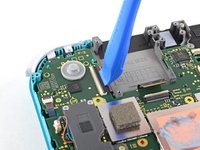
    • Use an opening tool or your fingernail to flip up the small, hinged locking flap on the game card reader cable's ZIF connector.

    crwdns2952109:0crwdne2952109:0

    crwdns2917038:0crwdne2917038:0

  18. Nintendo Switch Lite Motherboard Replacement: crwdns2935265:018crwdnd2935265:01crwdnd2935265:01crwdne2935265:0
    • Use a JIS 000 driver or an iFixit PH 000 driver to remove the seven 3.1 mm screws securing the game card reader and headphone jack.

    crwdns2952109:0crwdne2952109:0

    crwdns2917038:0crwdne2917038:0

  19. Nintendo Switch Lite Motherboard Replacement: crwdns2935265:019crwdnd2935265:01crwdnd2935265:03crwdne2935265:0 Nintendo Switch Lite Motherboard Replacement: crwdns2935265:019crwdnd2935265:02crwdnd2935265:03crwdne2935265:0 Nintendo Switch Lite Motherboard Replacement: crwdns2935265:019crwdnd2935265:03crwdnd2935265:03crwdne2935265:0
    crwdns2935267:0crwdne2935267:0
    Tweezers
    $4.99
    • Use a pair of tweezers or your fingers to carefully lift the game card reader and maneuver it to the left to slide the cable out of its connector.

    • Remove the game card reader and headphone jack.

    crwdns2952109:0crwdne2952109:0

    crwdns2917038:0crwdne2917038:0

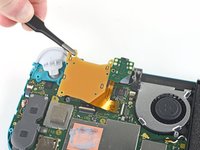
  20. Nintendo Switch Lite Motherboard Replacement, Remove the right trigger button assembly: crwdns2935265:020crwdnd2935265:01crwdnd2935265:01crwdne2935265:0
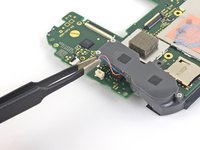
    • Use a JIS 000 driver or an iFixit PH 000 driver to remove the two 4.5 mm screws securing the right trigger button assembly to the motherboard.

    crwdns2952109:0crwdne2952109:0

    crwdns2917038:0crwdne2917038:0

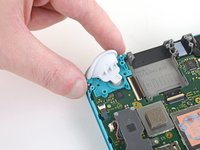
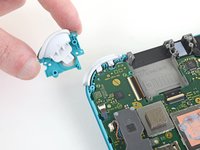
  21. Nintendo Switch Lite Motherboard Replacement: crwdns2935265:021crwdnd2935265:01crwdnd2935265:02crwdne2935265:0 Nintendo Switch Lite Motherboard Replacement: crwdns2935265:021crwdnd2935265:02crwdnd2935265:02crwdne2935265:0
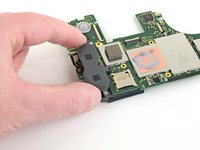
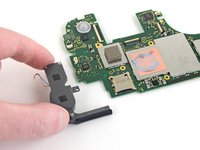
    • Remove the right trigger button assembly.

    crwdns2952109:0crwdne2952109:0

    crwdns2917038:0crwdne2917038:0

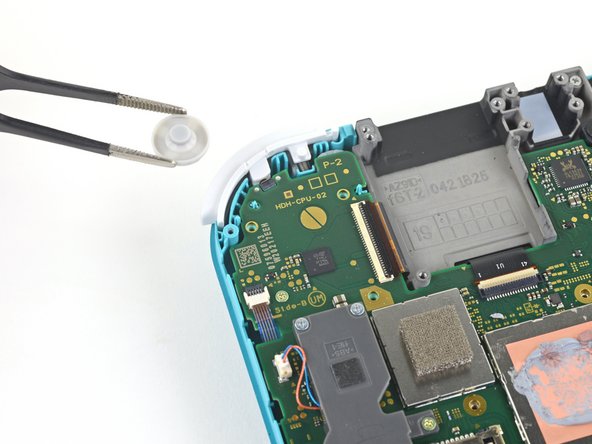
  22. Nintendo Switch Lite Motherboard Replacement: crwdns2935265:022crwdnd2935265:01crwdnd2935265:02crwdne2935265:0 Nintendo Switch Lite Motherboard Replacement: crwdns2935265:022crwdnd2935265:02crwdnd2935265:02crwdne2935265:0
    crwdns2935267:0crwdne2935267:0
    Tweezers
    $4.99
    • Use a pair of tweezers or your fingers to remove the right trigger button assembly's rubber pad if it didn't stay attached to the button assembly.

    crwdns2952109:0crwdne2952109:0

    crwdns2917038:0crwdne2917038:0

  23. Nintendo Switch Lite Motherboard Replacement, Disconnect the antenna cables: crwdns2935265:023crwdnd2935265:01crwdnd2935265:03crwdne2935265:0 Nintendo Switch Lite Motherboard Replacement, Disconnect the antenna cables: crwdns2935265:023crwdnd2935265:02crwdnd2935265:03crwdne2935265:0 Nintendo Switch Lite Motherboard Replacement, Disconnect the antenna cables: crwdns2935265:023crwdnd2935265:03crwdnd2935265:03crwdne2935265:0
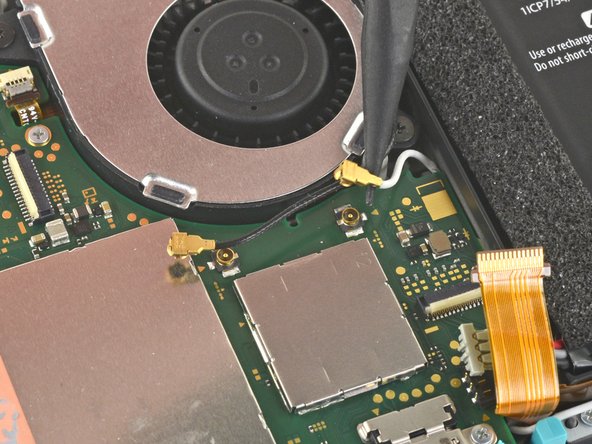
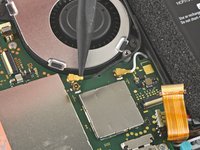
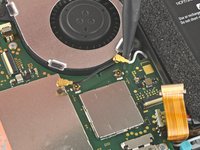
    • Use the point of a spudger to pry the black antenna cable coaxial connector straight up off its socket on the motherboard.

    • Repeat the same process for the white antenna cable.

    crwdns2952109:0crwdne2952109:0

    crwdns2917038:0crwdne2917038:0

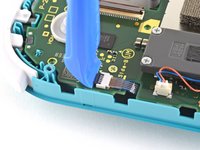
  24. Nintendo Switch Lite Motherboard Replacement, Disconnect the fan cable: crwdns2935265:024crwdnd2935265:01crwdnd2935265:01crwdne2935265:0
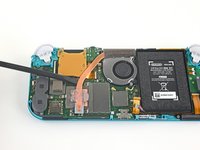
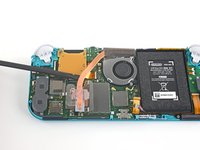
    • Use an opening tool or your fingernail to flip up the small, hinged locking flap on the fan cable's ZIF connector.

    crwdns2952109:0crwdne2952109:0

    crwdns2917038:0crwdne2917038:0

  25. Nintendo Switch Lite Motherboard Replacement: crwdns2935265:025crwdnd2935265:01crwdnd2935265:02crwdne2935265:0 Nintendo Switch Lite Motherboard Replacement: crwdns2935265:025crwdnd2935265:02crwdnd2935265:02crwdne2935265:0
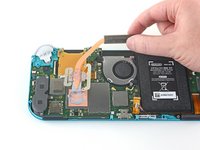
    • Use a pair of tweezers to slide out the fan cable from its connector on the motherboard.

    crwdns2952109:0crwdne2952109:0

    crwdns2917038:0crwdne2917038:0

  26. Nintendo Switch Lite Motherboard Replacement, Disconnect the screen cable: crwdns2935265:026crwdnd2935265:01crwdnd2935265:02crwdne2935265:0 Nintendo Switch Lite Motherboard Replacement, Disconnect the screen cable: crwdns2935265:026crwdnd2935265:02crwdnd2935265:02crwdne2935265:0
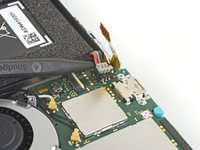
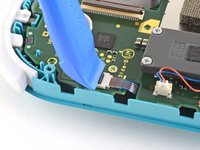
    • Use an opening tool or your fingernail to flip up the small, hinged locking flap on the screen cable's ZIF connector.

    crwdns2952109:0crwdne2952109:0

    crwdns2917038:0crwdne2917038:0

  27. Nintendo Switch Lite Motherboard Replacement: crwdns2935265:027crwdnd2935265:01crwdnd2935265:02crwdne2935265:0 Nintendo Switch Lite Motherboard Replacement: crwdns2935265:027crwdnd2935265:02crwdnd2935265:02crwdne2935265:0
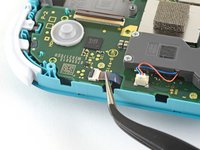
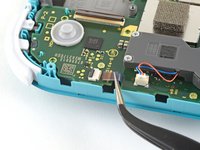
    • Use a pair of tweezers to slide the screen cable out of its connector on the motherboard.

    crwdns2952109:0crwdne2952109:0

    crwdns2917038:0crwdne2917038:0

  28. Nintendo Switch Lite Motherboard Replacement, Disconnect the digitizer cable: crwdns2935265:028crwdnd2935265:01crwdnd2935265:02crwdne2935265:0 Nintendo Switch Lite Motherboard Replacement, Disconnect the digitizer cable: crwdns2935265:028crwdnd2935265:02crwdnd2935265:02crwdne2935265:0
    • Use an opening tool or your fingernail to flip up the small, hinged locking flap on the digitizer cable's ZIF connector.

    crwdns2952109:0crwdne2952109:0

    crwdns2917038:0crwdne2917038:0

  29. Nintendo Switch Lite Motherboard Replacement: crwdns2935265:029crwdnd2935265:01crwdnd2935265:02crwdne2935265:0 Nintendo Switch Lite Motherboard Replacement: crwdns2935265:029crwdnd2935265:02crwdnd2935265:02crwdne2935265:0
    • Use a pair of tweezers to slide the digitizer cable out of its connector on the motherboard.

    crwdns2952109:0crwdne2952109:0

    crwdns2917038:0crwdne2917038:0

  30. Nintendo Switch Lite Motherboard Replacement, Disconnect the right joystick cable: crwdns2935265:030crwdnd2935265:01crwdnd2935265:02crwdne2935265:0 Nintendo Switch Lite Motherboard Replacement, Disconnect the right joystick cable: crwdns2935265:030crwdnd2935265:02crwdnd2935265:02crwdne2935265:0
    • Use an opening tool or your fingernail to flip up the small, hinged locking flap on the right joystick cable's ZIF connector.

    crwdns2952109:0crwdne2952109:0

    crwdns2917038:0crwdne2917038:0

  31. Nintendo Switch Lite Motherboard Replacement: crwdns2935265:031crwdnd2935265:01crwdnd2935265:02crwdne2935265:0 Nintendo Switch Lite Motherboard Replacement: crwdns2935265:031crwdnd2935265:02crwdnd2935265:02crwdne2935265:0
    • Use a pair of tweezers to slide the right joystick cable out of its connector on the motherboard.

    crwdns2952109:0crwdne2952109:0

    crwdns2917038:0crwdne2917038:0

  32. Nintendo Switch Lite Motherboard Replacement, Remove the motherboard assembly: crwdns2935265:032crwdnd2935265:01crwdnd2935265:01crwdne2935265:0
    • Use a JIS 000 driver or an iFixit PH 000 driver to remove the following six screws securing the motherboard:

    • Three 3.1 mm screws

    • Three 4.5 mm screws

    crwdns2952109:0crwdne2952109:0

    crwdns2917038:0crwdne2917038:0

  33. Nintendo Switch Lite Motherboard Replacement: crwdns2935265:033crwdnd2935265:01crwdnd2935265:03crwdne2935265:0 Nintendo Switch Lite Motherboard Replacement: crwdns2935265:033crwdnd2935265:02crwdnd2935265:03crwdne2935265:0 Nintendo Switch Lite Motherboard Replacement: crwdns2935265:033crwdnd2935265:03crwdnd2935265:03crwdne2935265:0
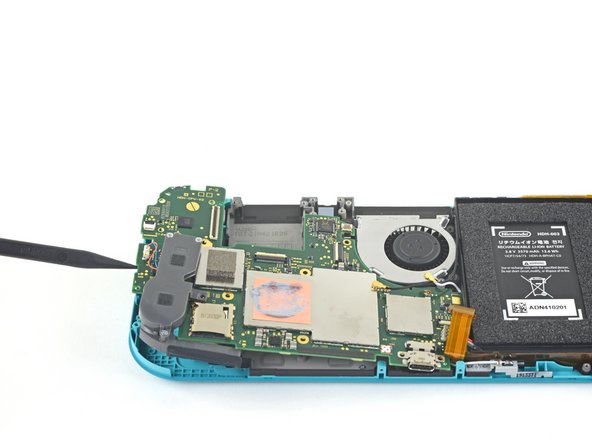
    • Insert a spudger in the gap between the frame and the motherboard and lift the motherboard up and out of its recess.

    • Remove the motherboard assembly.

    crwdns2952109:0crwdne2952109:0

    crwdns2917038:0crwdne2917038:0

  34. Nintendo Switch Lite Motherboard Replacement, Remove the right speaker module: crwdns2935265:034crwdnd2935265:01crwdnd2935265:02crwdne2935265:0 Nintendo Switch Lite Motherboard Replacement, Remove the right speaker module: crwdns2935265:034crwdnd2935265:02crwdnd2935265:02crwdne2935265:0
    crwdns2935267:0crwdne2935267:0
    Tweezers
    $4.99
    • Use a pair of tweezers or your fingers to pull the right speaker cable straight up and out of its socket on the motherboard.

    crwdns2952109:0crwdne2952109:0

    crwdns2917038:0crwdne2917038:0

  35. Nintendo Switch Lite Motherboard Replacement: crwdns2935265:035crwdnd2935265:01crwdnd2935265:02crwdne2935265:0 Nintendo Switch Lite Motherboard Replacement: crwdns2935265:035crwdnd2935265:02crwdnd2935265:02crwdne2935265:0
    • Remove the right speaker module from the motherboard.

    crwdns2952109:0crwdne2952109:0

    crwdns2917038:0crwdne2917038:0

  36. Nintendo Switch Lite Motherboard Replacement: crwdns2935265:036crwdnd2935265:01crwdnd2935265:01crwdne2935265:0
    • Only the motherboard remains.

    crwdns2952109:0crwdne2952109:0

    crwdns2917038:0crwdne2917038:0

crwdns2915888:0crwdne2915888:0

To reassemble your device, follow these instructions in reverse order.

Take your e-waste to an R2 or e-Stewards certified recycler.

Repair didn’t go as planned? Try some basic troubleshooting, or ask our Nintendo Switch Lite Answers community for help.

crwdns2935221:0crwdne2935221:0

crwdns2935229:029crwdne2935229:0

Craig Lloyd

crwdns2935283:002/10/16crwdne2935283:0

42 887 crwdns2915208:0crwdne2915208:0

crwdns2935297:082crwdne2935297:0

crwdns2947412:09crwdne2947412:0

Great guide, helped me fix charge port replacement, did notice between 16-17 the card reader magically disappeared, but help me tear down and repair and rebuild with a little bit of head scratching.

Sean Topp - crwdns2934203:0crwdne2934203:0 crwdns2950251:0crwdne2950251:0
La guida è molto chiara.. ma dove si può acquistare una scheda madre di ricambio ?

Walter - crwdns2934203:0crwdne2934203:0 crwdns2950251:0crwdne2950251:0
It stops at motherboard removal, is there a section for replacing the USB charging port on the switch lite?

Christian Knight - crwdns2934203:0crwdne2934203:0 crwdns2950251:0crwdne2950251:0

No, you can not replace the port without soldering it. If you aren't good at soldering I would highly advise looking into costs at local repair shops.

Nova - crwdns2934203:0crwdne2934203:0 crwdns2950251:0crwdne2950251:0
Where can i get the motherboard from, i cant replace the charging port, cause it is soldered to the motherboard. So if you could please let me know onto where i can get the mother board from. 😊

JoyBoy - crwdns2934203:0crwdne2934203:0 crwdns2950251:0crwdne2950251:0

crwdns2917038:0crwdne2917038:0

crwdns2936625:0crwdne2936625:0:

crwdns2936751:024crwdne2936751:0 35

crwdns2936753:07crwdne2936753:0 381

crwdns2936753:030crwdne2936753:0 1,193

crwdns2942667:0crwdne2942667:0 78,123