crwdns2915892:0crwdne2915892:0
Use this guide to upgrade or replace the solid-state drive in a MacBook Air 13” Early 2015. This MacBook Air uses a proprietary storage drive connector, and is therefore not compatible with common M.2 drives without the use of an adapter.
Before you perform this repair, if at all possible, back up your existing SSD. Then, either familiarize yourself with internet recovery or create a bootable external drive so you’ll be ready to install macOS onto your new drive and migrate your data to the new SSD.
Finally, we strongly recommend installing macOS 10.13 High Sierra (or a later macOS) before replacing the original SSD from your MacBook Air. Most new SSDs require updated storage drivers not found in versions of macOS prior to High Sierra.
crwdns2942213:0crwdne2942213:0
crwdns2936621:0crwdne2936621:0
-
-
crwdns2935267:0crwdne2935267:0P5 Pentalobe Screwdriver Retina MacBook Pro and Air$5.99
-
Use a P5 Pentalobe driver to remove ten screws securing the lower case, of the following lengths:
-
Two 9 mm screws
-
Eight 2.6 mm screws
 crwdns2952109:0crwdne2952109:0
-
-
-
Wedge your fingers between the display and the lower case and pull upward to pop the lower case off the Air.
-
Remove the lower case and set it aside.
-
-
-
-
-
-
Grab the clear plastic pull tab attached to the battery connector and pull it parallel to the board toward the front edge of the Air.
-
-
-
-
-
Remove the single 2.9 mm T5 Torx screw securing the SSD to the logic board.
-
-
-
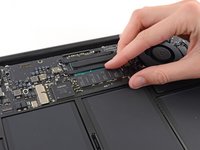
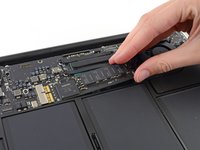
Gently lift the end of the SSD about half an inch and pull it straight out of its socket on the logic board.
-
-


To reassemble your device, follow these instructions in reverse order.
Take your e-waste to an R2 or e-Stewards certified recycler.
Repair didn’t go as planned? Try some basic troubleshooting, or ask our Answers community for help.
crwdns2935221:0crwdne2935221:0
crwdns2935229:0216crwdne2935229:0


crwdns2947412:051crwdne2947412:0
Great... Now tell me where I can get an SSD for this machine.
Dave - crwdns2934203:0crwdne2934203:0 crwdns2950251:0crwdne2950251:0
yes) and prompt and appropriate model that was not inferior in speed built.
Thank!
ilyabuhov - crwdns2934203:0crwdne2934203:0 crwdns2950251:0crwdne2950251:0
Dave, I am sure these are M.2 SSD. I am not sure what apple uses but at least you have somewhere you can start for research
klacorum - crwdns2934203:0crwdne2934203:0 crwdns2950251:0crwdne2950251:0
That’s indeed an M.2 SSD but you’ll need an adapter as the one that came with the Macbook uses a proprietary connector.
Farie Indriawan - crwdns2934203:0crwdne2934203:0 crwdns2950251:0crwdne2950251:0
Is there a way to upgrade it ? I cant find a bigger SSD which can be installed on this model.
Any update is welcome.
Max - crwdns2934203:0crwdne2934203:0 crwdns2950251:0crwdne2950251:0
