crwdns2933423:0crwdne2933423:0
crwdns2947577:0crwdnd2947577:0crwdne2947577:0

Logitech Signature M650 L Scroll Wheel Assembly Replacement

crwdns2942213:0crwdne2942213:0

  1. Logitech Signature M650 L Scroll Wheel Assembly Replacement, Scroll Wheel Assembly: crwdns2935265:01crwdnd2935265:01crwdnd2935265:03crwdne2935265:0 Logitech Signature M650 L Scroll Wheel Assembly Replacement, Scroll Wheel Assembly: crwdns2935265:01crwdnd2935265:02crwdnd2935265:03crwdne2935265:0 Logitech Signature M650 L Scroll Wheel Assembly Replacement, Scroll Wheel Assembly: crwdns2935265:01crwdnd2935265:03crwdnd2935265:03crwdne2935265:0
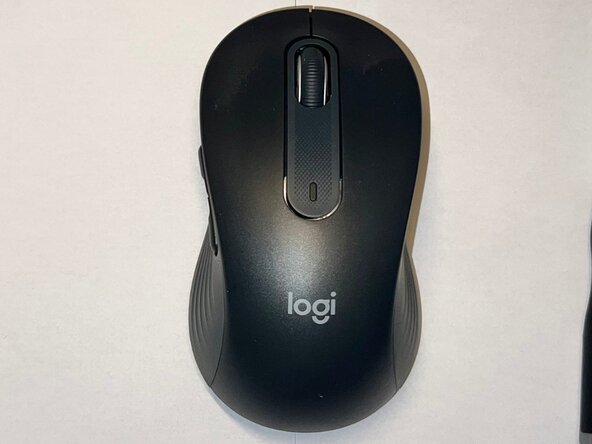
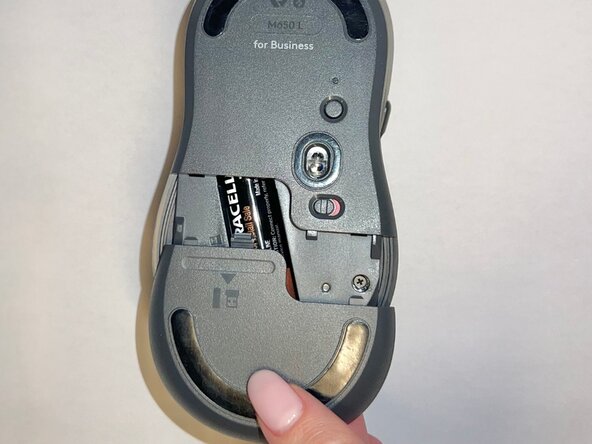
    • Slide the battery compartment cover downward and lift it away from the mouse.

    crwdns2952109:0crwdne2952109:0
  2. Logitech Signature M650 L Scroll Wheel Assembly Replacement: crwdns2935265:02crwdnd2935265:01crwdnd2935265:01crwdne2935265:0
    • Remove the AA battery from the battery compartment.

    crwdns2952109:0crwdne2952109:0
  3. Logitech Signature M650 L Scroll Wheel Assembly Replacement: crwdns2935265:03crwdnd2935265:01crwdnd2935265:02crwdne2935265:0 Logitech Signature M650 L Scroll Wheel Assembly Replacement: crwdns2935265:03crwdnd2935265:02crwdnd2935265:02crwdne2935265:0
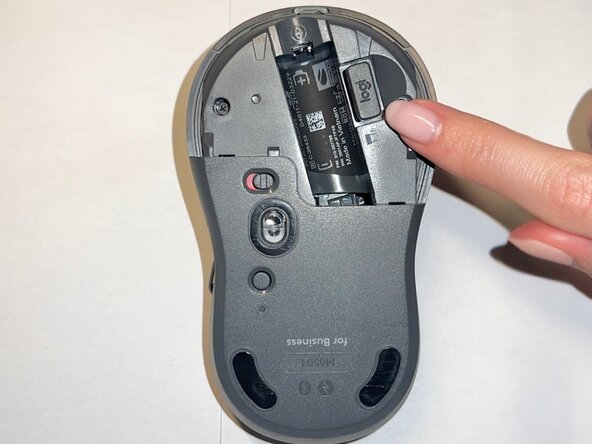
    • Remove the USB receiver from its storage slot inside the battery compartment.

    crwdns2952109:0crwdne2952109:0
  4. Logitech Signature M650 L Scroll Wheel Assembly Replacement: crwdns2935265:04crwdnd2935265:01crwdnd2935265:01crwdne2935265:0
    • Use a Phillips #000 screwdriver to remove the two screws securing the internal frame.

    crwdns2952109:0crwdne2952109:0
  5. Logitech Signature M650 L Scroll Wheel Assembly Replacement: crwdns2935265:05crwdnd2935265:01crwdnd2935265:02crwdne2935265:0 Logitech Signature M650 L Scroll Wheel Assembly Replacement: crwdns2935265:05crwdnd2935265:02crwdnd2935265:02crwdne2935265:0
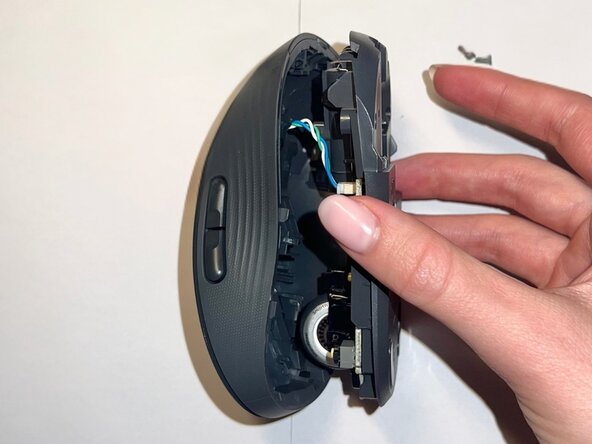
    • Gently lift the top shell away from the mouse body.

    • Do not remove it completely, as it is still connected to the base by a cable.

    crwdns2952109:0crwdne2952109:0
  6. Logitech Signature M650 L Scroll Wheel Assembly Replacement: crwdns2935265:06crwdnd2935265:01crwdnd2935265:01crwdne2935265:0
    • Use a Phillips #000 screwdriver to remove the two screws securing the scroll wheel assembly.

    crwdns2952109:0crwdne2952109:0
  7. Logitech Signature M650 L Scroll Wheel Assembly Replacement: crwdns2935265:07crwdnd2935265:01crwdnd2935265:02crwdne2935265:0 Logitech Signature M650 L Scroll Wheel Assembly Replacement: crwdns2935265:07crwdnd2935265:02crwdnd2935265:02crwdne2935265:0
    • Lift the scroll wheel assembly out of the mouse and install the replacement assembly in the same position.

    crwdns2952109:0crwdne2952109:0
  8. Logitech Signature M650 L Scroll Wheel Assembly Replacement: crwdns2935265:08crwdnd2935265:01crwdnd2935265:01crwdne2935265:0
    • Replace the two Phillips #000 screws to secure the scroll wheel assembly.

    crwdns2952109:0crwdne2952109:0
  9. Logitech Signature M650 L Scroll Wheel Assembly Replacement: crwdns2935265:09crwdnd2935265:01crwdnd2935265:01crwdne2935265:0
    • Align the top shell with the base and press down along the edges until it snaps into place.

    crwdns2952109:0crwdne2952109:0
  10. Logitech Signature M650 L Scroll Wheel Assembly Replacement: crwdns2935265:010crwdnd2935265:01crwdnd2935265:01crwdne2935265:0
    • Use a Phillips #000 screwdriver to reinstall the two internal screws.

    crwdns2952109:0crwdne2952109:0
  11. Logitech Signature M650 L Scroll Wheel Assembly Replacement: crwdns2935265:011crwdnd2935265:01crwdnd2935265:03crwdne2935265:0 Logitech Signature M650 L Scroll Wheel Assembly Replacement: crwdns2935265:011crwdnd2935265:02crwdnd2935265:03crwdne2935265:0 Logitech Signature M650 L Scroll Wheel Assembly Replacement: crwdns2935265:011crwdnd2935265:03crwdnd2935265:03crwdne2935265:0
    • Insert the AA battery, reinstall the USB receiver, and slide the battery compartment cover back into place.

    crwdns2952109:0crwdne2952109:0
  12. Logitech Signature M650 L Scroll Wheel Assembly Replacement: crwdns2935265:012crwdnd2935265:01crwdnd2935265:01crwdne2935265:0
    • Your mouse is now fully reassembled.

    crwdns2952109:0crwdne2952109:0
crwdns2915888:0crwdne2915888:0

To reassemble your device, follow these instructions in reverse order. Take your e-waste to an R2 or e-Stewards certified recycler.

crwdns2935227:0crwdne2935227:0

Angela Gerasimova

crwdns2935283:001/08/26crwdne2935283:0

205 crwdns2915208:0crwdne2915208:0

crwdns2935295:0crwdne2935295:0

crwdns2935287:0crwdne2935287:0

Central Washington University, Team 1-10, Pengilly Winter 2026 crwdns2935289:0Central Washington University, Team 1-10, Pengilly Winter 2026crwdne2935289:0

CWU-PENGILLY-W26S1G10

crwdns2934841:01crwdne2934841:0

crwdns2935303:01crwdne2935303:0

crwdns2947412:00crwdne2947412:0

crwdns2917038:0crwdne2917038:0

crwdns2936625:0crwdne2936625:0:

crwdns2936751:024crwdne2936751:0 1

crwdns2936753:07crwdne2936753:0 6

crwdns2936753:030crwdne2936753:0 41

crwdns2942667:0crwdne2942667:0 77