
Logitech G920 Driving Force XYAB Buttons Replacement

crwdns2959932:0crwdnd2959932:0Tristyn Dolancrwdnd2959932:0crwdnd2959932:0crwdnd2959932:04crwdnd2959932:0crwdne2959932:0
crwdns2959936:0N'w 18, 2023crwdne2959936:0
crwdns2869540:0crwdne2869540:0: 1,5 mil
crwdns2959988:0crwdne2959988:0
- crwdns2959990:0crwdne2959990:0
- 1
- crwdns2959992:0crwdne2959992:0
- 22
- crwdns2959994:0crwdne2959994:0
- 96
- crwdns2959996:0crwdne2959996:0
- 1.471
crwdns2955950:0crwdne2955950:0: 1
crwdns2960002:01crwdne2960002:0.
crwdns2959984:0crwdne2959984:0: 1 2
crwdns2959972:01crwdne2959972:0
crwdns2959970:02crwdne2959970:0
crwdns2959986:0crwdne2959986:0: 0 1
crwdns2959958:0crwdne2959958:0
crwdns2959976:01crwdne2959976:0
crwdns2915892:0crwdne2915892:0
crwdns2959928:0crwdne2959928:0 ↓This guide will be used to aid you in replacing the Logitech G920 Driving Force XYAB buttons. The steering wheel buttons control the inputs when pressing down on them. If your device is having problems related to the buttons not responding, take a look at the troubleshooting guide before continuing with this guide. The problems related to buttons could also be a result of a faulty motherboard. However, if you know it's a problem with the buttons themselves, continue with this replacement guide. Unplug all parts of the device from any outlets before you start.
crwdns2959930:0crwdne2959930:0
crwdns2943215:0crwdne2943215:0

-
-
-
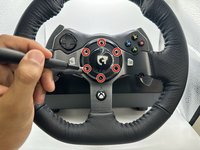
Use the Phillips #0 screwdriver to remove the five 9.5 mm external screws.
 crwdns2952109:0crwdne2952109:0
-
-
-
Using the Phillips #0 screwdriver, remove the 5 mm screws holding the bumpers in place.
-
-
-
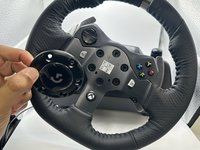
Using the TR25 Torx Security Screwdriver, remove the six 23.8 mm screws holding the face plate together.
-
Remove the face plate from the steering wheel.
-
-
-
Remove the wheel from the main steering wheel console.
-
-
-
-
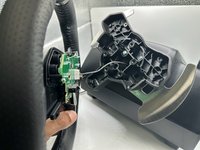
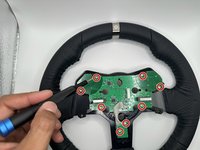
Remove the eight 7.5 mm screws holding the steering wheel motherboard in place using a Phillips #0 screwdriver.
-
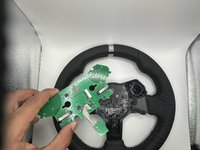
Remove the steering wheel motherboard.
-
-
-
-
-
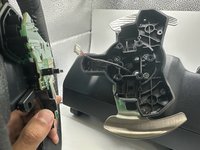
Remove the XYAB buttons from the back of the steering wheel.
-
-







To reassemble your device, follow these instructions in reverse order.
crwdns2935221:0crwdne2935221:0
crwdns2935227:0crwdne2935227:0

crwdns2935287:0crwdne2935287:0

University of North Texas, Team 2-1, Harold Fall 2023 crwdns2935289:0University of North Texas, Team 2-1, Harold Fall 2023crwdne2935289:0
UNT-HAROLD-F23S2G1
crwdns2931471:04crwdne2931471:0
crwdns2935297:060crwdne2935297:0
