crwdns2933423:0crwdne2933423:0
crwdns2947577:0crwdnd2947577:0crwdne2947577:0

LG Fortune Motherboard Replacement

crwdns2942213:0crwdne2942213:0

    1. LG Fortune Motherboard Replacement, Battery: crwdns2935265:01crwdnd2935265:01crwdnd2935265:02crwdne2935265:0 LG Fortune Motherboard Replacement, Battery: crwdns2935265:01crwdnd2935265:02crwdnd2935265:02crwdne2935265:0
      • Use the slit on the bottom right side of the phone to open the back cover of your phone.

      • It will be the bottom left of the phone if looking at it from the back.

      • Slowly pry the back cover off the phone starting from the bottom up to the top.

      crwdns2952109:0crwdne2952109:0

      crwdns2917038:0crwdne2917038:0

    2. LG Fortune Motherboard Replacement: crwdns2935265:02crwdnd2935265:01crwdnd2935265:02crwdne2935265:0 LG Fortune Motherboard Replacement: crwdns2935265:02crwdnd2935265:02crwdnd2935265:02crwdne2935265:0
      • Use the slot in the middle of the bottom edge of the battery to pry it up and out of the case.

      crwdns2952109:0crwdne2952109:0

      crwdns2917038:0crwdne2917038:0

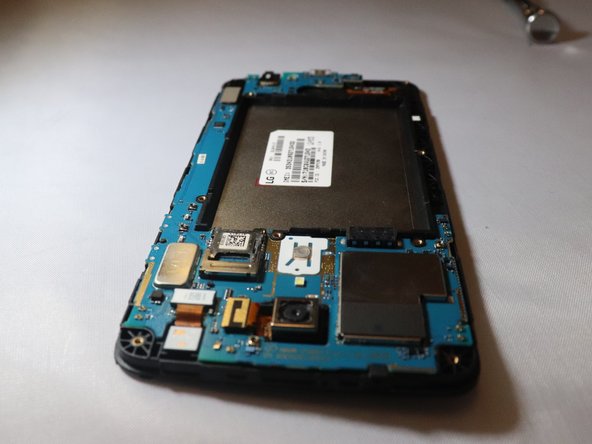
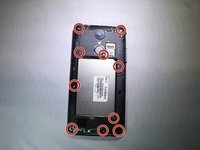
    1. LG Fortune Motherboard Replacement, Motherboard: crwdns2935265:03crwdnd2935265:01crwdnd2935265:03crwdne2935265:0 LG Fortune Motherboard Replacement, Motherboard: crwdns2935265:03crwdnd2935265:02crwdnd2935265:03crwdne2935265:0 LG Fortune Motherboard Replacement, Motherboard: crwdns2935265:03crwdnd2935265:03crwdnd2935265:03crwdne2935265:0
      • Using a PH000 screwdriver, remove the ten 4mm screws on the back panelling.

      • Remove the back panelling from the device with your fingers or a spudger.

      • Work slowly side to side to release this back casing and expose the motherboard.

      crwdns2952109:0crwdne2952109:0

      crwdns2917038:0crwdne2917038:0

    2. LG Fortune Motherboard Replacement: crwdns2935265:04crwdnd2935265:01crwdnd2935265:01crwdne2935265:0
      • Place a spudger or an opening tool under the edge of the video card press connector and pry straight up to disconnect it from the motherboard.

      • Using the metal spudger as shown in the photos has the potential to damage your device.

      crwdns2952109:0crwdne2952109:0

      crwdns2917038:0crwdne2917038:0

    3. LG Fortune Motherboard Replacement: crwdns2935265:05crwdnd2935265:01crwdnd2935265:01crwdne2935265:0
      • Unplug the front facing camera press fit connector from the motherboard by prying upwards with a spudger or plastic opening tool.

      • Using a metal spudger as shown in the photos could potentially damage your device.

      crwdns2952109:0crwdne2952109:0

      crwdns2917038:0crwdne2917038:0

    4. LG Fortune Motherboard Replacement: crwdns2935265:06crwdnd2935265:01crwdnd2935265:01crwdne2935265:0
      • Unplug the rear facing camera ribbon cable from the motherboard by prying up the press fit connector with a spudger.

      • Using a metal spudger as shown in the photos has the potential to damage your device. Choose an ESD safe tool instead.

      crwdns2952109:0crwdne2952109:0

      crwdns2917038:0crwdne2917038:0

    5. LG Fortune Motherboard Replacement: crwdns2935265:07crwdnd2935265:01crwdnd2935265:01crwdne2935265:0
      • Use the spudger to pry off the motherboard from the rest of the device on the top left corner down to the bottom right corner

      crwdns2952109:0crwdne2952109:0

      crwdns2917038:0crwdne2917038:0

crwdns2915888:0crwdne2915888:0

To reassemble your device, follow these instructions in reverse order. Take your e-waste to an R2 or e-Stewards certified recycler.

crwdns2935221:0crwdne2935221:0

Cori Johnson

crwdns2935283:004/08/19crwdne2935283:0

537 crwdns2915208:0crwdne2915208:0

crwdns2935297:05crwdne2935297:0

crwdns2935287:0crwdne2935287:0

Eastern Washington University, Team S1-G5, Rowley Spring 2019 crwdns2935289:0Eastern Washington University, Team S1-G5, Rowley Spring 2019crwdne2935289:0

EWU-ROWLEY-S19S1G5

crwdns2931471:03crwdne2931471:0

crwdns2935297:060crwdne2935297:0

crwdns2947412:00crwdne2947412:0

crwdns2917038:0crwdne2917038:0

crwdns2936625:0crwdne2936625:0:

crwdns2936751:024crwdne2936751:0 0

crwdns2936753:07crwdne2936753:0 4

crwdns2936753:030crwdne2936753:0 39

crwdns2942667:0crwdne2942667:0 1,021