
Jazz UltraTab C855 Battery Replacement

crwdns2959932:0crwdnd2959932:0Cory Hodgecrwdnd2959932:0crwdnd2959932:0crwdnd2959932:02crwdnd2959932:0crwdne2959932:0
crwdns2959936:0Sun 5, 2016crwdne2959936:0
crwdns2869540:0crwdne2869540:0: 946
crwdns2959988:0crwdne2959988:0
- crwdns2959990:0crwdne2959990:0
- 4
- crwdns2959992:0crwdne2959992:0
- 25
- crwdns2959994:0crwdne2959994:0
- 100
- crwdns2959996:0crwdne2959996:0
- 946
crwdns2955950:0crwdne2955950:0: 1
crwdns2960006:01crwdne2960006:0
crwdns2960000:0crwdne2960000:0crwdns2959984:0crwdne2959984:0: 0 1
crwdns2959956:0crwdne2959956:0
crwdns2959968:01crwdne2959968:0
crwdns2959986:0crwdne2959986:0: 0 1
crwdns2959958:0crwdne2959958:0
crwdns2959976:01crwdne2959976:0
crwdns2869446:0crwdne2869446:0
crwdns2869447:0crwdne2869447:0
crwdns2915892:0crwdne2915892:0
crwdns2959928:0crwdne2959928:0 ↓Soldering skills are required to replace the battery in this device. Check out iFixit's Soldering Skills guide for more help.
crwdns2959930:0crwdne2959930:0
crwdns2943215:0crwdne2943215:0


-
-
-
Remove the 4 exterior screws using a Phillips #000 Screwdriver .
 crwdns2952109:0crwdne2952109:0
-
-
-
Pry the back case off using the blue Plastic Opening Tools. Work one along the seem until you can get your fingers under to pull it apart.
-
-
-
-
-
-
Remove the yellow tape from the sides of the battery, and the surrounding components.
-
-
-
Cut the pos(+) and neg (-) wires that connect the battery to the device using wire cutters.
-
-
-
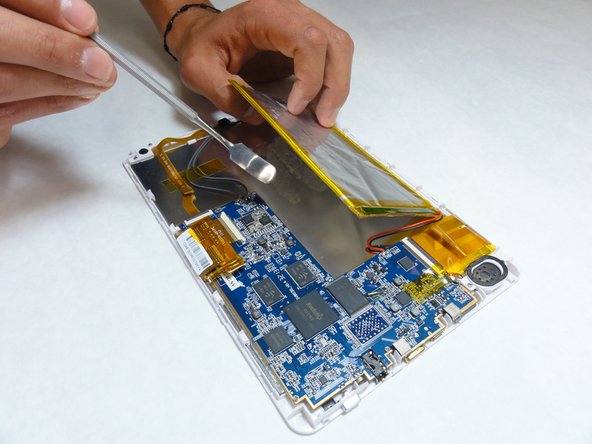
Using a plastic opening tool or spudger, slowly pry the battery away from the board.
-
-
-
Use a two sided adhesive to secure the new battery in place.
-
Solder or crimp the wires back together to reattach to the motherboard.
-
Replace any yellow tape that you removed at the beginning to secure the wires back in place.
-
-



To reassemble your device, follow these instructions in reverse order.

crwdns2935287:0crwdne2935287:0

IUPUI, Team 1-3, Baechle Fall 2015 crwdns2935289:0IUPUI, Team 1-3, Baechle Fall 2015crwdne2935289:0
IUPUI-BAECHLE-F15S1G3
crwdns2931471:05crwdne2931471:0
crwdns2935297:060crwdne2935297:0
crwdns2947410:01crwdne2947410:0
Very good instructions.....but where do I buy the repkacement battery from?
fremontmyers - crwdns2934203:0crwdne2934203:0 crwdns2950251:0crwdne2950251:0
