crwdns2915892:0crwdne2915892:0
Use this guide to open your Huawei P9 smartphone.
crwdns2942213:0crwdne2942213:0
-
-
-
First switch off your phone and remove the SIM card tray.
-
Unscrew the two Pentalobe P2 screws located at the bottom next to the device's USB C port.
 crwdns2952109:0crwdne2952109:0
-
-
-
-
Use an iSclack or a suction handle to separate the phone assembly from the rear panel.
-
-
-
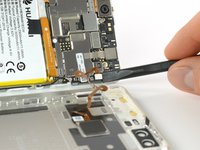
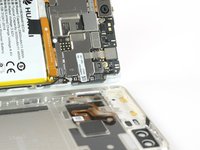
Disconnect the fingerprint sensor using a spudger.
-
-


To reassemble your device, follow these instructions in reverse order.
crwdns2935221:0crwdne2935221:0
crwdns2935229:08crwdne2935229:0

crwdns2935287:0crwdne2935287:0

Tobias Isakeit - Repairability Engineer crwdns2935289:0Tobias Isakeit - Repairability Engineercrwdne2935289:0
Business
crwdns2934841:01crwdne2934841:0
crwdns2935297:02,262crwdne2935297:0
crwdns2947410:01crwdne2947410:0
I cant open the phone
Chizu - crwdns2934203:0crwdne2934203:0 crwdns2950251:0crwdne2950251:0
