crwdns2933423:0crwdne2933423:0
crwdns2947577:0crwdnd2947577:0crwdne2947577:0

Garmin DriveSmart 55 EX Screen Replacement

crwdns2942213:0crwdne2942213:0

  1. Garmin DriveSmart 55 EX Screen Replacement, Screen: crwdns2935265:01crwdnd2935265:01crwdnd2935265:03crwdne2935265:0 Garmin DriveSmart 55 EX Screen Replacement, Screen: crwdns2935265:01crwdnd2935265:02crwdnd2935265:03crwdne2935265:0 Garmin DriveSmart 55 EX Screen Replacement, Screen: crwdns2935265:01crwdnd2935265:03crwdnd2935265:03crwdne2935265:0
    • Use a T5 Torx screwdriver to remove the four 4.2 mm black screws from the back case.

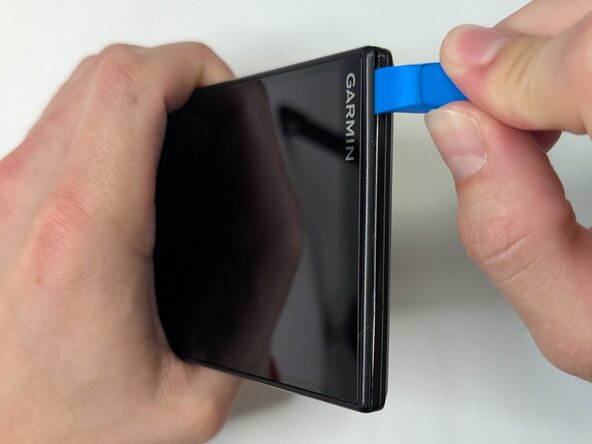
    • Insert the plastic opening tool into the gap between the screen and case, and release the clips along the edges of the device.

    • Use opening picks along the perimeter to keep them separated until you can remove the screen.

    crwdns2952109:0crwdne2952109:0

    crwdns2917038:0crwdne2917038:0

  2. Garmin DriveSmart 55 EX Screen Replacement: crwdns2935265:02crwdnd2935265:01crwdnd2935265:03crwdne2935265:0 Garmin DriveSmart 55 EX Screen Replacement: crwdns2935265:02crwdnd2935265:02crwdnd2935265:03crwdne2935265:0 Garmin DriveSmart 55 EX Screen Replacement: crwdns2935265:02crwdnd2935265:03crwdnd2935265:03crwdne2935265:0
    • Gently separate the screen from the case and place the device flat on the surface.

    • Avoid pulling on the screen too forcefully, as the display ribbon cable is still connected to the motherboard.

    • Use a T5 Torx screwdriver to remove the four 3.8 mm silver screws from the motherboard.

    • Avoid scratching the motherboard when using the screwdriver, as this can damage the device.

    • Gently pry the motherboard up using the plastic opening tool.

    crwdns2952109:0crwdne2952109:0

    crwdns2917038:0crwdne2917038:0

  3. Garmin DriveSmart 55 EX Screen Replacement: crwdns2935265:03crwdnd2935265:01crwdnd2935265:02crwdne2935265:0 Garmin DriveSmart 55 EX Screen Replacement: crwdns2935265:03crwdnd2935265:02crwdnd2935265:02crwdne2935265:0
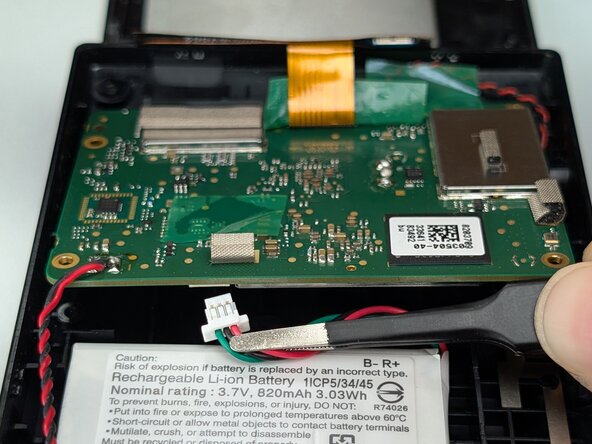
    • Use your fingers or tweezers to disconnect the battery connector on the underside of the motherboard.

    • Avoid pulling on the cables.

    crwdns2952109:0crwdne2952109:0

    crwdns2917038:0crwdne2917038:0

  4. Garmin DriveSmart 55 EX Screen Replacement: crwdns2935265:04crwdnd2935265:01crwdnd2935265:03crwdne2935265:0 Garmin DriveSmart 55 EX Screen Replacement: crwdns2935265:04crwdnd2935265:02crwdnd2935265:03crwdne2935265:0 Garmin DriveSmart 55 EX Screen Replacement: crwdns2935265:04crwdnd2935265:03crwdnd2935265:03crwdne2935265:0
    • Use a spudger or a clean fingernail to flip up the locking flap on the ZIF connector.

    • Use the widest tool possible to avoid damaging the delicate hinge pins.

    • Use tweezers to gently pull the gold ribbon cable from the socket on the motherboard.

    • Be careful when removing the ribbon cable because it is thin and can tear easily.

    crwdns2952109:0crwdne2952109:0

    crwdns2917038:0crwdne2917038:0

  5. Garmin DriveSmart 55 EX Screen Replacement: crwdns2935265:05crwdnd2935265:01crwdnd2935265:02crwdne2935265:0 Garmin DriveSmart 55 EX Screen Replacement: crwdns2935265:05crwdnd2935265:02crwdnd2935265:02crwdne2935265:0
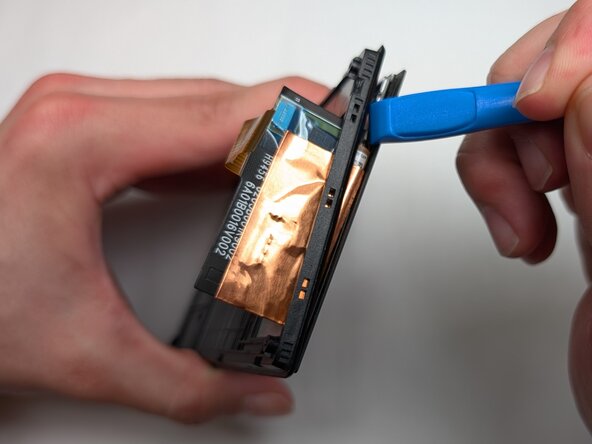
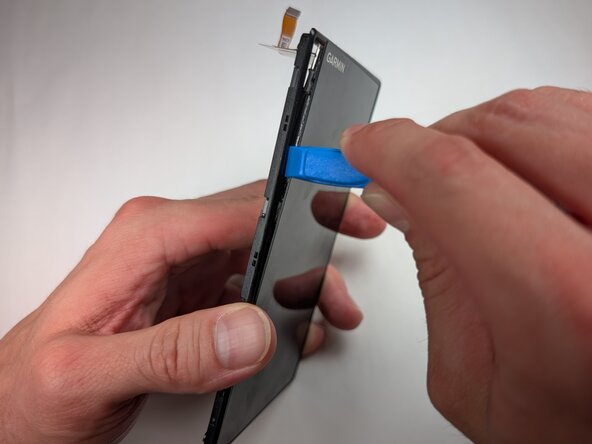
    • Insert a spudger or plastic opening tool into the gap between the screen and display frame.

    • Once a corner begins to lift, slowly slide the tool around the edges to release the clips securing them.

    • The screen is glass and if you use too much force it can shatter and crack the screen.

    • Separate the screen from the device.

    crwdns2952109:0crwdne2952109:0

    crwdns2917038:0crwdne2917038:0

crwdns2915888:0crwdne2915888:0

To reassemble your device, follow these instructions in reverse order. Take your e-waste to an R2 or e-Stewards certified recycler.

crwdns2935221:0crwdne2935221:0

Jacob Behnke

crwdns2935283:003/11/26crwdne2935283:0

707 crwdns2915208:0crwdne2915208:0

crwdns2935297:04crwdne2935297:0

crwdns2935287:0crwdne2935287:0

Purdue University Northwest, Team 7-1, Dieterle Spring 2026 crwdns2935289:0Purdue University Northwest, Team 7-1, Dieterle Spring 2026crwdne2935289:0

PNW-DIETERLE-S26S7G1

crwdns2931471:03crwdne2931471:0

crwdns2935297:04crwdne2935297:0

crwdns2947412:00crwdne2947412:0

crwdns2917038:0crwdne2917038:0

crwdns2936625:0crwdne2936625:0:

crwdns2936751:024crwdne2936751:0 0

crwdns2936753:07crwdne2936753:0 3

crwdns2936753:030crwdne2936753:0 22

crwdns2942667:0crwdne2942667:0 73