crwdns2933423:0crwdne2933423:0
crwdns2947577:0crwdnd2947577:0crwdne2947577:0

GameSir X2 Pro USB-C Cable Replacement

crwdns2942213:0crwdne2942213:0

  1. GameSir X2 Pro USB-C Cable Replacement, USB-C Cable: crwdns2935265:01crwdnd2935265:01crwdnd2935265:01crwdne2935265:0
    • Insert the tip of the Jimmy between the rubber pad and the back of the controller, then slide it along the edge to loosen the adhesive and lift the pad away.

    • Gently remove the rubber pad.

    crwdns2952109:0crwdne2952109:0

    crwdns2917038:0crwdne2917038:0

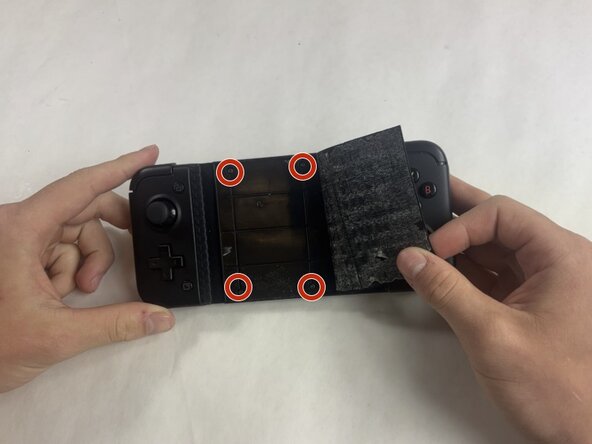
  2. GameSir X2 Pro USB-C Cable Replacement: crwdns2935265:02crwdnd2935265:01crwdnd2935265:02crwdne2935265:0 GameSir X2 Pro USB-C Cable Replacement: crwdns2935265:02crwdnd2935265:02crwdnd2935265:02crwdne2935265:0
    • Use a Phillips #000 screwdriver to remove the four 4.5 mm screws under the rubber pad.

    crwdns2952109:0crwdne2952109:0

    crwdns2917038:0crwdne2917038:0

  3. GameSir X2 Pro USB-C Cable Replacement: crwdns2935265:03crwdnd2935265:01crwdnd2935265:02crwdne2935265:0 GameSir X2 Pro USB-C Cable Replacement: crwdns2935265:03crwdnd2935265:02crwdnd2935265:02crwdne2935265:0
    • Flip the controller over so the back is facing up.

    • Remove the eight 6.0 mm T6 Torx screws from the back of the device.

    crwdns2952109:0crwdne2952109:0

    crwdns2917038:0crwdne2917038:0

  4. GameSir X2 Pro USB-C Cable Replacement: crwdns2935265:04crwdnd2935265:01crwdnd2935265:03crwdne2935265:0 GameSir X2 Pro USB-C Cable Replacement: crwdns2935265:04crwdnd2935265:02crwdnd2935265:03crwdne2935265:0 GameSir X2 Pro USB-C Cable Replacement: crwdns2935265:04crwdnd2935265:03crwdnd2935265:03crwdne2935265:0
    • Use the Jimmy to pry the back cover of the controller, following the seam.

    • Some force is necessary, but be careful not to damage any of the clips holding the controller together.

    crwdns2952109:0crwdne2952109:0

    crwdns2917038:0crwdne2917038:0

  5. GameSir X2 Pro USB-C Cable Replacement: crwdns2935265:05crwdnd2935265:01crwdnd2935265:02crwdne2935265:0 GameSir X2 Pro USB-C Cable Replacement: crwdns2935265:05crwdnd2935265:02crwdnd2935265:02crwdne2935265:0
    • Remove the two 6.0 mm Phillips #000 screws from the bracket near the end of the back panel.

    crwdns2952109:0crwdne2952109:0

    crwdns2917038:0crwdne2917038:0

  6. GameSir X2 Pro USB-C Cable Replacement: crwdns2935265:06crwdnd2935265:01crwdnd2935265:02crwdne2935265:0 GameSir X2 Pro USB-C Cable Replacement: crwdns2935265:06crwdnd2935265:02crwdnd2935265:02crwdne2935265:0
    • Remove the plastic bracket from the plug.

    crwdns2952109:0crwdne2952109:0

    crwdns2917038:0crwdne2917038:0

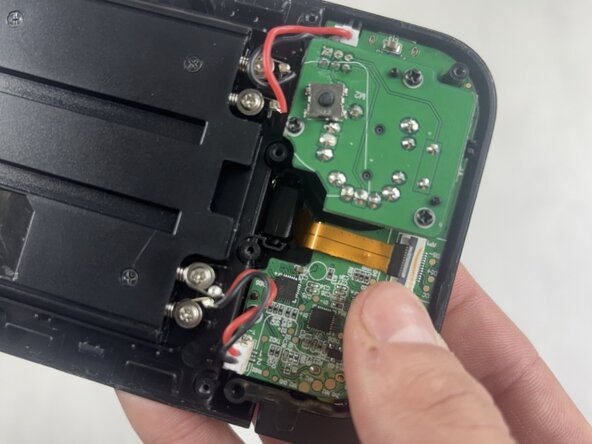
  7. GameSir X2 Pro USB-C Cable Replacement: crwdns2935265:07crwdnd2935265:01crwdnd2935265:03crwdne2935265:0 GameSir X2 Pro USB-C Cable Replacement: crwdns2935265:07crwdnd2935265:02crwdnd2935265:03crwdne2935265:0 GameSir X2 Pro USB-C Cable Replacement: crwdns2935265:07crwdnd2935265:03crwdnd2935265:03crwdne2935265:0
    • Use a spudger or a clean fingernail to flip up the black locking flap.

    • Use the widest tool possible to avoid damaging the delicate hinge pins.

    • Use tweezers or your fingers to gently pull the cable out of its socket.

    crwdns2952109:0crwdne2952109:0

    crwdns2917038:0crwdne2917038:0

  8. GameSir X2 Pro USB-C Cable Replacement: crwdns2935265:08crwdnd2935265:01crwdnd2935265:03crwdne2935265:0 GameSir X2 Pro USB-C Cable Replacement: crwdns2935265:08crwdnd2935265:02crwdnd2935265:03crwdne2935265:0 GameSir X2 Pro USB-C Cable Replacement: crwdns2935265:08crwdnd2935265:03crwdnd2935265:03crwdne2935265:0
    • Gently pull the USB-C plug out of the device.

    • If it is difficult to remove, you can push the USB-C out rather than pulling.

    • Be careful when removing the USB-C port to avoid damaging the ribbon cable.

    crwdns2952109:0crwdne2952109:0

    crwdns2917038:0crwdne2917038:0

crwdns2915888:0crwdne2915888:0

To reassemble your device, follow these instructions in reverse order. Take your e-waste to an R2 or e-Stewards certified recycler.

crwdns2935221:0crwdne2935221:0

crwdns2935227:0crwdne2935227:0

Matthew Suprenard

crwdns2935283:003/04/26crwdne2935283:0

184 crwdns2915208:0crwdne2915208:0

crwdns2935295:0crwdne2935295:0

crwdns2935287:0crwdne2935287:0

UMass Dartmouth, Team 5-2, Rioux Spring 2026 crwdns2935289:0UMass Dartmouth, Team 5-2, Rioux Spring 2026crwdne2935289:0

UMASSD-RIOUX-S26S5G2

crwdns2931471:03crwdne2931471:0

crwdns2935297:05crwdne2935297:0

crwdns2947412:00crwdne2947412:0

crwdns2917038:0crwdne2917038:0

crwdns2936625:0crwdne2936625:0:

crwdns2936751:024crwdne2936751:0 3

crwdns2936753:07crwdne2936753:0 12

crwdns2936753:030crwdne2936753:0 17

crwdns2942667:0crwdne2942667:0 68