crwdns2933423:0crwdne2933423:0
crwdns2947577:0crwdnd2947577:0crwdne2947577:0

Fujitsu LIFEBOOK P7010D Hard Drive Replacement

crwdns2942213:0crwdne2942213:0

    1. Fujitsu LIFEBOOK P7010D Hard Drive Replacement, Battery: crwdns2935265:01crwdnd2935265:01crwdnd2935265:01crwdne2935265:0
      • Place the laptop upside down on a table.

      crwdns2952109:0crwdne2952109:0

      crwdns2917038:0crwdne2917038:0

    2. Fujitsu LIFEBOOK P7010D Hard Drive Replacement: crwdns2935265:02crwdnd2935265:01crwdnd2935265:01crwdne2935265:0
      • Locate the battery (the grey block). Find the two tabs on one end of the battery, as pictured.

      • Using two fingers, press both tabs down at once until they are fully depressed.

      crwdns2952109:0crwdne2952109:0

      crwdns2917038:0crwdne2917038:0

    3. Fujitsu LIFEBOOK P7010D Hard Drive Replacement: crwdns2935265:03crwdnd2935265:01crwdnd2935265:01crwdne2935265:0
      • While holding the tabs down, slowly pivot the battery up.

      • The battery is now free and safe to pull out.

      crwdns2952109:0crwdne2952109:0

      crwdns2917038:0crwdne2917038:0

    1. Fujitsu LIFEBOOK P7010D Hard Drive Replacement, Disc Drive: crwdns2935265:04crwdnd2935265:01crwdnd2935265:03crwdne2935265:0 Fujitsu LIFEBOOK P7010D Hard Drive Replacement, Disc Drive: crwdns2935265:04crwdnd2935265:02crwdnd2935265:03crwdne2935265:0 Fujitsu LIFEBOOK P7010D Hard Drive Replacement, Disc Drive: crwdns2935265:04crwdnd2935265:03crwdnd2935265:03crwdne2935265:0
      • Push the tab down as far as possible using your finger or opening tool to unlock the disc drive.

      • While still holding the tab down, use your other hand to pull out the disc drive straight out of its place.

      crwdns2952109:0crwdne2952109:0

      crwdns2917038:0crwdne2917038:0

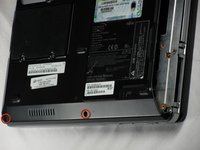
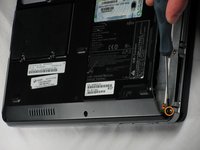
    1. Fujitsu LIFEBOOK P7010D Hard Drive Replacement, Hard Drive: crwdns2935265:05crwdnd2935265:01crwdnd2935265:02crwdne2935265:0 Fujitsu LIFEBOOK P7010D Hard Drive Replacement, Hard Drive: crwdns2935265:05crwdnd2935265:02crwdnd2935265:02crwdne2935265:0
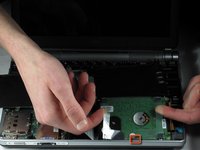
      • On the bottom of the laptop, find the two bottom-plate screw holes near the disc drive. Parallel to them is a 2.4mm screw (second photo).

      • After locating the 2.4mm screw, use a Phillips #0 screwdriver to unscrew it.

      crwdns2952109:0crwdne2952109:0

      crwdns2917038:0crwdne2917038:0

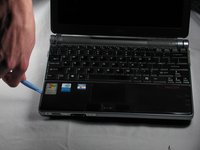
    2. Fujitsu LIFEBOOK P7010D Hard Drive Replacement: crwdns2935265:06crwdnd2935265:01crwdnd2935265:02crwdne2935265:0 Fujitsu LIFEBOOK P7010D Hard Drive Replacement: crwdns2935265:06crwdnd2935265:02crwdnd2935265:02crwdne2935265:0
      crwdns2935267:0crwdne2935267:0
      Anti-Static Wrist Strap
      $7.95
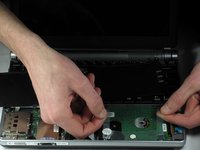
      • Flip the laptop over and open it facing you.

      • The cover is connected to the inner computer with an aluminum strip, so be careful lifting it.

      • Use a plastic opening tool to lift the bottom black cover on both sides.

      • For the proceeding steps, put on an anti-static wrist strap to protect the delicate circuitry inside the computer. To learn how to use the anti-static wrist strap, click here.

      crwdns2952109:0crwdne2952109:0

      crwdns2917038:0crwdne2917038:0

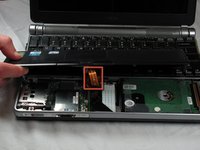
    3. Fujitsu LIFEBOOK P7010D Hard Drive Replacement: crwdns2935265:07crwdnd2935265:01crwdnd2935265:03crwdne2935265:0 Fujitsu LIFEBOOK P7010D Hard Drive Replacement: crwdns2935265:07crwdnd2935265:02crwdnd2935265:03crwdne2935265:0 Fujitsu LIFEBOOK P7010D Hard Drive Replacement: crwdns2935265:07crwdnd2935265:03crwdnd2935265:03crwdne2935265:0
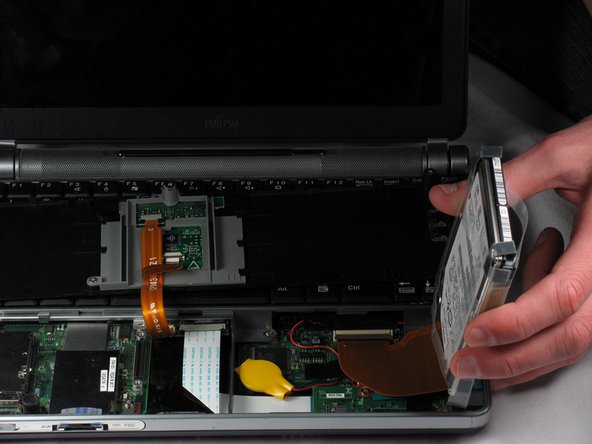
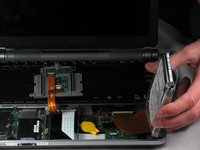
      • The hard drive is connected with a strip, so be careful when lifting it out.

      • Once the black cover is lifted, gently flip it and set it on the keyboard.

      • Locate the disc drive on the right side, as pictured.

      • Using two fingers and the clear plastic handles on the top, gently lift it out. Place it on the side of the laptop.

      crwdns2952109:0crwdne2952109:0

      crwdns2917038:0crwdne2917038:0

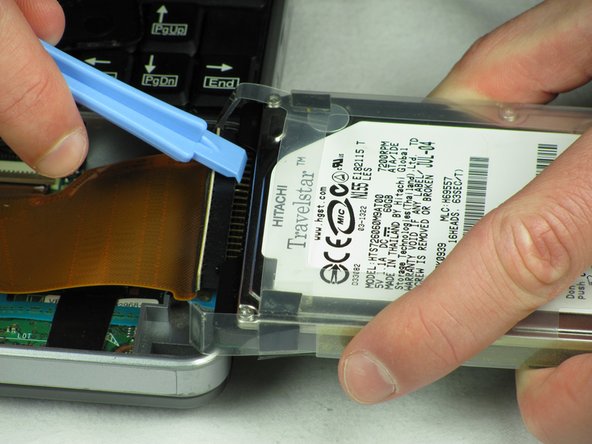
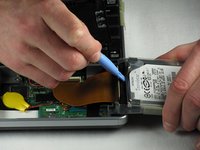
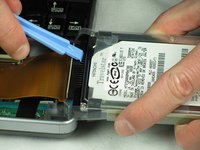
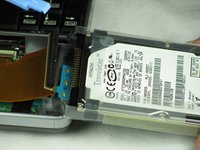
    4. Fujitsu LIFEBOOK P7010D Hard Drive Replacement: crwdns2935265:08crwdnd2935265:01crwdnd2935265:03crwdne2935265:0 Fujitsu LIFEBOOK P7010D Hard Drive Replacement: crwdns2935265:08crwdnd2935265:02crwdnd2935265:03crwdne2935265:0 Fujitsu LIFEBOOK P7010D Hard Drive Replacement: crwdns2935265:08crwdnd2935265:03crwdnd2935265:03crwdne2935265:0
      • Flip the hard drive on its side.

      • The pins connected to the hard drive are extremely fragile. Take care in handling the next few steps.

      • Hold the hard drive and insert a plastic opening tool, preferably a wider one, in between the black pin holder and the hard drive.

      • Gently wiggle the black pin holder back and forth, on each side, until it comes off.

      crwdns2952109:0crwdne2952109:0

      crwdns2917038:0crwdne2917038:0

crwdns2915888:0crwdne2915888:0

To reassemble your device, follow these instructions in reverse order.

crwdns2935221:0crwdne2935221:0

crwdns2935229:03crwdne2935229:0

Nicholas Ross

crwdns2935283:001/20/12crwdne2935283:0

207 crwdns2915208:0crwdne2915208:0

crwdns2935297:07crwdne2935297:0

crwdns2935287:0crwdne2935287:0

Cal Poly, Team 10-31, Amido Winter 2012 crwdns2935289:0Cal Poly, Team 10-31, Amido Winter 2012crwdne2935289:0

CPSU-AMIDO-W12S10G31

crwdns2931471:05crwdne2931471:0

crwdns2935297:049crwdne2935297:0

crwdns2947410:01crwdne2947410:0

hai sir..please help me..how to replacement hdd lifebook PH770/5AN ? can you answer to my email antogantengnian@gmail.com..thanks a lot

anto adhitya - crwdns2934203:0crwdne2934203:0 crwdns2950251:0crwdne2950251:0

crwdns2917038:0crwdne2917038:0

crwdns2936625:0crwdne2936625:0:

crwdns2936751:024crwdne2936751:0 5

crwdns2936753:07crwdne2936753:0 15

crwdns2936753:030crwdne2936753:0 48

crwdns2942667:0crwdne2942667:0 6,310