crwdns2933423:0crwdne2933423:0
crwdns2947577:0crwdnd2947577:0crwdne2947577:0

Flydigi Apex 4 Trigger Assembly Replacement

crwdns2942213:0crwdne2942213:0

  1. Flydigi Apex 4 Trigger Assembly Replacement, Trigger Assembly: crwdns2935265:01crwdnd2935265:01crwdnd2935265:03crwdne2935265:0 Flydigi Apex 4 Trigger Assembly Replacement, Trigger Assembly: crwdns2935265:01crwdnd2935265:02crwdnd2935265:03crwdne2935265:0 Flydigi Apex 4 Trigger Assembly Replacement, Trigger Assembly: crwdns2935265:01crwdnd2935265:03crwdnd2935265:03crwdne2935265:0
    • Ensure the controller is fully powered off before beginning.

    • Disconnect the USB-C cable if the controller is plugged in.

    • Remove any wireless adapter or dongle connected to your device.

    • Never work on the controller while it is powered on or charging. Doing so may damage internal components or cause injury.

    crwdns2952109:0crwdne2952109:0

    crwdns2917038:0crwdne2917038:0

  2. Flydigi Apex 4 Trigger Assembly Replacement: crwdns2935265:02crwdnd2935265:01crwdnd2935265:03crwdne2935265:0 Flydigi Apex 4 Trigger Assembly Replacement: crwdns2935265:02crwdnd2935265:02crwdnd2935265:03crwdne2935265:0 Flydigi Apex 4 Trigger Assembly Replacement: crwdns2935265:02crwdnd2935265:03crwdnd2935265:03crwdne2935265:0
    • Remove the button caps and the magnetic faceplate of the controller.

    • It should come off with a tug.

    • Use a Phillips #00 screwdriver to remove the four screws securing the front of the controller to the frame.

    • Some screws may be hidden under grip pads or stickers. Gently peel these back if necessary.

    crwdns2952109:0crwdne2952109:0

    crwdns2917038:0crwdne2917038:0

  3. Flydigi Apex 4 Trigger Assembly Replacement: crwdns2935265:03crwdnd2935265:01crwdnd2935265:02crwdne2935265:0 Flydigi Apex 4 Trigger Assembly Replacement: crwdns2935265:03crwdnd2935265:02crwdnd2935265:02crwdne2935265:0
    • Insert a plastic opening tool into the seam between the front and back shell along the bottom edge of the controller.

    • Gently run the opening tool along the seam to release the plastic clips holding the two halves together.

    • Work your way around all edges until the back shell is fully unclipped.

    • Carefully lift the back shell away from the front half and set it aside.

    • Do not force the shell open. If you feel strong resistance, check for any screws you may have missed.

    crwdns2952109:0crwdne2952109:0

    crwdns2917038:0crwdne2917038:0

  4. Flydigi Apex 4 Trigger Assembly Replacement: crwdns2935265:04crwdnd2935265:01crwdnd2935265:01crwdne2935265:0
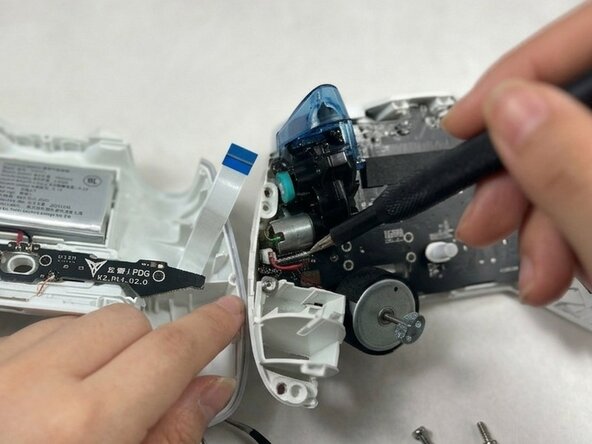
    • With the controller open, identify the trigger assembly on the side you are replacing.

    • The trigger assembly consists of the trigger lever, the spring mechanism, and the analog sensor attached to the internal frame.

    • Take a photo of the internal layout before removing any components. This will help you reassemble the controller correctly.

    crwdns2952109:0crwdne2952109:0

    crwdns2917038:0crwdne2917038:0

  5. Flydigi Apex 4 Trigger Assembly Replacement: crwdns2935265:05crwdnd2935265:01crwdnd2935265:03crwdne2935265:0 Flydigi Apex 4 Trigger Assembly Replacement: crwdns2935265:05crwdnd2935265:02crwdnd2935265:03crwdne2935265:0 Flydigi Apex 4 Trigger Assembly Replacement: crwdns2935265:05crwdnd2935265:03crwdnd2935265:03crwdne2935265:0
    • Use a spudger or your fingernail to gently flip up the locking tab on the connector linking the trigger assembly to the main PCB.

    • Carefully pull the ribbon cable straight out of the connector.

    • Do not pull at an angle, as this may tear the cable.

    crwdns2952109:0crwdne2952109:0

    crwdns2917038:0crwdne2917038:0

  6. Flydigi Apex 4 Trigger Assembly Replacement: crwdns2935265:06crwdnd2935265:01crwdnd2935265:02crwdne2935265:0 Flydigi Apex 4 Trigger Assembly Replacement: crwdns2935265:06crwdnd2935265:02crwdnd2935265:02crwdne2935265:0
    • Use a Phillips #00 screwdriver to remove the screws securing each trigger assembly.

    • Lift the trigger assembly straight up and out of the controller frame.

    crwdns2952109:0crwdne2952109:0

    crwdns2917038:0crwdne2917038:0

crwdns2915888:0crwdne2915888:0

To reassemble your device, follow these instructions in reverse order. Take your e-waste to an R2 or e-Stewards certified recycler.

crwdns2935221:0crwdne2935221:0

janavi

crwdns2935283:003/23/25crwdne2935283:0

241 crwdns2915208:0crwdne2915208:0

crwdns2935297:02crwdne2935297:0

crwdns2935287:0crwdne2935287:0

UMass Dartmouth, Team 3-1, Shaddix Spring 2026 crwdns2935289:0UMass Dartmouth, Team 3-1, Shaddix Spring 2026crwdne2935289:0

UMASSD-SHADDIX-S26S3G1

crwdns2931471:03crwdne2931471:0

crwdns2935297:02crwdne2935297:0

crwdns2947412:00crwdne2947412:0

crwdns2917038:0crwdne2917038:0

crwdns2936625:0crwdne2936625:0:

crwdns2936751:024crwdne2936751:0 1

crwdns2936753:07crwdne2936753:0 8

crwdns2936753:030crwdne2936753:0 29

crwdns2942667:0crwdne2942667:0 61