crwdns2933423:0crwdne2933423:0
crwdns2947577:0crwdnd2947577:0crwdne2947577:0

Fitbit Ionic Display Assembly Replacement

crwdns2942213:0crwdne2942213:0

    1. Fitbit Ionic Display Assembly Replacement, How to open the Fitbit Ionic: crwdns2935265:01crwdnd2935265:01crwdnd2935265:02crwdne2935265:0 Fitbit Ionic Display Assembly Replacement, How to open the Fitbit Ionic: crwdns2935265:01crwdnd2935265:02crwdnd2935265:02crwdne2935265:0
      • Before starting, take your Fitbit Ionic off the charger and power it down.

      • Feel free to attach or remove the watch band as needed to provide more control as you make repairs.

      crwdns2952109:0crwdne2952109:0

      crwdns2917038:0crwdne2917038:0

    2. Fitbit Ionic Display Assembly Replacement: crwdns2935265:02crwdnd2935265:01crwdnd2935265:01crwdne2935265:0
      • Heat an iOpener and apply it on the display for at least two minutes to soften the adhesive underneath.

      • The adhesive of the Fitbit Ionic is very strong. You may need to reheat the iOpener and repeat this procedure several times until the display adhesive gets loose enough.

      crwdns2952109:0crwdne2952109:0

      crwdns2917038:0crwdne2917038:0

    3. Fitbit Ionic Display Assembly Replacement: crwdns2935265:03crwdnd2935265:01crwdnd2935265:03crwdne2935265:0 Fitbit Ionic Display Assembly Replacement: crwdns2935265:03crwdnd2935265:02crwdnd2935265:03crwdne2935265:0 Fitbit Ionic Display Assembly Replacement: crwdns2935265:03crwdnd2935265:03crwdnd2935265:03crwdne2935265:0
      • Insert a technician's razor with a flat blade into the small gap between the watch case and the display.

      • Cut through the adhesive on the upper side of the Fitbit Ionic.

      crwdns2952109:0crwdne2952109:0

      crwdns2917038:0crwdne2917038:0

    4. Fitbit Ionic Display Assembly Replacement: crwdns2935265:04crwdnd2935265:01crwdnd2935265:02crwdne2935265:0 Fitbit Ionic Display Assembly Replacement: crwdns2935265:04crwdnd2935265:02crwdnd2935265:02crwdne2935265:0
      • Use a technician's razor with a flat blade to pry up the top edge of the display and create a small gap.

      crwdns2952109:0crwdne2952109:0

      crwdns2917038:0crwdne2917038:0

    5. Fitbit Ionic Display Assembly Replacement: crwdns2935265:05crwdnd2935265:01crwdnd2935265:03crwdne2935265:0 Fitbit Ionic Display Assembly Replacement: crwdns2935265:05crwdnd2935265:02crwdnd2935265:03crwdne2935265:0 Fitbit Ionic Display Assembly Replacement: crwdns2935265:05crwdnd2935265:03crwdnd2935265:03crwdne2935265:0
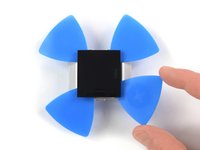
      • Insert two opening picks underneath the top left and the top right corner.

      • Leave the opening picks in place to prevent the adhesive from resealing.

      • Remove the razor blade.

      crwdns2952109:0crwdne2952109:0

      crwdns2917038:0crwdne2917038:0

    6. Fitbit Ionic Display Assembly Replacement: crwdns2935265:06crwdnd2935265:01crwdnd2935265:02crwdne2935265:0 Fitbit Ionic Display Assembly Replacement: crwdns2935265:06crwdnd2935265:02crwdnd2935265:02crwdne2935265:0
      • Insert a third opening pick underneath the top right corner and slide it along the right edge of the display.

      • Leave the opening pick in the bottom right corner to prevent the adhesive from resealing.

      • If cutting becomes too difficult, reheat and reapply the iOpener.

      crwdns2952109:0crwdne2952109:0

      crwdns2917038:0crwdne2917038:0

    7. Fitbit Ionic Display Assembly Replacement: crwdns2935265:07crwdnd2935265:01crwdnd2935265:02crwdne2935265:0 Fitbit Ionic Display Assembly Replacement: crwdns2935265:07crwdnd2935265:02crwdnd2935265:02crwdne2935265:0
      • Insert a fourth opening pick underneath the top left corner and slide it along the left edge of the display.

      • Leave the opening pick in bottom left corner to prevent the adhesive from resealing.

      • Do not remove the display assembly all the way yet—it's still connected to the mainboard.

      crwdns2952109:0crwdne2952109:0

      crwdns2917038:0crwdne2917038:0

    8. Fitbit Ionic Display Assembly Replacement: crwdns2935265:08crwdnd2935265:01crwdnd2935265:02crwdne2935265:0 Fitbit Ionic Display Assembly Replacement: crwdns2935265:08crwdnd2935265:02crwdnd2935265:02crwdne2935265:0
      • Carefully fold the display assembly in the direction of the bottom edge.

      crwdns2952109:0crwdne2952109:0

      crwdns2917038:0crwdne2917038:0

    1. Fitbit Ionic Display Assembly Replacement, Display Assembly: crwdns2935265:09crwdnd2935265:01crwdnd2935265:02crwdne2935265:0 Fitbit Ionic Display Assembly Replacement, Display Assembly: crwdns2935265:09crwdnd2935265:02crwdnd2935265:02crwdne2935265:0
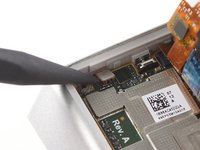
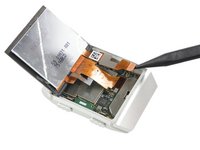
      • Use the flat end of a spudger to loosen and pry up the mildly glued NFC antenna.

      • Carefully fold the NFC antenna in the direction of the upper edge of the watch.

      crwdns2952109:0crwdne2952109:0

      crwdns2917038:0crwdne2917038:0

    2. Fitbit Ionic Display Assembly Replacement: crwdns2935265:010crwdnd2935265:01crwdnd2935265:02crwdne2935265:0 Fitbit Ionic Display Assembly Replacement: crwdns2935265:010crwdnd2935265:02crwdnd2935265:02crwdne2935265:0
      • Carefully fold the display assembly onto the upper side of the watch.

      • Take care not to pull or bend the cables too much—they are still connected to the mainboard.

      crwdns2952109:0crwdne2952109:0

      crwdns2917038:0crwdne2917038:0

    3. Fitbit Ionic Display Assembly Replacement: crwdns2935265:011crwdnd2935265:01crwdnd2935265:01crwdne2935265:0
      • Remove the Torx T2 screw (3.65 mm length) on the bottom left corner.

      crwdns2952109:0crwdne2952109:0

      crwdns2917038:0crwdne2917038:0

    4. Fitbit Ionic Display Assembly Replacement: crwdns2935265:012crwdnd2935265:01crwdnd2935265:02crwdne2935265:0 Fitbit Ionic Display Assembly Replacement: crwdns2935265:012crwdnd2935265:02crwdnd2935265:02crwdne2935265:0
      crwdns2935267:0crwdne2935267:0
      Tweezers
      $4.99
      • Use a pair of tweezers to remove the metal shield covering the battery flex cable.

      crwdns2952109:0crwdne2952109:0

      crwdns2917038:0crwdne2917038:0

    5. Fitbit Ionic Display Assembly Replacement: crwdns2935265:013crwdnd2935265:01crwdnd2935265:02crwdne2935265:0 Fitbit Ionic Display Assembly Replacement: crwdns2935265:013crwdnd2935265:02crwdnd2935265:02crwdne2935265:0
      • Use a spudger to pry up and disconnect the battery flex cable.

      crwdns2952109:0crwdne2952109:0

      crwdns2917038:0crwdne2917038:0

    6. Fitbit Ionic Display Assembly Replacement: crwdns2935265:014crwdnd2935265:01crwdnd2935265:02crwdne2935265:0 Fitbit Ionic Display Assembly Replacement: crwdns2935265:014crwdnd2935265:02crwdnd2935265:02crwdne2935265:0
      • Fold the display assembly back to its original position.

      crwdns2952109:0crwdne2952109:0

      crwdns2917038:0crwdne2917038:0

    7. Fitbit Ionic Display Assembly Replacement: crwdns2935265:015crwdnd2935265:01crwdnd2935265:01crwdne2935265:0
      • Remove the two Torx T2 screws (3.65 mm length) from the top edge of the watch.

      crwdns2952109:0crwdne2952109:0

      crwdns2917038:0crwdne2917038:0

    8. Fitbit Ionic Display Assembly Replacement: crwdns2935265:016crwdnd2935265:01crwdnd2935265:02crwdne2935265:0 Fitbit Ionic Display Assembly Replacement: crwdns2935265:016crwdnd2935265:02crwdnd2935265:02crwdne2935265:0
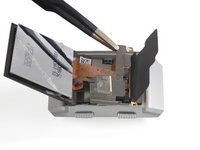
      • Use a pair of tweezers to remove the metal cover.

      crwdns2952109:0crwdne2952109:0

      crwdns2917038:0crwdne2917038:0

    9. Fitbit Ionic Display Assembly Replacement: crwdns2935265:017crwdnd2935265:01crwdnd2935265:02crwdne2935265:0 Fitbit Ionic Display Assembly Replacement: crwdns2935265:017crwdnd2935265:02crwdnd2935265:02crwdne2935265:0
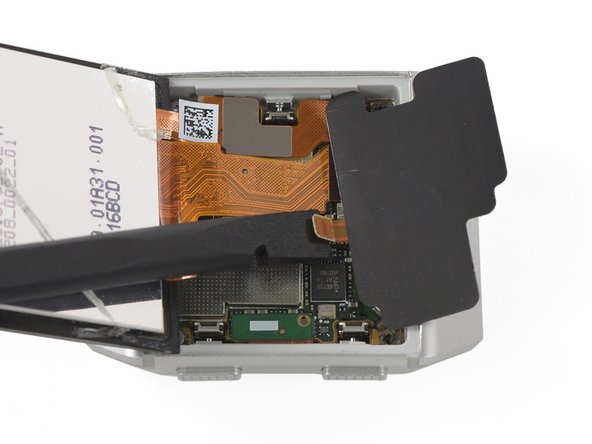
      • Use a spudger to pry up and disconnect the NFC antenna.

      • Remove the NFC antenna.

      crwdns2952109:0crwdne2952109:0

      crwdns2917038:0crwdne2917038:0

    10. Fitbit Ionic Display Assembly Replacement: crwdns2935265:018crwdnd2935265:01crwdnd2935265:03crwdne2935265:0 Fitbit Ionic Display Assembly Replacement: crwdns2935265:018crwdnd2935265:02crwdnd2935265:03crwdne2935265:0 Fitbit Ionic Display Assembly Replacement: crwdns2935265:018crwdnd2935265:03crwdnd2935265:03crwdne2935265:0
      • Use a spudger to pry up and disconnect the two display cables from the motherboard.

      crwdns2952109:0crwdne2952109:0

      crwdns2917038:0crwdne2917038:0

    11. Fitbit Ionic Display Assembly Replacement: crwdns2935265:019crwdnd2935265:01crwdnd2935265:01crwdne2935265:0
      • Remove the display assembly.

      • If possible, turn on your Fitbit Ionic and test your repair before installing new adhesive and resealing.

      crwdns2952109:0crwdne2952109:0

      crwdns2917038:0crwdne2917038:0

crwdns2915888:0crwdne2915888:0

To reassemble your device, follow these instructions in reverse order. Apply new adhesive where necessary after cleaning the relevant areas with isopropyl alcohol (>90%).


Compare your new replacement part to the original part—you may need to transfer remaining components or remove adhesive backings from the new part before installing.


Take your e-waste to an R2 or e-Stewards certified recycler.

Repair didn’t go as planned? Check out our Answers community for troubleshooting help.

crwdns2935221:0crwdne2935221:0

crwdns2935229:02crwdne2935229:0

Adriana Zwink

crwdns2935283:012/18/19crwdne2935283:0

68,810 crwdns2915208:0crwdne2915208:0

crwdns2935297:0167crwdne2935297:0

crwdns2935287:0crwdne2935287:0

iFixit crwdns2935289:0iFixitcrwdne2935289:0

Staff

crwdns2931471:0122crwdne2931471:0

crwdns2935297:086,241crwdne2935297:0

crwdns2947412:02crwdne2947412:0

It says in the description that you need replacement adhesive when reassembling, but what adhesive do you mean? Adhesive strips, adhesive glue? In all my searching nobody seems to have a good answer. The best thing I could find was b-7000 glue on amazon, but some people say it is water proof some say it Isn’t waterproof, so I’m not sure what to do. Any advice/feedback would be much appreciated!

JJB - crwdns2934203:0crwdne2934203:0 crwdns2950251:0crwdne2950251:0

Hi JJB, it’s very difficult to seal your watch waterproof after a repair but I can recommend this glue. I hope your repair works! Feel free to share your experience with us when you have finished it.

Adriana Zwink - crwdns2934203:0crwdne2934203:0 crwdns2950251:0crwdne2950251:0

crwdns2917038:0crwdne2917038:0

crwdns2936625:0crwdne2936625:0:

crwdns2936751:024crwdne2936751:0 1

crwdns2936753:07crwdne2936753:0 18

crwdns2936753:030crwdne2936753:0 42

crwdns2942667:0crwdne2942667:0 6,749