crwdns2933423:0crwdne2933423:0
crwdns2947577:0crwdnd2947577:0crwdne2947577:0

Alcatel 1B 2020 Screen Replacement

crwdns2942213:0crwdne2942213:0

  1. Alcatel 1B 2020 Screen Replacement, Battery: crwdns2935265:01crwdnd2935265:01crwdnd2935265:03crwdne2935265:0 Alcatel 1B 2020 Screen Replacement, Battery: crwdns2935265:01crwdnd2935265:02crwdnd2935265:03crwdne2935265:0 Alcatel 1B 2020 Screen Replacement, Battery: crwdns2935265:01crwdnd2935265:03crwdnd2935265:03crwdne2935265:0
    • For your safety, unplug all peripherals, discharge the battery below 25%, and power down your device before beginning disassembly.

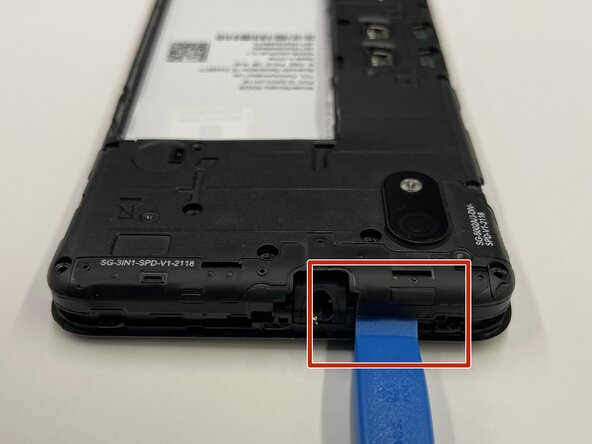
    • Insert the opening tool into the seam between the back plastic case and the front screen.

    • Slide it around the edge of the phone to release the clips holding them together.

    • Remove the bottom case by hand.

  2. Alcatel 1B 2020 Screen Replacement: crwdns2935265:02crwdnd2935265:01crwdnd2935265:03crwdne2935265:0 Alcatel 1B 2020 Screen Replacement: crwdns2935265:02crwdnd2935265:02crwdnd2935265:03crwdne2935265:0 Alcatel 1B 2020 Screen Replacement: crwdns2935265:02crwdnd2935265:03crwdnd2935265:03crwdne2935265:0
    • Place the pry tool between the bottom of the battery and the bracket.

    • Lift the battery using the pry tool to remove it.

  3. Alcatel 1B 2020 Screen Replacement, Rear Camera: crwdns2935265:03crwdnd2935265:01crwdnd2935265:03crwdne2935265:0 Alcatel 1B 2020 Screen Replacement, Rear Camera: crwdns2935265:03crwdnd2935265:02crwdnd2935265:03crwdne2935265:0 Alcatel 1B 2020 Screen Replacement, Rear Camera: crwdns2935265:03crwdnd2935265:03crwdnd2935265:03crwdne2935265:0
    • Use a Phillips #000 screwdriver to remove sixteen 3.0 mm screws that secure the black plastic bracket.

  4. Alcatel 1B 2020 Screen Replacement: crwdns2935265:04crwdnd2935265:01crwdnd2935265:03crwdne2935265:0 Alcatel 1B 2020 Screen Replacement: crwdns2935265:04crwdnd2935265:02crwdnd2935265:03crwdne2935265:0 Alcatel 1B 2020 Screen Replacement: crwdns2935265:04crwdnd2935265:03crwdnd2935265:03crwdne2935265:0
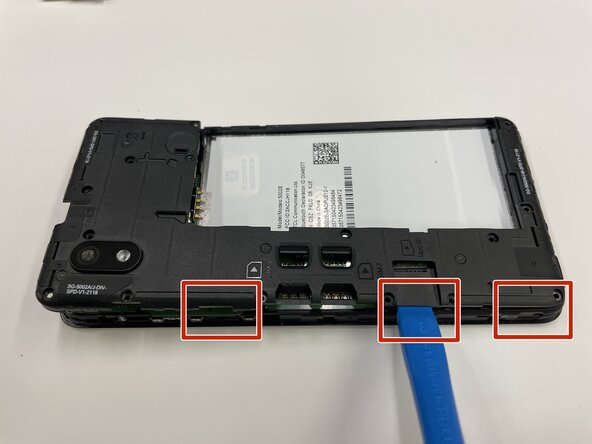
    • Use a plastic opening tool to pry the midframe from the bottom case.

    • Slide the end of the opening tool around the perimeter of the device to release the clips holding the midframe and bottom case together.

    • Be careful, the motherboard is located right beneath the midframe.

    • Remove the midframe from the phone.

  5. Alcatel 1B 2020 Screen Replacement: crwdns2935265:05crwdnd2935265:01crwdnd2935265:03crwdne2935265:0 Alcatel 1B 2020 Screen Replacement: crwdns2935265:05crwdnd2935265:02crwdnd2935265:03crwdne2935265:0 Alcatel 1B 2020 Screen Replacement: crwdns2935265:05crwdnd2935265:03crwdnd2935265:03crwdne2935265:0
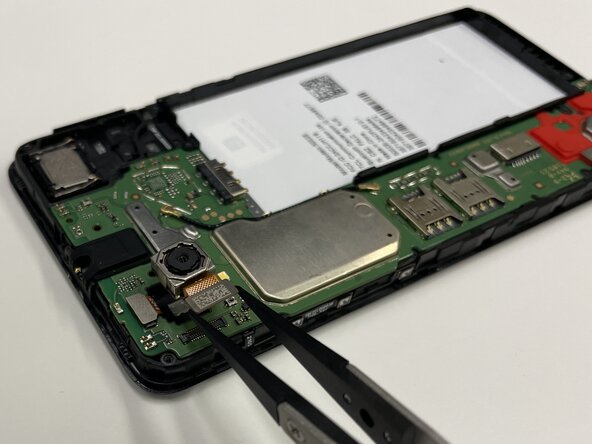
    • Place a spudger or an opening tool under the camera press connector edge and pry straight up to disconnect it.

    • Make sure to pry under the edge of the connector itself, and not under the socket on the board. Otherwise, you risk permanently damaging the socket.

    • Use the tweezers to pull the rear camera out.

  6. Alcatel 1B 2020 Screen Replacement, Motherboard: crwdns2935265:06crwdnd2935265:01crwdnd2935265:02crwdne2935265:0 Alcatel 1B 2020 Screen Replacement, Motherboard: crwdns2935265:06crwdnd2935265:02crwdnd2935265:02crwdne2935265:0
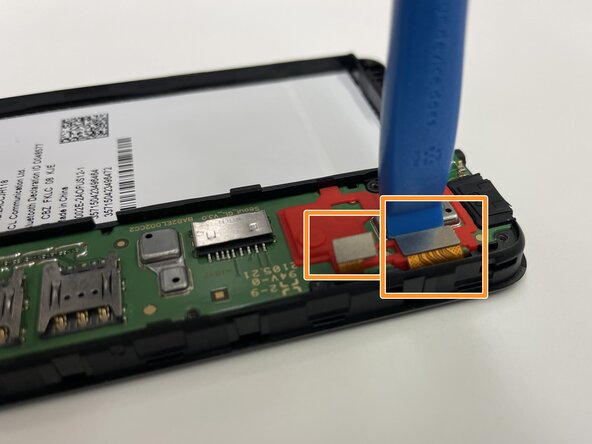
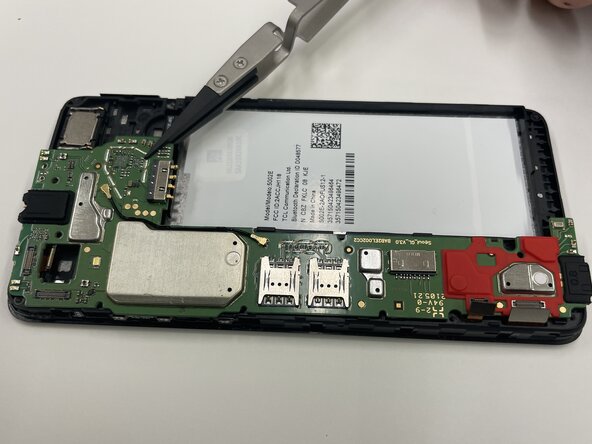
    • Insert a spudger or opening tool under the edge of the front camera cable connector and pry straight up to disconnect it.

    • Disconnect the other two press connectors near the red part of the motherboard.

  7. Alcatel 1B 2020 Screen Replacement: crwdns2935265:07crwdnd2935265:01crwdnd2935265:03crwdne2935265:0 Alcatel 1B 2020 Screen Replacement: crwdns2935265:07crwdnd2935265:02crwdnd2935265:03crwdne2935265:0 Alcatel 1B 2020 Screen Replacement: crwdns2935265:07crwdnd2935265:03crwdnd2935265:03crwdne2935265:0
    • Use tweezers to remove the motherboard from the phone.

  8. Alcatel 1B 2020 Screen Replacement, Front Camera: crwdns2935265:08crwdnd2935265:01crwdnd2935265:03crwdne2935265:0 Alcatel 1B 2020 Screen Replacement, Front Camera: crwdns2935265:08crwdnd2935265:02crwdnd2935265:03crwdne2935265:0 Alcatel 1B 2020 Screen Replacement, Front Camera: crwdns2935265:08crwdnd2935265:03crwdnd2935265:03crwdne2935265:0
    • Place the motherboard to the side.

    • The front camera ribbon connector was already removed in the previous step.

    • Use tweezers to pull the front-facing camera from the smartphone.

  9. Alcatel 1B 2020 Screen Replacement, Screen: crwdns2935265:09crwdnd2935265:01crwdnd2935265:03crwdne2935265:0 Alcatel 1B 2020 Screen Replacement, Screen: crwdns2935265:09crwdnd2935265:02crwdnd2935265:03crwdne2935265:0 Alcatel 1B 2020 Screen Replacement, Screen: crwdns2935265:09crwdnd2935265:03crwdnd2935265:03crwdne2935265:0
    • Flip your Alcatel 1B 2020 face up so the screen is facing you.

    • Slide the edge of the Jimmy between the case and the screen to pry it from the phone.

    • Insert opening picks under the screen as you work around the edge with the Jimmy to keep the adhesive from reattaching.

  10. Alcatel 1B 2020 Screen Replacement: crwdns2935265:010crwdnd2935265:01crwdnd2935265:03crwdne2935265:0 Alcatel 1B 2020 Screen Replacement: crwdns2935265:010crwdnd2935265:02crwdnd2935265:03crwdne2935265:0 Alcatel 1B 2020 Screen Replacement: crwdns2935265:010crwdnd2935265:03crwdnd2935265:03crwdne2935265:0
    • The screen will eventually lift with enough prying.

    • Flip the device over.

    • Place a spudger or an opening tool under the edge of the press connector and pry straight up to disconnect it.

    • Make sure to pry under the edge of the connector itself, and not under the socket on the board. Otherwise, you risk permanently damaging the socket.

    • Carefully slide the ribbon cable out from the opening at the edge of the frame.

  11. Alcatel 1B 2020 Screen Replacement: crwdns2935265:011crwdnd2935265:01crwdnd2935265:03crwdne2935265:0 Alcatel 1B 2020 Screen Replacement: crwdns2935265:011crwdnd2935265:02crwdnd2935265:03crwdne2935265:0 Alcatel 1B 2020 Screen Replacement: crwdns2935265:011crwdnd2935265:03crwdnd2935265:03crwdne2935265:0
    • Flip the device back over.

    • The LCD screen is very fragile. Be careful when prying and handling it.

    • The ribbon connector for the LCD screen was disconnected in the previous step, so the screen will pop up using the Jimmy.

    • Slide the Jimmy between the LCD and the digitizer to separate the two components.

    • Lift the LCD screen out with tweezers or your hands.

crwdns2915888:0crwdne2915888:0

To reassemble your device, follow these instructions in reverse order. Take your e-waste to an R2 or e-Stewards certified recycler.

Peter Wisniewski

crwdns2935283:003/09/26crwdne2935283:0

707 crwdns2915208:0crwdne2915208:0

crwdns2935297:05crwdne2935297:0

crwdns2935287:0crwdne2935287:0

Purdue University Northwest, Team 7-2, Dieterle Spring 2026 crwdns2935289:0Purdue University Northwest, Team 7-2, Dieterle Spring 2026crwdne2935289:0

PNW-DIETERLE-S26S7G2

crwdns2931471:03crwdne2931471:0

crwdns2935297:05crwdne2935297:0

crwdns2947412:00crwdne2947412:0

crwdns2917038:0crwdne2917038:0

crwdns2936625:0crwdne2936625:0:

crwdns2936751:024crwdne2936751:0 3

crwdns2936753:07crwdne2936753:0 3

crwdns2936753:030crwdne2936753:0 10

crwdns2942667:0crwdne2942667:0 40