Battery

|
crwdns2933313:01crwdne2933313:0 crwdns2934263:02crwdne2934263:0 |
How do I stop my camera zoom from malfunctioning |
|
crwdns2933313:01crwdne2933313:0 crwdns2934263:00crwdne2934263:0 |
Why won't my camera turn on? |
crwdns2935065:0crwdne2935065:0
Samsung Electronics Co., Ltd released a new member of the WB family of handheld zoom cameras in 2014, the WB35F. The WB35F boasts an impressive 12X optical zoom, 2.7" LCD, Smart Wi-Fi, and 16MP CCD sensor, allowing photographers to capture stunning images in sharp definition and vibrant color.
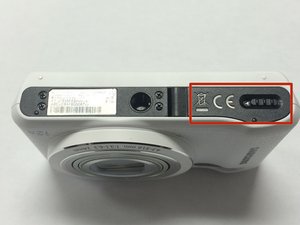
The Samsung WB35F digital camera can be identified by the IMEI and serial number on the label located on the bottom of the device near the battery. For additional help with identifying your camera, visit the Samsung Support page.
16.2 megapixel 1/2.3" CCD
12x (24-288mm) Wide Angle Optical Zoom Lens
Optical Image Stabilization
2.7" LCD screen
720p full HD video at 30fps
ISO up to 3200
Built-in Wi-Fi & NFC
Tag & Go 1-Touch Sync to Smartphone
Smart Mode
Smart Auto mode
Live Panorama mode
Motion Photo
Split Shot
Smart Filter
Magic Frame
Samsung WB35F/WB36F/WB37F Benutzerhandbuch
Samsung WB35F/WB36F/WB37F Manuel d'utilisation
WB35F/WB36F/WB37F Návod na použitie fotoaparátu
WB35F/WB36F/WB37F Manualul utilizatorului
Samsung WB35F/WB36F/WB37F Manuale utente
WB35F/WB36F/WB37F kaamera kasutusjuhend
Samsung WB35F/WB36F/WB37F Navodila za uporabo
Samsung WB35F/WB36F/WB37F Bruksanvisning
Samsung WB35F/WB36F/WB37F Benutzerhandbuch
Samsung WB35F/WB36F/WB37F Käyttöopas
Samsung WB35F/WB36F/WB37F 使用手册
WB35F/WB36F/WB37F Gebruiksaanwijzing
USFT-TANSKI-W15S1G6
crwdns2931471:04crwdne2931471:0
crwdns2935297:060crwdne2935297:0
crwdns2936751:024crwdne2936751:0 1
crwdns2936753:07crwdne2936753:0 19
crwdns2936753:030crwdne2936753:0 102
crwdns2959996:0crwdne2959996:0 6,221


