crwdns2933423:0crwdne2933423:0
crwdns2947577:0crwdnd2947577:0crwdne2947577:0

Samsung WB35F Menu/Control Buttons Replacement

crwdns2869540:0crwdne2869540:0: 1.2K

crwdns2959988:0crwdne2959988:0

crwdns2959990:0crwdne2959990:0
2
crwdns2959992:0crwdne2959992:0
17
crwdns2959994:0crwdne2959994:0
81
crwdns2959996:0crwdne2959996:0
1,182
crwdns2955950:0crwdne2955950:0: 0

crwdns2959998:0crwdne2959998:0

crwdns2960000:0crwdne2960000:0
crwdns2959984:0crwdne2959984:0: 1

crwdns2959972:01crwdne2959972:0

crwdns2959986:0crwdne2959986:0: 0

crwdns2959958:0crwdne2959958:0

crwdns2955944:0crwdne2955944:0: 15 - 30 crwdns2931279:0crwdne2931279:0
crwdns2955970:0crwdne2955970:0: crwdns2937801:0crwdne2937801:0
Samsung WB35F Menu/Control Buttons  Replacement

crwdns2915892:0crwdne2915892:0

crwdns2959928:0crwdne2959928:0 ↓

This guide will give the user step by step instructions on how to replace Menu/Control Buttons of the camera.

crwdns2959930:0crwdne2959930:0

crwdns2943215:0crwdne2943215:0

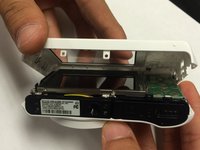
    1. Samsung WB35F Menu/Control Buttons  Replacement, Rear Case: crwdns2935265:01crwdnd2935265:01crwdnd2935265:03crwdne2935265:0 Samsung WB35F Menu/Control Buttons  Replacement, Rear Case: crwdns2935265:01crwdnd2935265:02crwdnd2935265:03crwdne2935265:0 Samsung WB35F Menu/Control Buttons  Replacement, Rear Case: crwdns2935265:01crwdnd2935265:03crwdnd2935265:03crwdne2935265:0
      • The first thing to do will be unscrew all the screws using Phillips #000 Screwdriver.

      • Keep all the screws in order. Black screws goes under the bottom of camera, and the silver screws goes on the sides and inside of the camera.

      crwdns2952109:0crwdne2952109:0

      crwdns2917038:0crwdne2917038:0

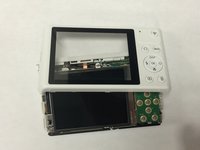
    2. Samsung WB35F Menu/Control Buttons  Replacement: crwdns2935265:02crwdnd2935265:01crwdnd2935265:02crwdne2935265:0 Samsung WB35F Menu/Control Buttons  Replacement: crwdns2935265:02crwdnd2935265:02crwdnd2935265:02crwdne2935265:0
      • Using the spudger, and plastic opening tool open the casing of camera.

      crwdns2952109:0crwdne2952109:0

      crwdns2917038:0crwdne2917038:0

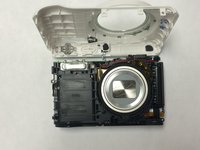
    3. Samsung WB35F Menu/Control Buttons  Replacement: crwdns2935265:03crwdnd2935265:01crwdnd2935265:03crwdne2935265:0 Samsung WB35F Menu/Control Buttons  Replacement: crwdns2935265:03crwdnd2935265:02crwdnd2935265:03crwdne2935265:0 Samsung WB35F Menu/Control Buttons  Replacement: crwdns2935265:03crwdnd2935265:03crwdnd2935265:03crwdne2935265:0
      • Once you open the camera case, you will be able to work on any part of the camera.

      crwdns2952109:0crwdne2952109:0

      crwdns2917038:0crwdne2917038:0

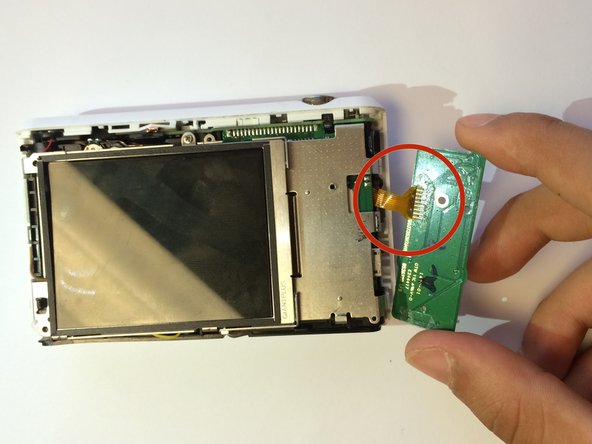
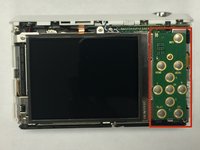
    1. Samsung WB35F Menu/Control Buttons  Replacement, Menu/Control Buttons: crwdns2935265:04crwdnd2935265:01crwdnd2935265:02crwdne2935265:0 Samsung WB35F Menu/Control Buttons  Replacement, Menu/Control Buttons: crwdns2935265:04crwdnd2935265:02crwdnd2935265:02crwdne2935265:0
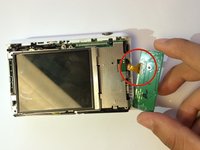
      • Carefully unplug the ribbon from the Menu/Control board.

      crwdns2952109:0crwdne2952109:0

      crwdns2917038:0crwdne2917038:0

    2. Samsung WB35F Menu/Control Buttons  Replacement: crwdns2935265:05crwdnd2935265:01crwdnd2935265:01crwdne2935265:0
      • Once you unplug the ribbon. Take out the old board and replace it with new menu/control board.

      crwdns2952109:0crwdne2952109:0

      crwdns2917038:0crwdne2917038:0

crwdns2915888:0crwdne2915888:0

To reassemble your device, follow these instructions in reverse order.

crwdns2935221:0crwdne2935221:0

crwdns2935227:0crwdne2935227:0

Sarmad Khan

crwdns2935283:001/09/15crwdne2935283:0

549 crwdns2915208:0crwdne2915208:0

crwdns2935297:05crwdne2935297:0

crwdns2935287:0crwdne2935287:0

USF Tampa, Team 1-6, Tanski Winter 2015 crwdns2935289:0USF Tampa, Team 1-6, Tanski Winter 2015crwdne2935289:0

USFT-TANSKI-W15S1G6

crwdns2931471:04crwdne2931471:0

crwdns2935297:060crwdne2935297:0

crwdns2947412:00crwdne2947412:0

crwdns2917038:0crwdne2917038:0

crwdns2936625:0crwdne2936625:0:

crwdns2936751:024crwdne2936751:0 2

crwdns2936753:07crwdne2936753:0 17

crwdns2936753:030crwdne2936753:0 81

crwdns2959996:0crwdne2959996:0 1,182