|
crwdns2933315:02crwdne2933315:0 crwdns2934263:00crwdne2934263:0 |
How can I check if something needs fixing? |
|
crwdns2933315:02crwdne2933315:0 crwdns2934263:00crwdne2934263:0 |
On/Off switch is no longer working on Dell XPS 8300. |
|
crwdns2933315:03crwdne2933315:0 crwdns2934263:00crwdne2934263:0 |
When I turn on my computer it began beeping g 4 times continuously |
|
crwdns2933313:01crwdne2933313:0 crwdns2934263:00crwdne2934263:0 |
When I turn on my computer it beeps 5 times continuously |
crwdns2916646:0crwdne2916646:0
Background and Identification
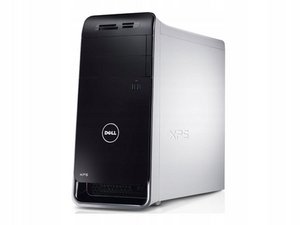
The Dell XPS 8500 was released in 2013 and was sold as a high-end consumer desktop by Dell. It has been superseded by multiple replacement systems and is long discontinued.
To identify your system as an XPS 8500, the model is located on the I/O shield on the back of the system. In addition, the model number can also be verified with the service tag.

Service tag locations
- Top case cover
- COA location for Windows 7 systems
- On the back of the chassis (Code 128 barcode)


Specifications
Note: These systems were sold with multiple configuration options (CTO/Preconfigured). As such, providing factory specifications is not practical. The factory configuration can be found under System configuration/Original configuration on the Dell Support website.
- Processor: LGA 1155 Core i3/5/7 Ivy Bridge (3XXX)
- Memory: 8-32GB
- Maximum supported memory:
- Dell official/Core i5: 16GB
- Unofficial (i7 systems only): 32GB
- NOTE: THIS IS NOT SUPPORTED BY DELL. Do this at your own risk!
- Maximum supported memory:
- Graphics: Dedicated or Integrated.
- Typically dedicated.
- Dedicated video systems can be identified by the port covers over the motherboard video connectors or a POST message stopping the boot process.
- In order to use the onboard graphics, the card must be removed. The system will not POST with a GPU installed while using onboard graphics.
- Typically dedicated.
- Wireless: Not available on all systems from the factory. Available as an option.
- The page author's system came with an ath9k based DW1703 installed. If the system comes with a low quality card or the footprint and antenna hardware, it can be added later on.
- Hard drive: Check system specifications.
- Typically ranges from 1-2TB on higher spec systems or 500GB for base models.
- Optical drive: SATA DVD±R Recorder (DVD/CD burning compatibility).
- Can be upgraded to a Blu-Ray drive if this is not sufficient.
Dell XPS 8500 Quick Start Guide (EN, CS, HU, SK)
Dell XPS 8500 Quick Start Guide (EN, FR, DE, IT, AR)
Dell XPS 8500 Quick Start Guide (EN, ZH, JA, KO)
Dell XPS 8500 Quick Start Guide (EN, ZH, JA, KO)
Dell XPS 8500 Kezelési kézikönyv
Dell XPS 8500 Quick Start Guide (EN, DA, FI, NO, SV)
Dell XPS 8500 Manual del propietario
Dell XPS 8500 Manual do proprietário
Dell XPS 8500 Quick Start Guide (EN, PL, RU, TR, HE)
Dell XPS 8500 Quick Start Guide (EN, PL, RU, TR, TH)
Dell XPS 8500 Instrukcja użytkownika
Dell XPS 8500 Quick Start Guide (EN, EL, PT)
Dell XPS 8500 Manuale del proprietario
Dell XPS 8500 Руководство по эксплуатации
Dell XPS 8500 Manual do Proprietário
Dell XPS 8500 Quick Start Guide (EN, ID, ES)
Dell XPS 8500 Quick Start Guide (EN, NL, FR, PT, ES)
Dell XPS 8500 Príručka majiteľa
Dell XPS 8500 Panduan Pemilik Komputer
Dell XPS 8500 Benutzerhandbuch
Dell XPS 8500 Εγχειρίδιο κατόχου
Dell XPS 8500 Kullanıcı El Kitabı
Dell XPS 8500 Manuel du propriétaire

crwdns2935287:0crwdne2935287:0

Master Techs crwdns2935289:0Master Techscrwdne2935289:0
Community
crwdns2931471:0337crwdne2931471:0
crwdns2935297:08,294crwdne2935297:0
