Battery
|
crwdns2933313:01crwdne2933313:0 crwdns2934263:02crwdne2934263:0 |
How to replace solar panel window |
|
crwdns2933313:01crwdne2933313:0 crwdns2934263:01crwdne2934263:0 |
Why are not all the buttons responding while pressing them? |
|
crwdns2933313:01crwdne2933313:0 crwdns2934263:00crwdne2934263:0 |
My calculator can't work, what should I do? |
|
crwdns2933313:01crwdne2933313:0 crwdns2934263:00crwdne2934263:0 |
Why won’t it use the battery? |
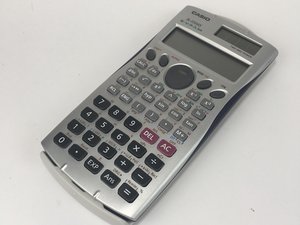
Scientific Casio Calculator released August 2000.
COLORS MAY VARY: Although the one featured in these guides has a white cover plate, a grey face plate, and a dark blue/purple back plate.
This calculator has a removable cover plate, and the face plate has a solar panel in the top right corner, a two line horizontal screen beneath the solar panel, it also has 46 buttons, and a central button used for display navigation.
It has the ability to input mathematical expressions as they are written. Therefore, it can view the expressions and results at the same time on the screen.
This device can be identified by the model name FX-115MS.
Casio FX-115MS Manufacturer's Guide
Casio FX-115MS Complete User Guide
Casio FX-115MS Features and Specifications
fx-95MS, fx-100MS, fx-115MS (fx-912MS), fx-570MS y fx-991MS Guía del usuario
Casio fx-MS Series User's Guide
Casio fx-100MS, fx-115MS, fx-570MS and fx-991MS User's Guide
Casio fx-100MS/fx-115MS (fx-912MS) — Mode d'emploi 2, fonctions supplémentaires
Casio fx-95MS/fx-100MS/fx-570MS/fx-912MS (fx-115MS)/fx-991MS 取扱説明書
CASIO fx-100MS, fx-115MS, fx-570MS e fx-991MS Guia do Usuário
Casio Office, School & Household Equipment and Electronic Calculators General Catalogue 2006–2007
USFT-NANCE-F16S2G2
crwdns2931471:04crwdne2931471:0
crwdns2935297:060crwdne2935297:0
crwdns2936751:024crwdne2936751:0 5
crwdns2936753:07crwdne2936753:0 26
crwdns2936753:030crwdne2936753:0 144
crwdns2959996:0crwdne2959996:0 11,110