|
crwdns2933313:01crwdne2933313:0 crwdns2934263:02crwdne2934263:0 |
How to fix no bootable device |
|
crwdns2933313:01crwdne2933313:0 crwdns2934263:00crwdne2934263:0 |
Broken my aux in the aux |
|
crwdns2933315:02crwdne2933315:0 crwdns2934263:00crwdne2934263:0 |
Why is my internal hard drive is not accepted by my pc |
|
crwdns2933313:01crwdne2933313:0 crwdns2934263:00crwdne2934263:0 |
My computer turns off right after it turns on. |
crwdns2916646:0crwdne2916646:0
Background
The Acer Extensa series is a line of Acer laptops designed for business and office users. The Extensa series includes several notebooks with different design, functionality, and performance. The Extensa name was used by Texas Instruments which sold its mobile computing division to Acer in 1997. The Extensa line competes with the Dell Vostro and Latitude lines and Lenovo ThinkPad laptops.
Acer markets its Extensa laptops as providing up to seven hours of portable power. Acer laptops include AcerCloud to store and access files on all of a user’s devices. Acer also markets the Extensa line as including some of the slimmest laptops in its class. The Extensa line includes the Precision Touchpad, which includes a pinch-to-zoom feature. The touchpad is designed to reduce unintended taps and stray cursor movements. Some Extensa laptops include a full numerical keypad, which causes the trackpad to be offset slightly to the left side of the laptop’s base. Most Extensa computers include a media drive that can be used for playing movies and storing data such as homework, financial documents, and family photos. The Extensa line is Skype Certified, meaning its hardware is optimized to reduce gaps and lags in speech and minimize background noise.
Identification
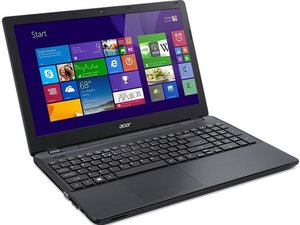
While there are many different laptop models within the Acer Extensa series, look for the following physical characteristics of the current models in the series:
- A dark gray, silver, or a combination, colored case, depending on the model number.
- A black bezel around the display with the brand "acer" in silver lowercase letters at the bottom of the bezel.
- The word "acer" displayed in silver letters located in the center top or direct center of the top case of the laptop.
Physical dimensions vary across the series. In general, the number in the model name designates the approximate dimensions of the display. For example, the Extensa 15 features a 15.6-inch display, measured diagonally from corner to corner.
The best way to identify the exact model of your Acer Extensa series laptop is to refer to the service label, which is usually found on the underside of Acer laptops.
Here's an example of where to locate the service label on an Acer Notebook.
Additional Information
Acer Extensa 5635/5635Z/5235 Service Guide
Acer Extensa 4620/4620Z/4220 Series User's Guide
Acer TravelMate 3300/Extensa 3100 Series Service Guide
Acer Extensa 4630/4630Z/4230/4230Z Series Quick Guide
Acer Extensa 2700 Series Service Guide
Extensa 5635/5635Z/5235 Service Guide
Acer Extensa 2000/2500 Series Service Guide
Acer Aspire 5110/5100/3100, TravelMate 5510/5210, Extensa 5410/5010 Service Guide
Service Guide TravelMate 5330/Extensa 5230/5630Z Series
TravelMate 5720/5320 Series Extensa 5620/5220 Series Service Guide
TravelMate 5720/5320 Series Extensa 5620/5220 Series Service Guide
Acer Extensa 610CD Dual-Scan Display Specifications
Acer Extensa 610CDT Active-Matrix Display Specifications
Acer Extensa 500 Series Notebook Computer User's Guide
Acer Extensa 4420/4120 Series User's Guide
Acer Extensa 5235-312G16N T3100 15,6-Zoll-Notebook Datenblatt
Acer Extensa 5510/5510Z/5200 Series User's Guide
Extensa 5620/5620Z/5220 Series User's Guide
Acer Extensa 5430/5130 Series Quick Guide
Acer Extensa 4010 Serie – Benutzerhandbuch
Acer Extensa 500 Series Notebook Computer User Guide
Acer Extensa 670 Series Notebook Computer User Guide
Acer Extensa 365 Series Notebook Computers User Guide
Acer Extensa 390 Series Notebook User's Guide
Acer Extensa 365 Series Notebook Computers User's Guide
Extensa 2000/2500 Series User's Guide
Extensa 5620/5620Z/5610/5220/5210 Series User's Guide
Acer Extensa 2900 Series Notebook User Guide
Extensa 6700 Series User's Guide
Acer Extensa 2300/3000 Series User's Guide
Acer Extensa 4610/4210 Series User's Guide
Acer Extensa 4100 Series User Guide
Acer Extensa Series Generic User Guide
Extensa 2350/2950 Series User's Guide