
crwdns2933423:0crwdne2933423:0
crwdns2947577:0crwdnd2947577:0crwdne2947577:0

Not enough disk space? Need a backup solution? External drives provide you with extra storage in your office or on the go. Learn how to repair them here.

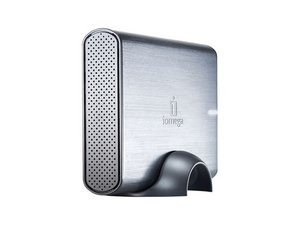
Disassembly of Simple Drive Deluxe

I have a REALLY old SimpleTech Simple Drive Deluxe, and it has stopped being accessible so I'd like to remove the drive from the case (I have a number of adapters for different types of drives) and see if I can still access the data. The drive has 4 deeply-inset screws that appear to be Phillips-head. I just bought an iFixit Essential Electronics toolkit and the largest Phillips head seems to fit (loosened up 2 of the 4 screws) - but I cannot get it to "catch" on the other two.

Any tips?

crwdns2934089:0crwdne2934089:0 crwdns2934093:0crwdne2934093:0

crwdns2934109:0crwdne2934109:0

crwdns2889612:0crwdne2889612:0 0

crwdns2934285:0crwdne2934285:0

crwdns2933313:01crwdne2933313:0

If two screws loosened but the other two won't catch, double check that they're actually Phillips screws and not Torx or a security variant, as older external drives sometimes use different screw types in the same enclosure. Try applying firm downward pressure with the correct sized bit and inspect the screw heads with a flashlight. If the drive itself is still healthy, removing it from the enclosure and connecting it through a compatible adapter is often the easiest way to recover the data.

crwdns2934105:0crwdne2934105:0

crwdns2889612:0crwdne2889612:0 0
crwdns2934285:0crwdne2934285:0

crwdns2934229:0crwdne2934229:0

Cara crwdns2934231:0crwdne2934231:0
crwdns2936625:0crwdne2936625:0:

crwdns2936751:024crwdne2936751:0 1

crwdns2936753:07crwdne2936753:0 22

crwdns2936753:030crwdne2936753:0 22

crwdns2942667:0crwdne2942667:0 22