
crwdns2933423:0crwdne2933423:0
crwdns2947577:0crwdnd2947577:0crwdne2947577:0

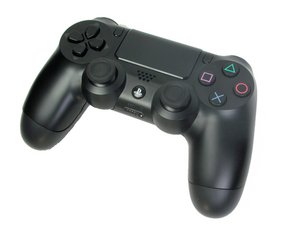
PS4 Controller model CUH-ZCT1. Released in November 2013 by Sony Computer Entertainment, this six-axis, 3.7 V lithium ion battery controller is uncomplicated to repair. (NOTE: Teardown guide is NOT for this model)

Can this component be replaced?

So when I was trying to change the analog sticks on my controller I accidently knocked off a component fortunately I have a few motherboards with that component can it be replaced?

Block Image
Block Image
Block Image
crwdns2934089:0crwdne2934089:0 crwdns2934093:0crwdne2934093:0

crwdns2934109:0crwdne2934109:0

crwdns2889612:0crwdne2889612:0 0

crwdns2934285:0crwdne2934285:0

crwdns2933313:01crwdne2933313:0

crwdns2934057:0crwdne2934057:0

Hi!

Yes it can, but requires soldering.

I think it’s a cap.

But since you got the same component on another motherboard, you can just replace it!

Please let us know how that goes!

crwdns2934105:0crwdne2934105:0

crwdns2889612:0crwdne2889612:0 1

crwdns2944067:06crwdne2944067:0:

As long as the pads haven’t been pulled off

crwdns2934271:0crwdnd2934271:0crwdne2934271:0

Do they look pulled off?

crwdns2934271:0crwdnd2934271:0crwdne2934271:0

Hard to see.. can you upload a closer/sharper picture? If the pads are ripped off, you need to repair the solder pad there..

crwdns2934271:0crwdnd2934271:0crwdne2934271:0

@christophe89153 try to apply solder to the contacts; if they stick then you're fine & if they don't then you've ripped the pads off. fortunately it's not such a hard fix judging from the pics but it's a little hard to explain

anyway, try to apply solder to the pads and see if they stick first, that'll help a lot.

crwdns2934271:0crwdnd2934271:0crwdne2934271:0

Update I put solder on the pads and it looks like it's sticking I've uploaded a photo

crwdns2934271:0crwdnd2934271:0crwdne2934271:0

crwdns2934273:01crwdne2934273:0

crwdns2934285:0crwdne2934285:0

crwdns2934229:0crwdne2934229:0

Christopher D crwdns2934231:0crwdne2934231:0
crwdns2936625:0crwdne2936625:0:

crwdns2936751:024crwdne2936751:0 0

crwdns2936753:07crwdne2936753:0 20

crwdns2936753:030crwdne2936753:0 49

crwdns2942667:0crwdne2942667:0 49