crwdns2933423:0crwdne2933423:0

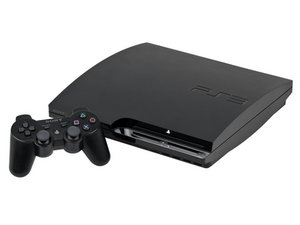
The PlayStation 3 Slim is the second version of the PS3 video game console with the original model number CECH-2000. Produced by Sony Computer Entertainment it fixed many issues of the original (fat) Playstation 3. It was released on September 1, 2009.

retrieving data from a ps3 hard drive

how do i retrieve the data from a ps3 slim hard drive as i have movies videos and other personal files and folders on the drive but unable to retrieve them so how do i do this as i want the drive contents off if a full memory wipe is to be performed

crwdns2934089:0crwdne2934089:0 crwdns2934093:0crwdne2934093:0

crwdns2934109:0crwdne2934109:0

crwdns2889612:0crwdne2889612:0 1
crwdns2934285:0crwdne2934285:0

crwdns2933315:02crwdne2933315:0

crwdns2934057:0crwdne2934057:0

Hi!

You cannot connect it to your PC and read the data from the HDD. This is because the data is encrypted with a unique key.

If the PS3 is still stock, the options are very limited and the chance is small that you can transfer it to your PC or NAS (it only can play from the NAS).

What kind of video's do you mean? Home videos? Downloaded movies from the PS Store? If the PS3 is still working, you can try to transfer them with a USB.

Plug the USB drive into the PS3 and go to Video > Highlight the video file > Press triangle and go to copy, copy it to your USB drive.

Be aware: Only FAT32 formatted USB drives will work, so the file size is limited to 4GB.

And what do you mean with personal files..?

There are not that many options left, I'm afraid.

crwdns2934105:0crwdne2934105:0

crwdns2889612:0crwdne2889612:0 1

crwdns2944067:02crwdne2944067:0:

does not matter what type of files they are just need to retrieve them

crwdns2934271:0crwdnd2934271:0crwdne2934271:0

The only thing you can try is to plug in a formatted FAT32 USB drive. Go to the files and movies, press triangle and search for the copy option. Copy it to your USB drive. That is the only way if your PS3 is stock.

crwdns2934271:0crwdnd2934271:0crwdne2934271:0

crwdns2934285:0crwdne2934285:0

Take it apart and connect to a PC using a SATA/SAS to USB cable.

Retrieve the files using your file explorer and then reconnect to your PS3

crwdns2934105:0crwdne2934105:0

crwdns2889612:0crwdne2889612:0 0

crwdns2944067:03crwdne2944067:0:

I don't think it works that way. The PS3 drive is encrypted with a unique key. You cannot just read the data on a computer.

crwdns2934271:0crwdnd2934271:0crwdne2934271:0

I already tried that and nothing so that is bull

crwdns2934271:0crwdnd2934271:0crwdne2934271:0

I completely forgot about that thanks guys!

Use this: https://github.com/jhonathanc/PS3-HDD-Re... make sure to follow the instructions. Good luck!

also use https://www.psx-place.com/threads/dumpin... for the root key

crwdns2934271:0crwdnd2934271:0crwdne2934271:0

crwdns2934285:0crwdne2934285:0

crwdns2934229:0crwdne2934229:0

Matt crwdns2934231:0crwdne2934231:0
crwdns2936625:0crwdne2936625:0:

crwdns2936751:024crwdne2936751:0 28

crwdns2936753:07crwdne2936753:0 32

crwdns2936753:030crwdne2936753:0 32

crwdns2942667:0crwdne2942667:0 32