crwdns2933423:0crwdne2933423:0

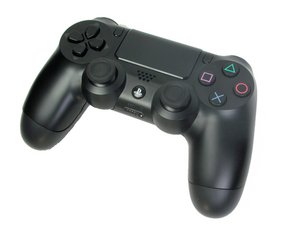
PS4 Controller model CUH-ZCT1. Released in November 2013 by Sony Computer Entertainment, this six-axis, 3.7 V lithium ion battery controller is uncomplicated to repair. (NOTE: Teardown guide is NOT for this model)

Dualshock4 after analog replacement, not turning on

Block Image
Block Image
Block Image
Block Image

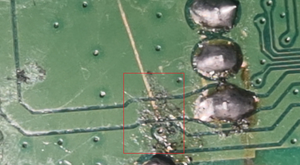
I had stick drift on one of my Ds4 v2 contoller (JDM-055), i decided to replace it with hall effect sticks, when i tried to desolder 1 pin had trouble coming loose, 1 of the big pins from module, i kept reapplying solder and desoldering with pump, i finally tried to pry the other loose pins, they all came loose except this one last pin, i treid to heat it again, it came off, but the circular ring on the pcb which touches the vias came off during last heating, i didnt see any traces from this pin, so i continued with replacement, replaced everything, but accidentally when adjusting my pcb holder, the plastic which has the battery pin connector came loose, it was still connected to pcb on the soldered part, but the plastic side kinda came loose, i tried applying hot glue and secured it, assembled everything and tried turning on, i got no power, so i connected back panel too to check power while wired, still no power, controller appears dead. Is it because of the loose battery pin or the burnt pcb pad

Block Image
Block Image

?

crwdns2934081:0crwdne2934081:0 crwdns2934083:0crwdne2934083:0 crwdns2934093:0crwdne2934093:0

crwdns2934109:0crwdne2934109:0

crwdns2889612:0crwdne2889612:0 0
crwdns2934285:0crwdne2934285:0

crwdns2933315:02crwdne2933315:0

crwdns2934051:0crwdne2934051:0

@paplo1634 before you do anything else, there's a serious issue with your motherboard. I found solder connecting the pins of this chip. Highlighted in this picture:

Block Image


You probably heated the motherboard for too long and that's what's causing the controller to not power on. Remove it using solder wick and see if it works.

The loose solder pad's only function is to hold the joystick in place, as it is only connected to the joystick's metal casing and not the potentiometers or the button. It shouldn't cause any functionality issues.

crwdns2934105:0crwdne2934105:0

crwdns2889612:0crwdne2889612:0 3

crwdns2944067:04crwdne2944067:0:

Good eye Leo!! Missed that one completely...

crwdns2934271:0crwdnd2934271:0crwdne2934271:0

Well the same thing happened to me when I was replacing the ZIF connectors on my joy-cons so I'm always keeping an eye out for stuff like this :)

crwdns2934271:0crwdnd2934271:0crwdne2934271:0

Good one :)! Happy that you found that solder ball!

crwdns2934271:0crwdnd2934271:0crwdne2934271:0

Omg i didnt even notice it, i used wick and tried turning on with battery it didnt turn on, i tried with wired, it works but kept saying low battery ds4 disconnected, that battery connector is gone i guess, but it works as wired, i dont mind it 😁, Thank you so much, i was sad from yesterday this was my first time doing this, i dont know if i can fix the battery connector, ill better take it to professionals, I have one other controller which lost a smd resistor ill post it later, Thanks everyone

crwdns2934271:0crwdnd2934271:0crwdne2934271:0

crwdns2934285:0crwdne2934285:0

Hi!

I don't think it's because the pad. Usually this will do other damage, like that the stick is drifting all the time or not working at all.

I think that the PCB is damaged by overheating causing this.

Are the other traces, fine?

Is it possible to upload pictures regarding your motherboard?

crwdns2934105:0crwdne2934105:0

crwdns2889612:0crwdne2889612:0 2

crwdns2944067:04crwdne2944067:0:

I just forgot about the scratch i made when i tried to push that last pin which was stuck, could this scratch have damaged the trace?, have attached images for it and the battery conenctor too

crwdns2934271:0crwdnd2934271:0crwdne2934271:0

Okay, the solder pad is damaged and need to be fixed. Also the traces look damaged and probably need to be fixed as well. Where the battery connector is, those pads and nearby trace do look a little damaged as well. This is probably the case why the controller isn't turning on.... So you do need to fix the traces and pad(s) to get it working again. Replacing the motherboard is another option as well.

crwdns2934271:0crwdnd2934271:0crwdne2934271:0

I found some pins connected by solder in the 3rd picture, that's probably why the controller's not turning on. If he can fix that then a new motherboard won't be necessary.

crwdns2934271:0crwdnd2934271:0crwdne2934271:0

Good eye Leo!! Missed that one completely...

crwdns2934271:0crwdnd2934271:0crwdne2934271:0

crwdns2934285:0crwdne2934285:0

crwdns2934229:0crwdne2934229:0

Paplo crwdns2934231:0crwdne2934231:0
crwdns2936625:0crwdne2936625:0:

crwdns2936751:024crwdne2936751:0 53

crwdns2936753:07crwdne2936753:0 56

crwdns2936753:030crwdne2936753:0 56

crwdns2942667:0crwdne2942667:0 56