crwdns2933423:0crwdne2933423:0

Model A1989, EMC 3358. A refresh of the existing design, with updated processor options and a change to the keyboard materials. Available in Silver and Space Gray. Released in May 2019.

Can my screen be repaired with a new eDP cable?

Block Image

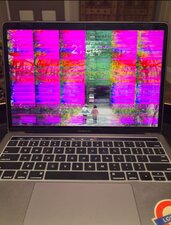
Hi, the image displayed on my screen looks like the attached image. Is this just a failed cable that can be replaced or something more serious? I am happy to try replacing the cable, just want to know if someone has encountered this before. The device is a Macbook Pro 13 inch 2019 Touchbar A1989

crwdns2934089:0crwdne2934089:0 crwdns2934093:0crwdne2934093:0

crwdns2934109:0crwdne2934109:0

crwdns2889612:0crwdne2889612:0 0
crwdns2934285:0crwdne2934285:0

crwdns2933315:03crwdne2933315:0

This smear effect is a failing T-CON board where the clocking has shifted.

Sadly, this is a circuit level repair within the T-CON board. I've attempted this repair twice and was not able to fix it as the chip was bad and not available.

Here's the needed guide MacBook Pro 13" Touch Bar 2019 Screen Replacement and the needed part is listed within it.

crwdns2934105:0crwdne2934105:0

crwdns2889612:0crwdne2889612:0 0
crwdns2934285:0crwdne2934285:0

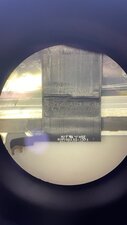
This issue is easiest to repair by just replacing the screen like DanJ mentioned - but its technical name is "dustgate" (not to be mixed with flexgate) You can repair this by replacing the data flex cables on the screen, as they get punctured by dirt and dust over time. It is a very complicated and delicate repair, but some repair shops do offer it.

Here is a close up of what can cause this damage to the cables.

Block Image

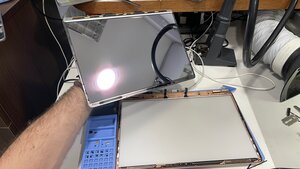
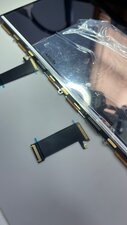
I was actually just working on one today and have a few pictures to share of what needs to be done.

You need to remove the Panel from the housing,

Block Image


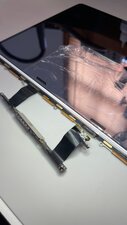
Then, you need to un-solder the flex cables so you can solder new ones on - they will go from the tcon board to the screen. I didnt finish the work today, so this is all the images I have.

Block Image
Block Image


Not something that is really a DIY project, but - a shop might want to buy your screen, or offer to fix it for you at a better price than a replacement would be!

crwdns2934105:0crwdne2934105:0

crwdns2889612:0crwdne2889612:0 0
crwdns2934285:0crwdne2934285:0

The issue you’re seeing is usually caused by a failing display flex cable or a damaged display panel. On the 2018–2019 MacBook Pro models (including A1989), the flex cable is known to wear out due to repeated opening and closing of the lid. If the distortion appears only at certain angles, it's very likely the flex cable. If the lines or artifacts stay permanently, the entire display panel may be damaged. Replacing the flex cable is cheaper, but if the problem persists, a full display replacement is required. Many users have faced this with the A1989 model.

crwdns2934105:0crwdne2934105:0

crwdns2889612:0crwdne2889612:0 0
crwdns2934285:0crwdne2934285:0

crwdns2934229:0crwdne2934229:0

Nickjw crwdns2934231:0crwdne2934231:0
crwdns2936625:0crwdne2936625:0:

crwdns2936751:024crwdne2936751:0 18

crwdns2936753:07crwdne2936753:0 18

crwdns2936753:030crwdne2936753:0 18

crwdns2942667:0crwdne2942667:0 18