crwdns2933423:0crwdne2933423:0
crwdns2947577:0crwdnd2947577:0crwdne2947577:0

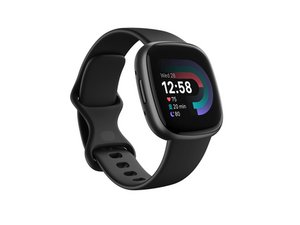
Repair and disassembly information for the 4th generation Fitbit Versa smartwatch. Released in September 2022 and identifiable by model number FB523.

Side button not working

The button on the side of the Fitbit does not work. You can press it but it doesn’t do anything. The rest of the Fitbit works fine so would be a shame to have to get a new one

crwdns2934089:0crwdne2934089:0 crwdns2934093:0crwdne2934093:0

crwdns2934109:0crwdne2934109:0

crwdns2889612:0crwdne2889612:0 0
crwdns2934285:0crwdne2934285:0

crwdns2933315:02crwdne2933315:0

It could be that the soldering points are no longer making the button have contact with the motherboard

crwdns2934105:0crwdne2934105:0

crwdns2889612:0crwdne2889612:0 0
crwdns2934285:0crwdne2934285:0

Managed to get our Fitbit Versa 4 working by lightly tapping the button and surrounding area with a small screwdriver handle!

The Issue: The watch only woke up when plugged into USB, showing the setup screen (history unknown). The button was totally dead—it wouldn't register clicks, wake the screen, or progress past setup.

The Fix: The button felt fine physically (not mushy, nice click), so mechanical failure seemed unlikely. Hoping to clear potential moisture buildup or a stuck contact, I gave it some mild vibration treatment. Why exactly it worked is still a mystery, but the tapping did the trick and brought the button back to life.
crwdns2934105:0crwdne2934105:0

crwdns2889612:0crwdne2889612:0 0
crwdns2934285:0crwdne2934285:0

crwdns2934229:0crwdne2934229:0

Rosa Ross crwdns2934231:0crwdne2934231:0
crwdns2936625:0crwdne2936625:0:

crwdns2936751:024crwdne2936751:0 3

crwdns2936753:07crwdne2936753:0 26

crwdns2936753:030crwdne2936753:0 116

crwdns2959996:0crwdne2959996:0 407