16.2 MP Exmor R CMOS Digital Still Camera with 3.5-inch OLED Touchscreen, 3D Sweep Panorama and Full HD 1080/60p Video (Black)
Release Date: January 12, 2011
There is a big white line on the screen of my camera. It works just the same nothing is wrong with it other than that. I placed it on top of my game console and when I went to use it today, there was a big white line on the screen. What do i need to fix it.
Hi! It’s a line around the middle of the screen. It’s not in the pictures I would say, it’s on the whole screen no matter what mode I put it in. I haven’t tried to download it onto another device but as of right now it goes from the top of the display to the bottom. And when I try to change the brightness of the screen, it doesn’t affect the white line, it stays very bright while the screen does not
You need to verify and not guess whether it is just seen in the camera screen or if there's also a line seen in pictures taken by the camera, downloaded and viewed on a different screen
If it is in the LCD screen in the camera only then most likely it is the screen that it the problem and it can be replaced.
if it is in pictures also then it may be a motherboard problem, a lens problem or both.
@jayeff I have added the image, and I also verified that is just on the camera screen, I viewed the pictures on my computer and they are perfectly fine.
Yeah, I found that website also and searched through all the parts but none of the descriptions seemed applicable to the screen.
Wasn't really surprised as it's not listed in the service manual parts list either.
The only reference to it is that it is designated as component EL901 and is comprised of an LCD screen, a touchscreen and a backlight circuit.
As I suggested, check if there's a part number on the back of the display or on the flex cable coming out of the display and search online for Sony (insert part number) and hope that there's more suppliers than just the two that I found (AliExpress,and Ebay)
Here's an image from the manual showing the relevant part of the schematic with the display module.
I don't know which of the items listed would be the screen because in the descriptions I don't see anything about a screen so could you help me and tell me which one is the screen please?


 1
1 

 420
420  1.6crwdns2936485:0crwdne2936485:0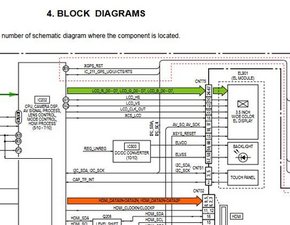

crwdns2944067:04crwdne2944067:0
Hi @gamingwithchris
Is the line showing up in pictures taken by the camera and then they're downloaded and viewed on a TV. monitor etc?
crwdns2934271:0crwdnd2934271:0 jayeff crwdne2934271:0
Hi! It’s a line around the middle of the screen. It’s not in the pictures I would say, it’s on the whole screen no matter what mode I put it in. I haven’t tried to download it onto another device but as of right now it goes from the top of the display to the bottom. And when I try to change the brightness of the screen, it doesn’t affect the white line, it stays very bright while the screen does not
crwdns2934271:0crwdnd2934271:0 Gaming With Chris crwdne2934271:0
@gamingwithchris
You need to verify and not guess whether it is just seen in the camera screen or if there's also a line seen in pictures taken by the camera, downloaded and viewed on a different screen
If it is in the LCD screen in the camera only then most likely it is the screen that it the problem and it can be replaced.
if it is in pictures also then it may be a motherboard problem, a lens problem or both.
Post an image showing the line in the screen here's how on ifixit Adding images to an existing question
crwdns2934271:0crwdnd2934271:0 jayeff crwdne2934271:0
@jayeff I have added the image, and I also verified that is just on the camera screen, I viewed the pictures on my computer and they are perfectly fine.
crwdns2934271:0crwdnd2934271:0 Gaming With Chris crwdne2934271:0