crwdns2933423:0crwdne2933423:0
crwdns2947577:0crwdnd2947577:0crwdne2947577:0

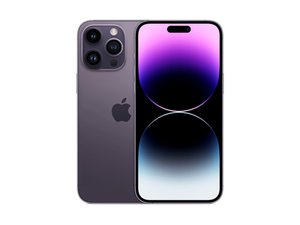
Apple's top-of-the-line flagship for 2022. Released September 16th, the iPhone 14 Pro Max sports a 6.7" ProMotion OLED, the new Bionic A16 chip, a triple rear camera system, and 5G connectivity. Successor to the iPhone 13 Pro Max.

My phone restarts itself

I have a 14pro Max and recently got my logic board changed every sense my phone been restarting itself every few minutes when it use, but when it's not in use or I'm not using it frequently it stays on what can be costing the problem I have the recent ios 17.1 I tried basically everything already, My battery health is also at 97% when it's restarts my battery doesn't deplete

crwdns2934081:0crwdne2934081:0 crwdns2934083:0crwdne2934083:0 crwdns2934093:0crwdne2934093:0

crwdns2934109:0crwdne2934109:0

crwdns2889612:0crwdne2889612:0 2

crwdns2934285:0crwdne2934285:0

crwdns2933315:05crwdne2933315:0

crwdns2934051:0crwdne2934051:0

Where can you see the panic log please? I see you’re close. I’m in sunny Belfast and a junior tech.

crwdns2934105:0crwdne2934105:0

crwdns2889612:0crwdne2889612:0 1

crwdns2944067:06crwdne2944067:0:

just outside ballymena

crwdns2957956:0crwdnd2957956:0crwdne2957956:0

Settings-> Privacy-> Analytics & Improvements-> Analytics Data-> Scroll down to the files starting with "panic-full..." & click on the most recent dated file

crwdns2957956:0crwdnd2957956:0crwdne2957956:0

"date" : "2024-03-29 11:39:44.47 -0400",

"panicString" : "panic(cpu 2 caller 0xfffffff0498dcce8): SMC PANIC - ASSERTION FAILED: target\/d74\/target.cpp:266: 0, SMC BSC failure, spreadsheet ver(*10) 150\nS.sensor array 0 - 4 is 0x0, 0x80000, 0x0, 0x0, 0x0 \nF.sensor array 0 is 0x0\n\n - Misc(2) OUTBOX1 not ready\nASSERTION FAILED: target\/d74\/target.cpp:266: 0, SMC BSC failure, spreadsheet ver(*10) 150\nS.sensor array 0 - 4 is 0x0, 0x80000, 0x0, 0x0, 0x0 \nF.sensor array 0 is 0x0\n\n\nRTKit: RTKit-2419.102.1.release - Client: AppleSMCFirmware-4283.102.1.d74.REL\n!UUID: dbddbc45-5a49-380c-a0ca-4a48d4deff69\nTime: 0x000000010f5c8e14\n\nFaulting task 2 Call Stack: 0x000000000004e8d8 0x000000000004e27c 0x000000000004e094 0x00000000000510cc 0x00000000000047e4 0x0000000000020c98 0x0000000000023e8c 0x000000000003ca40 000000000000000000\n\nChinook ASC Async error info: \nl2c_err_sts 0x5000fbfc00000000, l2c_err_adr 000000000000000000, l2c_err_inf 000000000000000000\nlsu_err_sts 000000000000000000

crwdns2957956:0crwdnd2957956:0crwdne2957956:0

@Trainee_tech NI if you need help contact me throught my facebook page

crwdns2957956:0crwdnd2957956:0crwdne2957956:0

@tech_ni thanks so much. I’ve just liked your page from my personal page so I’ll also do it from the shop. Much appreciated.

crwdns2957956:0crwdnd2957956:0crwdne2957956:0

crwdns2934273:01crwdne2934273:0

crwdns2934285:0crwdne2934285:0
crwdns2934057:0crwdne2934057:0

check the panic log and post if here

crwdns2934105:0crwdne2934105:0

crwdns2889612:0crwdne2889612:0 2

crwdns2944067:06crwdne2944067:0:

"date" : "2024-03-29 11:39:44.47 -0400",

"panicString" : "panic(cpu 2 caller 0xfffffff0498dcce8): SMC PANIC - ASSERTION FAILED: target\/d74\/target.cpp:266: 0, SMC BSC failure, spreadsheet ver(*10) 150\nS.sensor array 0 - 4 is 0x0, 0x80000, 0x0, 0x0, 0x0 \nF.sensor array 0 is 0x0\n\n - Misc(2) OUTBOX1 not ready\nASSERTION FAILED: target\/d74\/target.cpp:266: 0, SMC BSC failure, spreadsheet ver(*10) 150\nS.sensor array 0 - 4 is 0x0, 0x80000, 0x0, 0x0, 0x0 \nF.sensor array 0 is 0x0\n\n\nRTKit: RTKit-2419.102.1.release - Client: AppleSMCFirmware-4283.102.1.d74.REL\n!UUID: dbddbc45-5a49-380c-a0ca-4a48d4deff69\nTime: 0x000000010f5c8e14\n\nFaulting task 2 Call Stack: 0x000000000004e8d8 0x000000000004e27c 0x000000000004e094 0x00000000000510cc 0x00000000000047e4 0x0000000000020c98 0x0000000000023e8c 0x000000000003ca40 000000000000000000\n\nChinook ASC Async error info: \nl2c_err_sts 0x5000fbfc00000000, l2c_err_adr 000000000000000000, l2c_err_inf 000000000000000000\nlsu_err_sts 000000000000000000,

crwdns2957956:0crwdnd2957956:0crwdne2957956:0

@slimeball242 front flex cable issue

crwdns2957956:0crwdnd2957956:0crwdne2957956:0

@slimeball242 According to repair.wiki and iFixit's kernel panic page, here's the cause for your issue.

0x80000 is the proximity flex cable.

crwdns2957956:0crwdnd2957956:0crwdne2957956:0

@tech_ni my screen flex cable?

crwdns2957956:0crwdnd2957956:0crwdne2957956:0

@slimeball242 proximity flex

crwdns2957956:0crwdnd2957956:0crwdne2957956:0

crwdns2934273:01crwdne2934273:0

crwdns2934285:0crwdne2934285:0

As others have mentioned already, there are logs on your phone, referred to as panic logs, that record the reason your phone is restarting. It sounds like you have a bad or damaged sensor that is causing the phone to execute what's called a kernel panic, which is an attempt by the phone to recover from an unrecoverable error. Every three minutes it scans its sensors and if it finds one it can't read, it logs the error then reboots the phone.

You can read all about it in @flannelist's excellent Wiki article on Kernel Panics here.

iPhone Kernel Panics - iFixit

You don't necessarily need to study the whole thing and learn everything there is to know about kernel panics, but use the guide to locate and download the latest panic log you can find. Take a screenshot or cut and paste the first page or so into your question and we'll be able to analyze the contents and give you a pretty good idea of what's going on with your phone.

Adding images to an existing question - iFixit Repair Guide

crwdns2934105:0crwdne2934105:0

crwdns2889612:0crwdne2889612:0 1
crwdns2934285:0crwdne2934285:0

{"bug_type":"210" "timestamp":"2025-03-22 10:56:02.00

+0100", "os_version":"iPhone OS 18.3.2

(22D82)","roots_installed":0,"incident_id":"49C72640-03A1-4F2D-A700-

DDEF2D03FE67"1

{

"build" : "iPhone OS 18.3.2 (22D82)",

"product": "iPhone15,3",

"socld": "8120"

"socRevision": "11"

"incident": "49C72640-03A1-4F2D-A700-DDEF2D03FE67"

"crashReporterKey" : "fe0a28bfec044c77541faec6c4e93193f1714fb7"

"kernel": "Darwin Kernel Version 24.3.0: Thu Jan 16 02:59:08 PST 2025;

root:xnu-11215.82.4~20V/RELEASE_ARM64_T8120",

"date": "2025-03-22 10:56:02.83 +0100",

"panicString": "panic(cu 0 caller Oxfffffff03266bed4): SMC PANIC - ASSERT:

targetV/d74V/target.cpp:266: 0, SMC BSC failure, spreadsheet ver(*10) 150\nS.sensor array 0 - 4 is 0x0, 0x20000, 0x0, 0x0, 0x0 \nF.sensor array 0 is OxO\n|n - Misc (2) OUTBOX1 not ready\nASSERT: target\/d74Vtarget.cpp:266: 0, SMC BSC failure, spreadsheet ver (*10) 150\nS.sensor array 0 - 4 is 0x0, 0x20000, 0x0, 0x0, 0x0

InF.sensor array O is Ox0|n|n|nRTKit: RTKit-2758.80.3.release - Client:

AppleSMCFirmware_H15-5204.80.43.0.5.d74.REL\n!UUID:

crwdns2934105:0crwdne2934105:0

crwdns2889612:0crwdne2889612:0 0

crwdns2947414:01crwdne2947414:0:

I trimmed your panic log information down to just what we need. Based on the information contained, it's telling us you have an iPhone 14 Pro Max. The sensor array error code it's calling out is 0x20000; cross referencing that with the SMC Panic Assertion wiki page, that tells us the issue is with the gyroscope on your phone. You can see that information here.

iPhone SMC Panic Assert

The bad news is that there's a note indicating the gyroscope is located on the bottom board, meaning it's the lower one of the sandwich pair making up the motherboard. In order to even get to it, you have to disassemble the motherboard into separate boards, then use very fine microsoldering skills to replace or repair the gyroscope chip.

Obviously not something a home DIY is going to be able to fix; this requires very specialized expertise and equipment.

@flannelist, Alisha, have I got anything wrong here?

crwdns2957956:0crwdnd2957956:0crwdne2957956:0

crwdns2934285:0crwdne2934285:0

{"bug_type":"210","timestamp":"2026-09-14 02:19:56.00 +0800","os_version":"iPhone OS 26.6.1 (23G83)","roots_installed":0,"incident_id":"D1AE4A19-9C45-4399-8FBB-E2DB57D4244B"}

{

"crashReporterKey" : "fe5c668489eafc91da1a5edd59a6f38458d30bc1",

"panicProcessingFlags" : "0x0",

"product" : "iPhone15,3",

"kernel" : "Darwin Kernel Version 25.6.0: Thu Jul 30 12:45:17 PDT 2026; root:xnu-12377.162.14~4\/RELEASE_ARM64_T8120",

"socRevision" : "11",

"panicString" : "SOCD report detected: (AP watchdog expired)",

"socId" : "8120",

"date" : "2026-09-14 02:20:07.71 +0800",

"panicFlags" : "0x0",

"codeSigningMonitor" : 2,

"incident" : "D1AE4A19-9C45-4399-8FBB-E2DB57D4244B",

"build" : "iPhone OS 26.6.1 (23G83)",

"roots_installed" : 0,

"bug_type" : "210",

"trmStatus" : 1,

"foregroundAppHash" : "445262876",

"bootProgressRegister" : "0x20800004",

"repairStatus" : "1",

"SOCDContainers" :

SOCDPanicString":"SOCD report detected: (AP watchdog expired)"}],

"binaryImages" : [],

"notes" : ["missing stackshot buffer or size"]

}

crwdns2934105:0crwdne2934105:0

crwdns2889612:0crwdne2889612:0 0

crwdns2944067:06crwdne2944067:0:

We've seen this issue only a couple of times, and unfortunately we don't have a good idea of what's going on here. The term SOCD would seem to indicate the System On a Chip Daemon, a watchdog task that runs periodically to verify the processor is still running. At some point it found that the system was not functioning correctly and rebooted the phone to try and recover.

This would seem to be a software issue on the surface, although we can't entirely rule out that it could be hardware-related. As such, updating the OS should be the first thing to try, followed by a full factory reset, preferably using DFU mode (look that up). Once it's been reset, DO NOT restore your backup before checking thoroughly that the issue is gone. It's possible a corrupted piece of software or file could get restored with your backup, effectively reinstalling the problem.

If neither of those suggestions help, then it becomes more likely that you're seeing a hardware issue.

Try them out, then come back and let us know what you find.

crwdns2957956:0crwdnd2957956:0crwdne2957956:0

@dadibrokeit hello thank you for your response.

I appreciate the suggestions, i already did all of those (the rebooting, updating, etc.,) the past few months ago and i even brought my unit to the technician and they told me that my phone was just okay. However few months after, the issue was still there, example i turned my data on for internet then scroll on social media, minutes after my phone will get lag then it restarts automatically.

crwdns2957956:0crwdnd2957956:0crwdne2957956:0

@intelljojv61786 This is a tough one. If it's not a software problem, which should be fixed with a factory reset, then you're probably looking at a board-level failure somewhere on the motherboard, possibly having to do with the NAND memory storage device. Alisha, (@flannelist), do you have any suggestions or thoughts on the subject?

crwdns2957956:0crwdnd2957956:0crwdne2957956:0

i suspect that also, because i bought these phone 2nd hand with replaced battery (100% then year after 95%) so for sure this phone was opened.

should i replace the motherboard?

crwdns2957956:0crwdnd2957956:0crwdne2957956:0

@intelljojv61786 Since Apple refuses to share any internal information on their phones, we're going on guesswork and experience when figuring out what these panic logs mean. The one you're seeing appears on MacBooks a lot more than it does on iPhones, but again, I've yet to see a definitive diagnosis of what's causing the problem. I would say there's a high probability that replacing the motherboard will get rid of the issue, but since we don't know the cause, I can't say for sure. If it was my phone, yes, that would probably be my next step, but of course it's up to you.

crwdns2957956:0crwdnd2957956:0crwdne2957956:0

crwdns2934273:01crwdne2934273:0

crwdns2934285:0crwdne2934285:0

crwdns2934229:0crwdne2934229:0

SlimeBall _242 crwdns2934231:0crwdne2934231:0
crwdns2936625:0crwdne2936625:0:

crwdns2936751:024crwdne2936751:0 1

crwdns2936753:07crwdne2936753:0 24

crwdns2936753:030crwdne2936753:0 222

crwdns2942667:0crwdne2942667:0 3,295
