Working on this laptop for a friend. Has some minor water damage mostly from the right side (nearest display cable connector on mboard).
Assumed the fuse FG3301 for the backlight was blown but it's OK. what else should I check?
Update (05/07/23)
I may get back to this repair later; friend is currently using the laptop with an external hdmi display since the backlight is the only known issue after water damage.
Additional info: the UL indicator label on the board reads
@isaiahneumann what model is the motherboard? have you checked the display connector? What voltage do you get on there? It could be any component with the backlight circuit. You'd have to trace it to see where the power starts/stops. You did not tell us if the fuse was good or not.
@isaiahneumann do you get voltage at the fuse on both sides, if you do add photos of the lcd connector and the back of the board and also the connector on the screen itself
@isaiahneumann double check on that number. I would have expected a LCFC board for the IdeaPAd 5. something like a NM-D031 Even better. Post some good pictures of your board with your QUESTION. That way we can see what you see. Adding images to an existing question
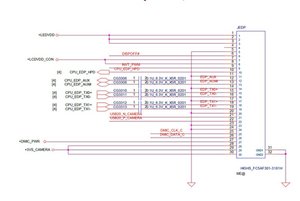
@isaiahneumann you have a corroded JEDP connector. You want to remove that cable and clean the connector with some high grade isopropyl alcohol. The first 4 contacts (top of your connector picture0 are for the backlight. They look pretty gnarly. You may need a new connector. Remove the cable, clean the connector and post some "after" images. Do not try to power on your board etc. since you may just cause more damage.
Post some good pictures of your board with your QUESTION. That way we can see what you see. Adding images to an existing question You can only add images to your Question which you must edit or to Answers. You can not add those as comments. Those do get lost....
At this point I would probably advise you to clean the complete board with some isopropyl alcohol. Nothing less than 90%. Preferably higher percentage. For as long as your board is not cleaned and you still have corrosion on connectors etc. no proper diagnostics can be accomplished.
Since I am pretty confident that this is a NM-D211 board, here is the schematic for it Lenovo Air 15ITL 202 LCFC NM D211 PDF Hopefully your board survived since your cable seems to have taken the damage.


 5
5  1
1 



 2.4crwdns2936485:0crwdne2936485:0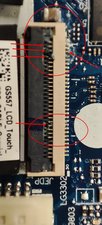

crwdns2944067:012crwdne2944067:0
@isaiahneumann what model is the motherboard? have you checked the display connector? What voltage do you get on there? It could be any component with the backlight circuit. You'd have to trace it to see where the power starts/stops. You did not tell us if the fuse was good or not.
crwdns2957956:0crwdnd2957956:0 oldturkey03 crwdne2957956:0
Board is "MV-4 94V-0".
Fuse was good.
Not sure which pins to check on display connector. Image and touchscreen work fine.
crwdns2957956:0crwdnd2957956:0 Isaiah Neumann crwdne2957956:0
@isaiahneumann do you get voltage at the fuse on both sides, if you do add photos of the lcd connector and the back of the board and also the connector on the screen itself
crwdns2957956:0crwdnd2957956:0 daniel crwdne2957956:0
@tech_ni
I only checked the fuse with the mboard entirely removed and disconnected.
crwdns2957956:0crwdnd2957956:0 Isaiah Neumann crwdne2957956:0
@isaiahneumann double check on that number. I would have expected a LCFC board for the IdeaPAd 5. something like a NM-D031 Even better. Post some good pictures of your board with your QUESTION. That way we can see what you see. Adding images to an existing question
crwdns2957956:0crwdnd2957956:0 oldturkey03 crwdne2957956:0
crwdns2934275:07crwdne2934275:0