When starting up this HP Pavilion 13 x360 Model Number: 13-a010dx. I sometimes
get an error message saying that there is an issue with the CMOS battery and it is resetting the BIOS do I need to replace the CMOS battery? If so where can I find the CMOS battery.
I went through both the regular User Manual as well as the Hardware Maintenance Manual and could find no indication from HP that there's a CMOS battery inside your computer. At this point the only thing I can suggest is to open it up and physically examine the motherboard looking for a coin cell battery mounted on or near it.
I have noted a trend in a couple of laptops where they've opted not to use a CMOS battery and instead rely exclusively on the main battery to maintain the BIOS and RTC settings. Of course, that means if you remove or unplug the battery for any reason, you have to redo your date & time and any BIOS settings you change.
@dadibrokeit is correct regarding the source of the RTC (Real Time Clock - aka cmos) battery supply in your model. It comes from the main battery.
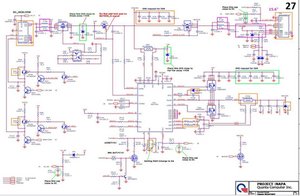
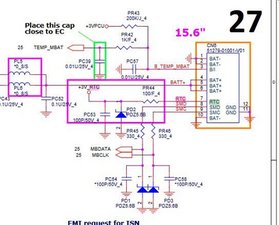
Here are some images from the motherboard schematic showing that the RTC batt supply is from pin 7 of the main battery.
(click on images)
Perhaps you should also create a battery report just to check the status of the main battery.
Compare the Design Capacity value against the Full Charge Capacity value and work out what percentage of the Design Capacity the Full Charge capacity value is.
If it's a low percentage, the battery may be failing and would need to be replaced.



 157
157  87
87  154
154