crwdns2933423:0crwdne2933423:0
crwdns2947577:0crwdnd2947577:0crwdne2947577:0

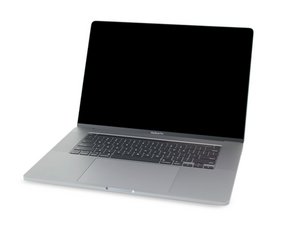
Repair guides and disassembly information for the MacBook Pro 16'' released in November of 2019. Model A2141, EMC 3347.

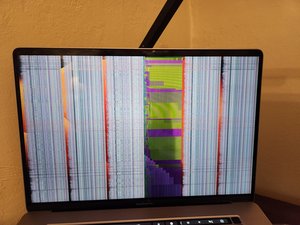
Is this a GPU problem or a display issue?
crwdns2915344:0crwdne2915344:0

I was watching Youtube when this started happening.

It's had some weird graphics issues in the past (horizontal green lines), but this seems different. Is this a GPU issue or a display issue?

crwdns2934081:0crwdne2934081:0 crwdns2934083:0crwdne2934083:0 crwdns2934093:0crwdne2934093:0

crwdns2934109:0crwdne2934109:0

crwdns2889612:0crwdne2889612:0 2
crwdns2947414:01crwdne2947414:0

Did you bang the hinge area or get something caught on the upper case when you closed the lid like a paperclip or other object near the hinge area?

Sadly, this is an expensive repair as the part alone is around $800

crwdns2934271:0crwdnd2934271:0crwdne2934271:0

crwdns2934285:0crwdne2934285:0

crwdns2933313:01crwdne2933313:0

crwdns2934051:0crwdne2934051:0

My initial thought is display. Especially based on the bands of "normal" in between. These stripes almost certainly align with the cabling inside the display.

You can see what I mean a bit in this photo from a 13" model with the bottom bezel (where the MacBook Pro branding is) removed.

crwdns2915344:0crwdne2915344:0

The best way to know for sure is to connect it to an external display. Normal video out is a dead ringer for it's a display issue.

crwdns2934105:0crwdne2934105:0

crwdns2889612:0crwdne2889612:0 4
crwdns2934285:0crwdne2934285:0

crwdns2934229:0crwdne2934229:0

Addison Moore crwdns2934231:0crwdne2934231:0
crwdns2936625:0crwdne2936625:0:

crwdns2936751:024crwdne2936751:0 1

crwdns2936753:07crwdne2936753:0 4

crwdns2936753:030crwdne2936753:0 36

crwdns2942667:0crwdne2942667:0 975