crwdns2933423:0crwdne2933423:0
crwdns2947577:0crwdnd2947577:0crwdne2947577:0

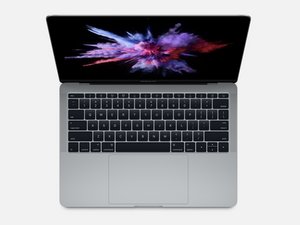
A1708/EMC 3164 — Released June 2017, this entry-level MacBook Pro retains its traditional function keys (as opposed to the OLED Touch Bar).

Upgrade (not replace) MacBook Pro 2017 Keyboard

Hello,

I own a 2017 13’’ MacBook pro (two thunderbolts no touch bar) bought in Jan/2018 and I absolutely hate the keyboard. Hate the sound it makes, I hate how little displacement of the keys. Sometimes I even go back to working on my MPB 2011 just to remember how good Apple’s keyboards were. However, I have noticed that the newer MacBook pro’s (2020-onwards) keyboard is noticeably better. I was wondering if any knows if it’s possible to install a 2020 MacBook pro keyboard system on a MacBook Pro 2017. An upgrade of sorts. I looked it up online and didn’t find anything on it, just a replacement of the damaged keys. I guess the issue would be to actually find an original keyboard from apple to replace it with.

If anyone has any thoughts, please let me know.

Best,

crwdns2934081:0crwdne2934081:0 crwdns2934083:0crwdne2934083:0 crwdns2934093:0crwdne2934093:0

crwdns2934109:0crwdne2934109:0

crwdns2889612:0crwdne2889612:0 0
crwdns2934285:0crwdne2934285:0

crwdns2933313:01crwdne2933313:0

crwdns2934051:0crwdne2934051:0

Sadly, there is no options to replace the keyboard to a newer design. It’s just not possible.

crwdns2934105:0crwdne2934105:0

crwdns2889612:0crwdne2889612:0 2

crwdns2947414:01crwdne2947414:0:

Yeah, I got feedback from the Apple Support Community and apparently, the keyboards are not the same dimensions and would not fit.

crwdns2957956:0crwdnd2957956:0crwdne2957956:0 crwdns2950251:0crwdne2950251:0

crwdns2934285:0crwdne2934285:0

crwdns2934229:0crwdne2934229:0

mpb11 crwdns2934231:0crwdne2934231:0
crwdns2936625:0crwdne2936625:0:

crwdns2936751:024crwdne2936751:0 9

crwdns2936753:07crwdne2936753:0 21

crwdns2936753:030crwdne2936753:0 28

crwdns2959996:0crwdne2959996:0 495