I was trying to install a VESA mount to my Cinema Display but the metal bracket which holds the stand retracted right after I removed the screws. I have run out of ideas on how to pull it back out.
Wow Man thanks for the awesome picture. Really explained how to fix this issue completely. NOT. And please don't pursue any career where you have to actually explain how to do something, no longer continuing to comment useless tips of real issues would also benefit the world. Moron. Lol, some people.
@jmmorga's images are actually extremely helpful. the tool he made works in a very similar way to what apple's technicians use to fix this, the bale retrieval tool james white mentioned above.
Thanks for the link! I used a paper clip and pliers. Know that you have to use the card release at the same time as the pull on the hinge to lock it in place.
I had the very same problem, where the mounting mechanism retracted back inside the back of the display as the latch that locks the mechanism in the "out" position was not engaged properly when I was taking the 8 small screws out.
I used the paperclip method with a pair of needle nose vise-grips and it work no problem. It was a bit difficult to get the right, bent shape of the paperclip to thread it through one of the screw holes of the actual mounting mechanism, and then back around and out of the opening in the back of the display, in order to grab both ends of the paperclip with the vise-grips. I used a regular pair on needle nose pliers to get inside the opening so I could slowly tease the paperclip around and through the opening. Once I had the paperclip threaded properly and had locked the needle nose vise-grips on to the two ends, I needed some help in the form of an extra set of hands to actually pull the mounting mechanism back out; one person to hold the hold screen in place and to use a cut credit card to insert and press the latch release down, and then another set of hands to hold the vise-grips and pull the mounting mechanism back out of the display. I did have to use quite a bit of pulling force to get the mounting mechanism back out and into the locked position.
Then it was easy to reattach the mounting bracket and use the card to release the locking and retract the entire assembly back into the display.
You know, I was seriously about to loose my "you know what" because of this problem. I didn't look on the web right away because I experience has taught me that specific little hardware challenges like this one typically aren't documented very well online. So, after struggling for an hour yesterday and 30 minutes today, I go on the web and find your article.
This is the essence of what makes the internet good. People like RJ 713 who share their credible information and resources with those who are in need. A heartfelt thank you to you sir.
Of course, once I got the mount pulled back out the housing and attached my vesa mount and take the display upstairs to mount on my Bretford combo mount:
The screws and threaded holes on the arm are not compatible with the third party vesa mount I ordered. I ordered the third party vesa mount instead of the overpriced apple one to save $20.00 I'd like to be able to go back in time and slap myself silly.
Does anyone have any tips on how to avoid the compulsion to buy a slightly cheaper off brand part?
I followed @Matthew 's method and used two paperclips to carefully hook around the holes directly. Then pulled the retracted mechnism hard while pushing the latch release down.


 2
2  2
2 
 162
162 





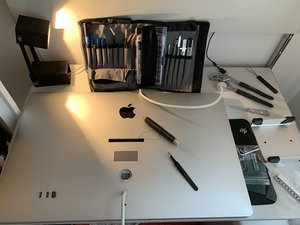
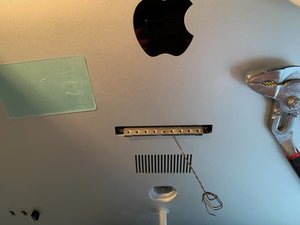

crwdns2944067:010crwdne2944067:0
Don't take your Display apart. Fixed mine with a simple home made tool: http://giphy.com/gifs/cinema-display-fla...
crwdns2957956:0crwdnd2957956:0 jjmorga crwdne2957956:0
Wow Man thanks for the awesome picture. Really explained how to fix this issue completely. NOT. And please don't pursue any career where you have to actually explain how to do something, no longer continuing to comment useless tips of real issues would also benefit the world. Moron. Lol, some people.
crwdns2957956:0crwdnd2957956:0 delusionalbill crwdne2957956:0
Apple part #922-7849 iMac and Display Hinge Bale Retrieval Tool
crwdns2957956:0crwdnd2957956:0 James White crwdne2957956:0
@jmmorga's images are actually extremely helpful. the tool he made works in a very similar way to what apple's technicians use to fix this, the bale retrieval tool james white mentioned above.
also, see the apple technician's guide here: http://tim.id.au/laptops/apple/displays/... page 84, "retrieval mechanism".
@delusionalbill - the only useless comment here seems to be yours.
crwdns2957956:0crwdnd2957956:0 eclogite crwdne2957956:0
What is the metal part that was used jjmorga?
crwdns2957956:0crwdnd2957956:0 Michael McKinley crwdne2957956:0
crwdns2934275:05crwdne2934275:0