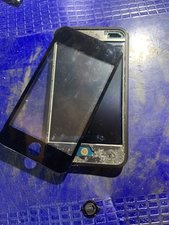
Replaced the LCD and Digitizer on an IPod 4 touch. All seems to work, but the home button has lost its ability to "click", pushing down on the home button does not respond. Does it mean that the rubber gasket is shot, or did I lose some spring or similar small part? The button looks OK.
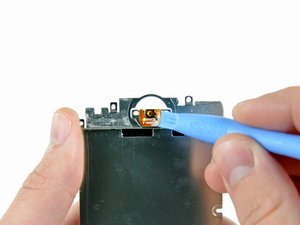
Look at this picture of the home button controller:
That is the part that is responsible for that clicking action. That part is probably out of place, missing or broken. I would take the panel off (sorry, I know it's not easy) and see if you can see the home button controller. Check and see if the whole assembly is intact and if it's in the right spot. I'd also try to depress the button as well and see if you can't get that clicking action to work.
I opened the panel, the controller looks intact, in fact, i can push on the tiny gold colored button and it clicks, but when put the black outside button (with the rubber gasket, and stainless steel round plate on other side) on top in proper position over the controller, the click does not occur. The tiny gold colored button does not have a black spot on it as noted on the picture you have. Do I need to put a small drop of black silicone on it? Perhaps that would offer a surface to allow the steel disc to push down on the controller? The rubber gasket do anything? Or just act as a dust protection? Thanks for the response
That gasket is mainly for dust. You could try to modify the button and see if it'll work. You're on the right track. Otherwise replacing that home button controller should do the trick. We don't sell that part (yet). So I would check the Google machine and see where you can find it if you want to replace it.
I had a similar problem with my ipod 4's home button suddenly not working. I opened it up, and removed a mysterious piece of black plastic that was wedged in there. In the process, I accidentally stuck that black dot to my thumb. I attempted to get it back on, and lost it. I was able to fix it with two VERY SMALL pieces of electrical tape( think two corner tips from one piece). I just stuck it on, and the ipod worked fine. In addition to that, the ipod has an electronic home button, activated via settings-general-accessibility-assistive touch. Just turn that on, and a white dot will then take up a corner of the screen. Upon tapping the dot, you are presented with a home button, voice control, and various other options. Hope this helps!
I won't open my iPod myself for fear of ruining it, but thank you for the info about the electronic "Home" button that can be put on the screen. It will work until I take it in to see how much it will cost to have the mechanical "Home" button fixed.
If your iPod home button is not working at all you can however add an alternative home button called assistive touch. This works with iOS 5 and up. Go to settings-general-accessibility-assistive touch on. A little white circle appears. If you tap it, it gives you 4 options. You can move it anywhere you want on your screen. My home button stopped working and that assistive touch feature saved my life! It's not as great as the home button though because it takes 2 taps to get to the home screen but it's better than nothing. It's a life saver!!
I've just tried the electrical tape method on an ipod 5, whilst it worked for a while I found the tape was moving around after a while. Eventually settled on a piece of card a little less than 1mm square, about 120gsm held in place by a piece of masking tape dead centre of the round bit, I first tried to glue it place, but that didn't work nor did trying to super glue the original black bit back on that just seemed to disolve.
Same problem here on an iPod 1st. Replaced digitizer and now no click. Mine didn’t have a black dot. Just the gold circle. Electrical tape didn’t work on first gen. Anyone have any luck with this?

 2
2  1
1 
 238
238