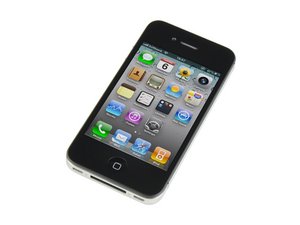
Fourth generation iPhone. Repair is straightforward, but the front glass and LCD must be replaced as a unit. GSM / 8, 16, or 32 GB capacity / Model A1332 / Black and White. This page aims to help users troubleshoot, fix, and seek help for the iPhone 4.
In order to operate my home button, I need to push extremely hard. What could be causing this?
Do I need a new button? Is there a problem with a flex cable? Is there some other easy fix that can be done by making sure that all the parts are in place?
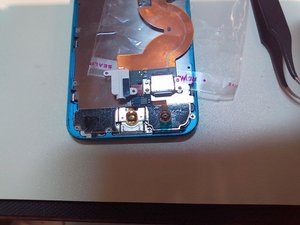
I had a similar problem with iphone 5 that occurred after replacing the digitizer assembly. Turns out that the home button cables end with two metallic circles, pointing towards the inside of the phone, was slightly out of place. I repositioned it to match the two golden color wire hooks on the back assembly. The metal circles are supposed to touch the two wire hooks. I pulled the two wire hooks outwards - so that when they flex back, they are slightly higher than the past position. Relaced the front assembly and that solved the problem.
Before you crack open your device, try the trick in the answer below this one. If that doesn't cut it, continue on.
I have come across this exact issues a few times. The home button itself is just a piece of plastic that pushes the flex ribbon beneath it—which causes the circuit to short, making the home button work. I can pretty much guarantee you the flex ribbon is the cause of this issue (erosion/poor quality part/rust etc.) and can be fixed quite easily, however it does require a complete strip of the ipPhone and requires the screen to be taken off. This guide should help you get to where you need to go in the device.
If you do decide to replace the home button, it is fairly inexpensive repair. I do it in my store for $39, so I'm sure you will be able to find it somewhere for a similar price. Also, the other option listed below about using the 30 pin connector cable to try to lodge the button back into place is worth a shot!
If you go into settings - general-accessibility - assistive touch. Turn on assistive touch. This produces a small clear circle in a square box that can be moved around the screen. If you touch this it gives you the option of home, favourites, voice control and device. Tap home and it takes you to your home screen! You can also do a lot more commands than home from this. Hope this helps.
It's a hardware issue that Apple overlooked. Try this workaround to save money. Plug your iPhone USB cable into the phone (no need to plug the other end into anything) and grip the part right where it is plugged into the phone. Carefully bend it up towards the screen just a little, (You might even hear a click.) and presto! This is guaranteed to work most of the time. If it doesn't, you need a new home button.
Just don't blame anyone if you break something; this workaround relies on your own strength. Ü
My iPhone4 home button was unresponsive and after browsing for a solution I landed here, before plunging into disassembling the phone, buying parts, etc I tried the solution by Ezekiel and it worked! The button recovered it's characteristic "click" sound and is responsive as before. Thanks a lot!
I figured it could've been something like that. Can't believe it's so poorly made. Apple store wouldn't have replaced it for free since it was out of warranty and i was just about to buy all the tools and parts for the iphone 4. thanks for the awesome tip! I'm surprised Apple doesn't know this fix!
Hi there! I'm from Italy and I was getting crazy with this annoying problem. THANK YOU very much Ezekiel!!!!!! I've solved in it ONE second!!!!! Pls share this trick all over the world!!!!
Amazing!! I was just about to tear into my beloved iphone 4 when I thought to take a look here. Man am I glad I did because the USB tweak fixed my unresponsive home button. It's workin like new again. Thank you so much!
Here is a simple solution to fix a slow or unresponsive home button. (re-calibrate)
Try this first before resorting to replacement of the Home Button.
I have had this solution get a totally unresponsive Home Button to work again many times. It works on all iPhones, I have not tested on but I am sure it that it should also work on iPod touch and iPads. It is commonly caused by a software glitch or your iDevice has alot of installed apps.
I sometimes like to compare it to a Disk Defragment in Windows. Though it's an Apple Operating System.
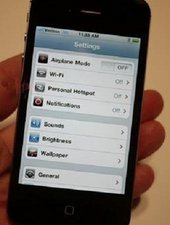
1. Open any application. For this example I will use Settings.
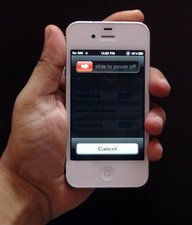
2. Hold down Power Button till display shows the Shutdown screen. Like image below.
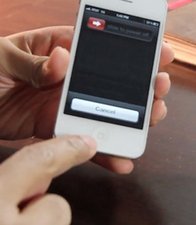
3. Now let go of Power Button and then start to continuously hold down the Home Button until the "Slide to Power Off" screen disappears. Be patient, eventually it will return to the Home Screen. It may even take between 1 - 2 minutes.
That's it. Now test by opening any application and then pressing the Home Button to return to Home Screen.
If you need something more visual to follow try this YouTube video.
I have had this problem myself with a half responsive button, I have written the below article which has fixed my home button.
I had bought a replacement button but was daunted by the job at hand in taking the phone apart. Have a read and post your comments to let others know if it helped you too. Richard applecor:apple:
For others who run into this problem. I replaced the screen and it seemed to go well, however the home button was non functioning afterwards. I found this thread and kept looking at the original home button flex which seemed normal, I could see a little black dot. So just in case I ordered a new home button flex cable. Then after I had them side by side I could see that what I had originally seen was the remnants of the black dot, and it was wearing off! I found a YouTube video about how to replace the black dot. Whew!!!
I hope this helps someone else who needs to see exactly what it is!
After trying all the software resets and putting up with assistive touch for a week I tried the below posted above. Did it a couple of weeks ago and worked for me! But only did it cus my phone was out o warranty and apple wanted over £100 to fix.
If recalibrating doesn;t fix it try a few drops of alcohol around the home button and press it to work it in. It will clean the contact point between the home button and the frame. It fixes alot for me.
We read that the switch may only be a bit dirty and that it may be restored to working order easily. So we bought some 98% isopropyl alcohol from Maplin gave it a go and it worked, this is what you do.
Switch the iPhone off. Then use 98% isopropyl alcohol (don't use anything else as you may cause damage) on a cotton bud and work some in around the edge of the home button. Don't get any on the screen. Tilt the phone up slightly so any isopropyl alcohol runs away from the screen. Keep pressing and releasing the home button using the tip of the cotton bud to get the liquid well into the switch. Do this for a couple of minutes then dry it off and leave for about 10 mins. Switch the phone on and test it out. :)
I have fixed several iphones and this is one of the issues I encountered, I tried a new home flex and it did not work. I knew the home button flex had to make metal contact with something so I lifted the two prongs on the bottom that when the screen is placed down it would make contact. That seemed to fix the home button on two phones. It's worth a try before you purchase a new home flex.

 6
6  18
18 

 1
1 







crwdns2944067:03crwdne2944067:0
Do you still feel the "clicking" action when you press it?
crwdns2957956:0crwdnd2957956:0 Scott Head crwdne2957956:0
Yes, I feel clicks. Can you please tell me how you diagnose it?
crwdns2957956:0crwdnd2957956:0 Shai crwdne2957956:0
I had a similar problem with iphone 5 that occurred after replacing the digitizer assembly. Turns out that the home button cables end with two metallic circles, pointing towards the inside of the phone, was slightly out of place. I repositioned it to match the two golden color wire hooks on the back assembly. The metal circles are supposed to touch the two wire hooks. I pulled the two wire hooks outwards - so that when they flex back, they are slightly higher than the past position. Relaced the front assembly and that solved the problem.
crwdns2957956:0crwdnd2957956:0 Ajaz Karim crwdne2957956:0